17 Best CRM for Small Business (2026)
Samuel Oyebode
May 13, 2026
42 min read


In this simple guide for beginners, we cover all important basics related to what CRM is and why its definition is not always as straightforward as you might think. This guide will help you easily navigate between different CRM options without getting overwhelmed or confused.
CRM stands for Customer Relationship Management. When businesses talk about CRM, they usually refer to a piece of software or an app built for tracking customer interactions and strengthening customer relationships. For a CRM to function properly, both of these two components are equally important. Nevertheless, in many CRM definitions, there’s a heavy emphasis only on the tracking part.
According to its definition, a CRM system has three main functionalities:
The definition of a CRM system sounds very simple on paper but it’s usually a bit confusing in reality.
Although both Google Sheets/Excel and phone books are used for storing and organizing contact information, a good CRM system doesn’t stop at data storage and management as the CRM definition above clearly shows.
A CRM should have three main components:
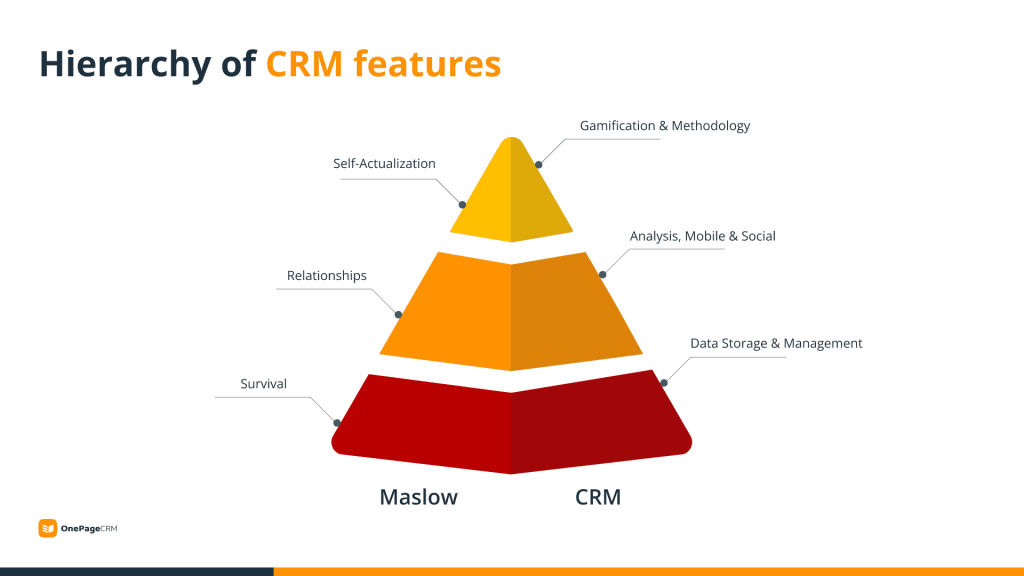
As you can see, storing and organizing contact information is just the very basic functionality of every CRM system. Once you have this information, you want to use it to build relationships with your clients.
If you have just a handful of customers, a simple spreadsheet might be enough for you. But regardless of what CRM solution you go with, if you want to grow your business, you need to put the focus on R in your CRM. This R should be right in the center of your business operations.
Since there exist thousands of CRM solutions, there were attempts to introduce classifications.
You might know some of them:
Although these CRM classifications were created to make lives easier, they don’t help much with choosing the right CRM solution.
Here are a few reasons why these classifications might not be very helpful in your search:
In other words, these classifications, however comprehensive, don’t help small businesses choose the best CRM solution.
There are thousands of CRM solutions and dozens of CRM types and categories. That’s why a simpler CRM classification emerged:
When looking for the right CRM system for a small business, you can divide all options into two categories:
This simple CRM classification can help you narrow down the number of vendors and find the best CRM solution for your business without worrying about which of the many classifications it belongs to and if it is really the right choice for you.
The action-vs-admin comparison eliminates unnecessary questions and helps you focus on one simple question: Does this CRM help me build relationships with clients and generate growth as a small business with limited resources?
Admin- and action-focused CRMs have similar functionality but, as you can guess, their primary focus is on two different things: admin vs. action. Either one can make or break your CRM strategy and how successful your CRM adoption is.
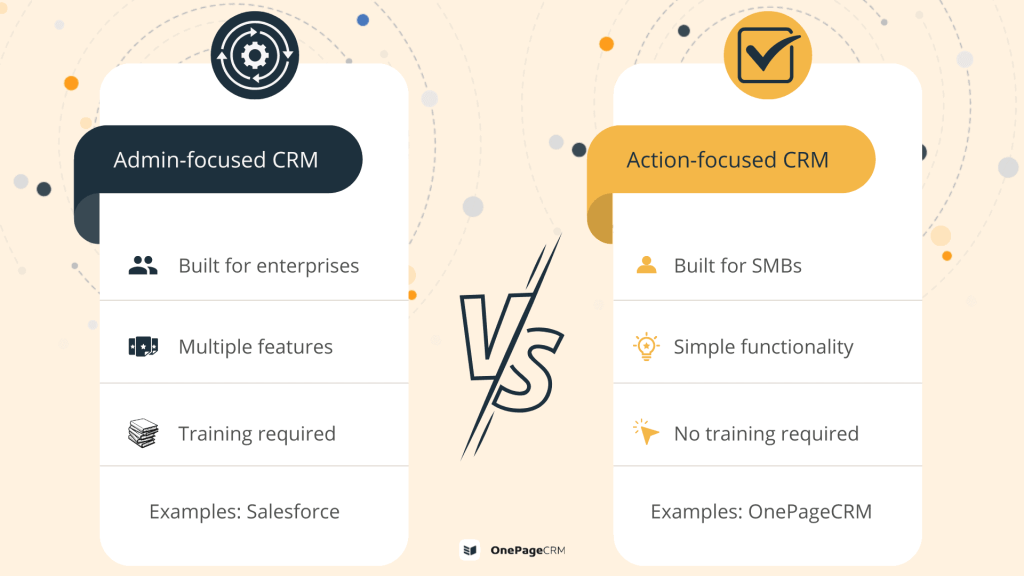
Traditional, or admin-focused, CRMs are great for managing, organizing, and processing information. They were built for recording and storing the history of client interactions. Based on these records, businesses can then automate client communication and make data-empowered decisions.
Since admin-focused CRMs are mostly built for large enterprises, they need to satisfy lots of different needs. Think about Salesforce. It’s a powerful tool with tons of features and add-ons that are great for multi-departmental customization but can slow down the growth of a small business. There are Salesforce alternatives sized for smaller teams.
Similar to admin-focused tools, action-focused CRMs allow users to keep all information in one place. But instead of solely storing and managing information, they motivate users to put this information into action. That’s why action-focused CRMs are especially popular with small businesses that need to grow.
Built on productivity principles, action-focused CRMs turn a contact list into a dynamic Action Stream where every client or lead has a reminder/task assigned to them. For example, “Send a follow-up email to John” or “Re-connect with Jane after the NYC conference”.
For those of you who prefer videos, here’s a short explanation of what an action-focused CRM is, what makes it so simple, and why small businesses prefer it over other solutions.
Recording interactions with clients and keeping your records straight sound easy when you have 5-10 clients. In this case, you can use a simple Google spreadsheet.
However, once your business grows, you start getting more and more clients. Keeping their information organized in a spreadsheet becomes too time-consuming.
For example, if you have hundreds (or thousands) of clients, at some point, you’ll need to segment them to provide them with better support. You will also have multiple points of contact with clients and will need to keep all meeting notes and email communication organized and easily accessible.
Once you feel that your client database is becoming messy and cumbersome, it’s usually a sign you need to look for a CRM solution. And most businesses, both small and large, prefer online CRM systems for their convenience and easy set-up.
Here’s a list of the top three CRM benefits:
While you can keep track of some notes about your clients in non-CRM tools, these notes will be hard to manage.
Imagine the following situation.
Jane Doe has been your client for the last 2 years. It’s quite a long time and you’ve already interacted with her on multiple occasions. Besides her contact details, you’d also want to have:
Remembering all of this for every client doesn’t sound feasible.
A CRM system allows business owners to keep all relevant client information easily accessible in one place instead of being scattered across several apps.
Similar to how you look at LinkedIn profiles, you need to be able to work with client profiles in your CRM and quickly grasp what’s the story behind this contact by looking at their Contact Page.
CRMs are built for managing and structuring your client information. This, in turn, can increase your bottom line.
When used correctly, a CRM can unlock several benefits for your business:
Award-winning London PR agency PHA Media knew from experience that things could quickly get out of hand with their new sales team if a sales process was not put in place.
“Within a few weeks, it was clear that managing and following up all leads in a timely fashion would be impossible without a CRM for sales”
— Charles Howard, Business Development Manager
Charles wanted to keep their sales team focused on the sale so they needed a tool which allowed them to predict revenues and manage follow-ups in a timely manner. Prior to using a CRM, they had no way of knowing who had previously reached out to prospects.
This was also a real pain point for the team as it often led to extra admin work – checking if other colleagues had reached out and when. The created sales process led to an 84% increase in lead traffic for the company.
Simply having all important information neatly organized right in front of you won’t make your business grow. Information without taking action is not helpful. That’s why, as a small business, you need an action-focused CRM.
An action-focused CRM lets you take control of the data you have in your system and proactively work on building relationships with clients. For example, scheduling follow-up appointments or triggering automated events based on some changes to data.
The best CRM for any business, regardless of how big or small, has a solid follow-up functionality. Research from The Bridge Group of 355 leading B2B sales teams revealed that “sales development reps who make 12 contact attempts (instead of the average 8) perform 16% better!”. Without a tool to manage those interactions opportunities will be missed.
“Your CRM will deliver a ROI of $8.71 for every dollar spent.” – Nucleus Research.
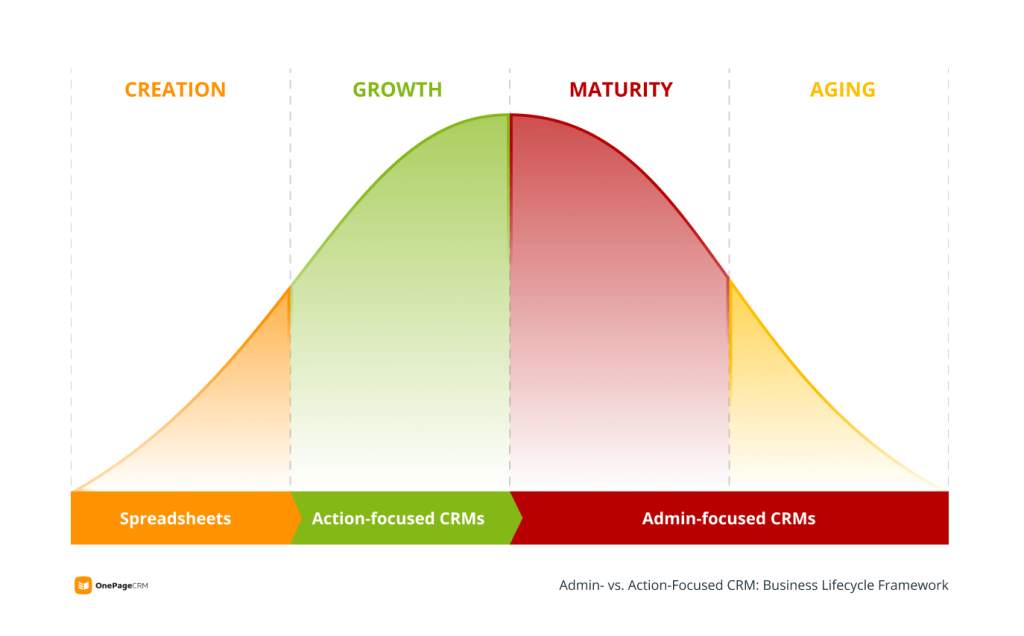
The best CRM for your business depends on your business lifecycle stage.
If you’ve just started a company, you probably don’t have many processes. You might have only a beta version of your product, a few potential users, and a couple of partners. At this stage, a simple spreadsheet can usually suffice.
Once your company starts to grow and get more clients, you’ll need a proper tool to support this growth and build relationships with potential and existing clients. This is the stage where companies start using action-focused CRMs.
Mature companies usually have complex processes, several departments, and a big database of customers. At this stage, you’ll need a highly customizable solution with different add-ons and features. This is when many businesses switch to an admin-focused CRM.
Here’s a short summary of what makes a CRM solution good for a specific business lifecycle stage:
| Spreadsheets/Google Sheets | Action-focused CRMs | Admin-focused CRMs | |
| Used for | Simple data management | Follow-up reminders, lead generation, sales efficiency, workflow automation, email management | Hyper-customization and all-in-one platform (CRM + CMS + ERP) |
| Ease of use | No training required | No training required | Training required (often paid) |
| Focus | Information-centric Contact details and notes | Relationship-centric A full picture of every client profile with seamless integration between your contact, deals, and services databases | Processes-centric A variety of in-depth customization options |
| Price | Free | Starting from $9-10 per month | Starting from $20-50 per month |
Here is a list of must-have CRM features for a small business:
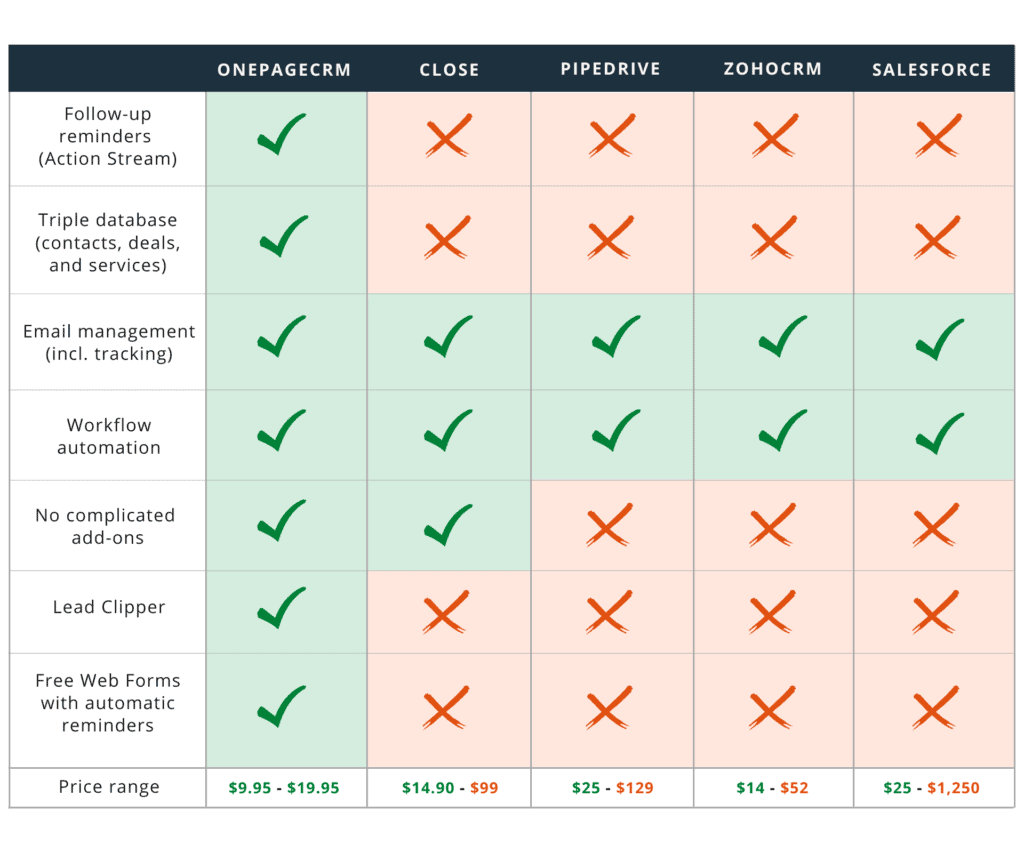
As you can see from this list, not every CRM solution ticks all the boxes. For example, the Action Stream is a unique feature and might not be as important for large enterprises as for small businesses. Besides, not every CRM is free of add-ons.
Here’s our list of top CRMs for small businesses and how they compare in terms of the features listed above:
By now, we already know what a CRM system is and why businesses need one.
Here are the six most obvious signs that it’s time for a CRM solution:
These are the obvious signs that your business should implement a CRM system.
Think for a moment, can you remember the names of all your customers and prospects?
As a general rule, you need a CRM if you can’t remember the name of every customer and prospect you deal with. It means you are starting to let opportunities slip through the cracks and forgetting to follow up in time.