
Writing sales emails is part of the job. But having to do it from scratch every time is not.
That’s what sales email templates are for.
In this post, we’ll explain what sales emails are and share eighteen templates that you can copy and use at any stage of a sale.
What are sales emails?
Sales emails are messages a business sends to people who might be interested in its products or services. Their aim is to encourage those people to buy.
They can be sent to new customers, current customers, or prospects.
Sales emails perform several tasks. They drive sales with promotions, reach new customers, reinforce relationships with existing ones, and help you gauge the success of your campaigns.
18 sales email templates
The templates below are grouped by the stage of the sale they’re for, from first contact to after the deal. Find your stage, copy the template, and change the words in brackets.
First contact
1. Cold sales email template
Cold outreach is the part of prospecting where you contact potential customers who have never heard from you or your business before. It’s the hardest email on this page to get right, because the reader has no reason to open it, let alone reply.
A good cold email is written for one person rather than a list, and it needs to be:
- thought-out and well-researched.
- personalized (have the prospect’s name and other relevant info).
- creative (to make sure they stand out).
- concise.
It also needs a call to action, such as inviting the prospect to a quick call.
Many cold emails get no reply, and that’s normal. When that happens, the follow-up emails in the next section are the ones to send next.
Hi [first name],
[One sentence on something specific you noticed about them, like a new office, a new hire or a recent post.]
Companies like yours often struggle with [pain point]. That’s what we help with, and this short video shows how we do it: [link to a personalized video].
How about a quick fifteen-minute chat next week?
Kind regards,
[your name]
After sending it: OnePageCRM shows you when they open your email, and how many times. If they open it two or three times without replying, you can give them a call.
2. Saw you in the news
Send this when a prospect’s company has just opened a new office, won an award, or made the news in some other way. The email congratulates them and uses the news as a reason to ask for a quick chat.
It works because it doesn’t read like a sales pitch. You’re writing about something that happened to them, and what you sell only comes up after that. Keep the news in the first line, keep the whole email short, and send it within a few days, while the news is still news.
Hey [first name],
I saw you recently [what they did]. Congratulations!
After [event] a lot of companies need help with [pain point]. I’m sure things are crazy right now at [their company name] but I’d love to share how we can help you [what you do about it].
Do you have time for a quick chat next week? Pick a time that suits you here: [link to schedule a call].
Congrats again,
[your name]
Tip: Follow your prospects’ companies on LinkedIn, so you see the news the day it happens.
3. Find the decision maker
If you aren’t sure who makes the buying decision at a company, this is the email to send. It explains what you do and asks the person to point you to the right colleague.
Most people will point you to the right person if you make it easy for them. So keep the email to a few lines, and don’t mention anyone else at the company you’ve already written to. That only makes it look like you’re emailing everyone there.
Hi [first name],
I’m trying to find the person at [their company name] who looks after [department]. [your company name] helps businesses in [industry] with [pain point], and I’d like to show them what that looks like.
If that’s you, would you have fifteen minutes next week? You can pick a time here: [link to schedule a call]
If not, who do you recommend I talk to?
Thanks,
[your name]
After sending it: If they point you to a colleague, add that colleague to your CRM and send your next email to them.
Sales follow-up emails
4. Follow-up email after no response
A follow-up email is one you send after an earlier email, call or meeting to keep the conversation going. This one is for when a first email got no reply.
Wait three or four days before you send it. The person may simply not have read your first email yet, so don’t apologize for writing again, and don’t suggest they’ve been ignoring you.
A good follow-up reminds the reader what you wrote about and asks whether they’re interested or not. Keep it short, because a follow-up that’s longer than the first email is more likely to be ignored.
Hi [first name],
I sent you a note last week about [what you offered]. Is it something you’d want to look at, or should I leave it there?
Either answer is fine.
Best,
[your name]
Here’s an example of a short follow-up from Neil Gandhi, the founder of Paage:
This is the first of four follow-ups on this page. For more on timing and tone, our follow-up guide has twenty-one tips and eight more templates.
After sending it: Wait a few days. If they still don’t reply, send the next follow-up on this page.
5. Re-engagement email after a conversation stalls
This email template is for when you haven’t heard from a lead in quite some time. It reminds them of the problem they told you about and asks whether it’s still there.
Don’t just ask how things are going. Remind them of the problem they mentioned when you spoke, because that’s what they cared about and it gives them a reason to write back. Then suggest two times for a call, so all they have to do is pick one.
Hi [first name],
When we spoke in [month], you mentioned [pain point] was costing you [what they said it was costing them].
Is that still the case? If it is, I’d like to pick up where we left off. Two times next week that work for me are [option 1] and [option 2], or you can choose your own here: [link to schedule a call]
If it’s no longer a problem, let me know and I’ll leave it there.
Best,
[your name]
After sending it: When they reply, set the next step as a Next Action in OnePageCRM, so you don’t forget about it.
6. Follow-up with a result
Sometimes your follow-ups get no reply, and another one that says the same thing is unlikely to do any better. So this email takes a different approach. It shows the prospect a result you got for a company like theirs and asks if they’d like the same.
The result is what makes this email work, so pick a real one. A number from a customer in the same line of business means more than a general claim, and a link to the full story gives them somewhere to go if they’re curious. Keep the rest of the email to a line or two.
Hi [first name],
I wrote to you a few days ago about [what you offered to help with]. Since then, we’ve finished a project for a company a lot like yours, and they [the result, with a number if you have one]. You can read about it here: [link to the case study].
If now isn’t the right time, just say and I’ll check back later.
Best,
[your name]
Tip: If you send the same two or three follow-ups to every lead, you can set them up once as an email sequence in OnePageCRM, and they’ll go out on the days you choose.
7. Missed call email template
If you call a prospect and get no answer, send this email straight after. It tells them why you called and when you’ll call again.
A missed call on its own is easy to forget, because all the prospect sees is a number they don’t know. This email puts a name and a reason to that number, so when you call back they’ll know who it is. Keep the reason to one sentence, say which day and time you’ll try again, and add a link for anyone who’d rather book a time themselves.
Hi [first name],
I just tried to call you, but there was no answer. I was calling about [one sentence on why].
It may have been a bad time, so I’ll try again on [date] at [time]. If a video call suits you better, you can book a time here: [link to schedule a call].
Looking forward to speaking with you.
Best,
[your name]
Tip: If you log the missed call in OnePageCRM, Autoflow can send this email and set the next step for you.
Meetings
8. Meeting request email
A meeting is easier to say yes to when the email says what it’s for and makes picking a time simple. The one below gives a reason, offers two times, and includes a link for anyone who’d rather choose their own.
This email works best once you’ve had a first conversation with the prospect and have something worth showing them. That could be a short demo, or a result you got for a customer in their line of business. In the email, say what the meeting is for and how long it will take, so the prospect knows what they’re agreeing to. And remember to keep the meeting short.
Hi [first name],
Thanks for your time on [day]. You mentioned [pain point], and I said I’d show you what we did about it for [customer name], who had the same problem. They [the result, with a number if you have one].
Could we book twenty minutes for that? Two times that work for me are [option 1] and [option 2], and if neither suits, you can pick your own here: [link to schedule a call].
I’ll keep it to the walkthrough and your questions.
Best,
[your name]
After sending it: When they pick a time, make the meeting their Next Action in OnePageCRM, and it’ll show up in your calendar as well.
9. I’m around the area
Some conversations go better in person. This email is for when you’ll be in a prospect’s area anyway and want to make use of the trip. It offers two days to choose from, so agreeing is as simple as picking one.
Start by saying which days you’ll be in the area. Then invite them to meet, and if you’re happy to take them to lunch, say so. End with how long the meeting would take, and of course, be sure to keep the whole email short.
Hey [first name],
I’ll be in [prospect’s area] on [date], with some free time on [day and time option 1] and [day and time option 2].
Would you be free to meet up on either day? It’d be great to finally meet in person.
Best,
[your name]
Tip: If you’re seeing several people that day, the Route Planner in OnePageCRM can put the visits in the best order for you.
10. Follow-up email after a sales call
This is the email to send once a call or meeting has ended. It sums up what was agreed and sets a date for the next conversation.
This one goes out on the same day as the call, while the conversation is still fresh in both your minds. In it, list the things you agreed on as a few short points, then say when you’ll speak next and send a calendar invite for that date. Finish by asking them to let you know if you’ve left anything out.
Hi [first name],
Thanks for your time today. So we’re working from the same notes, here’s what we agreed:
[point 1]
[point 2]
[point 3]
Our next step is to talk again on [date] about [topic], and the calendar invite is on its way. If I’ve missed anything, let me know.
Best,
[your name]
After sending it: In OnePageCRM, add the next call as a Next Action and paste the three points into a note.
Closing the deal
11. Promotional email template
This email announces a special offer to your customers and prospects. It says what the offer is, what it costs, and when it ends.
The offer itself goes in the first line, so it’s the first thing they read. Then say what it costs and when it ends, because an end date gives people a reason to act. After that, tell them what to do next, like replying to you or clicking a link. And make the email look good, because for many readers it will be the first thing they’ve seen from you.
Hi [first name],
We’re running a limited-time offer, and I thought [their company name] would want to see it before it ends.
For [price], you get:
[benefit 1, in one line]
[benefit 2, in one line]
[benefit 3, in one line]
The offer ends on [date]. If you’d like the details, just reply to this email and I’ll send them over.
Kind regards,
[your name]
A promo email should also sound and look like you. If your brand uses humor everywhere else, the promo email should too, the way Windscribe’s back-to-school campaign for students does:

Tip: If you’re sending this promo to a lot of people, OnePageCRM can send it to all of them at once. It fills in each person’s name for you, and if you want to add a personal line to any of the emails, you can do that before they go out.
12. Next steps email
Some prospects stop replying after a demo or a proposal, because they haven’t made up their mind and don’t know what to say. This email makes it easy for them to reply by giving them three options to pick from.
A week or two after the demo or proposal is usually the right time, once it’s clear they aren’t going to write back on their own. Keep the three options short and different from each other, so the reader can pick one without thinking too hard. And if they choose to leave it there, treat that as a useful answer. It tells you where you stand, which is more than silence does.
Hi [first name],
Yesterday my manager asked me for an update on your account, and I didn’t have one to give.
Which of these would you like to do next?
1. Have a quick call
2. Get a quote
3. Leave it there for now
If you’d rather do something else, just say.
Looking forward to hearing from you.
[your name]
After sending it: Whatever they choose, set it as their Next Action in OnePageCRM, so you know exactly when to follow up.
13. Reminder email template
When a prospect gives you a start date and then stops replying, this is the email to send. It reminds them of the date they chose and asks whether they’re still interested.
The time to use it is once that date has passed, or is about to. Begin with the date they gave you, in their own words if you can, because it was their idea and not yours. Then ask the question straight, without making them feel bad for missing it. If they say they’re not ready, you can stop chasing and check back later.
Hi [first name],
When we last spoke, you said you were hoping to get started by [time period]. That won’t be possible unless we have a quick call this month to agree on the next steps.
It sounds like you may not be ready to move forward just yet. If that’s the case, should I leave it there for now? Or have I read it wrong?
[your name]
After sending it: If they say they’re not ready, mark them as not interested in OnePageCRM, note why, and set a Next Action to check in again in a few months.
14. Sales breakup email
Some prospects never say no, but they never say yes either. This is the last email you send them, and it asks them to decide one way or the other.
The right moment for it is after your other follow-ups have gone unanswered. Keep the tone calm, with no mention of how many times you’ve written and no apology for writing again. Make it easy for them to say no, because a clear no lets you close the file and move on. And if they say the timing is wrong, you’ve learned when to come back.
Hi [first name],
I’ve written a few times about [pain point] and haven’t heard back. Usually that means it’s not a priority right now, or it’s a polite no. Either one is fine.
If it’s a no, can I close your file?
If the timing isn’t right, what would need to change for us to talk again?
Thanks,
[your name]
After sending it: If this is the end, mark the deal as lost in OnePageCRM and record the reason. Over time, those reasons will show you where deals tend to fail.
After the sale
15. Thank-you for your business email
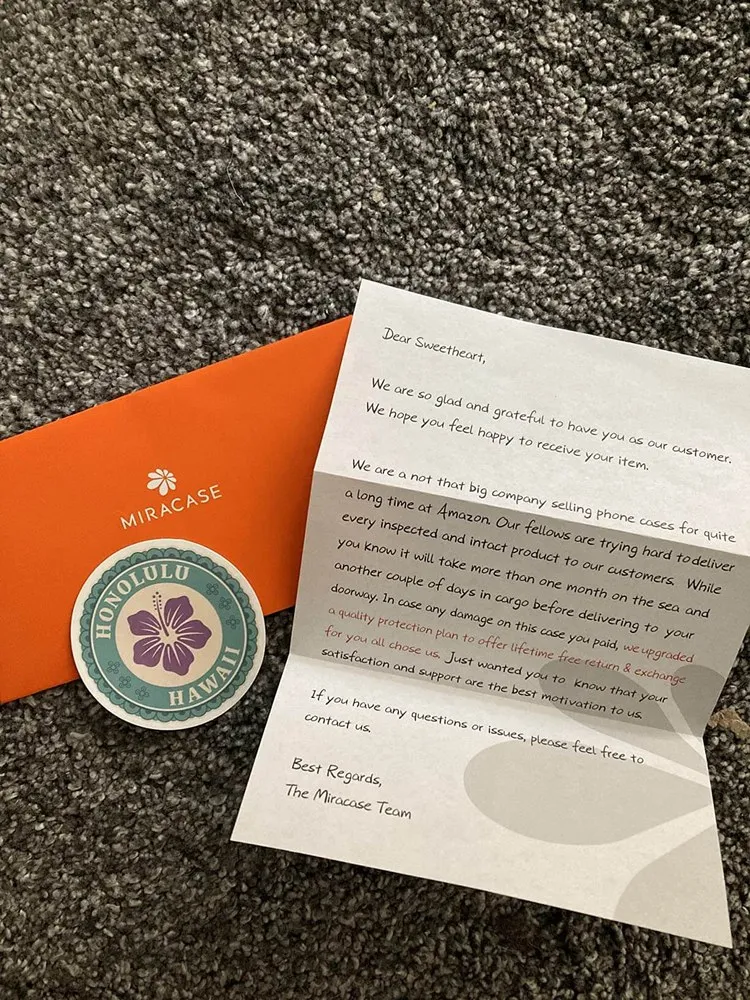
A thank-you email is the first thing a new customer should get from you once the deal is done. Its job is to make them feel they made the right choice, and to tell them what happens next and who to contact if they need anything.
Keep it warm and short, and don’t sell anything in it. If you offer a discount code for a future order, this is a natural place for it, but the thank-you should come first. And if you run a small local business, a handwritten note can do even more than an email, as the two examples under the template show.
Hi [first name],
Thank you for choosing [your company name]. We’re glad to have you with us.
Here’s what happens next: [the next step, with a date if you have one].
I’m your contact for anything you need, so if a question comes up, reply to this email or call me on [phone number].
Thanks again,
[your name]
Here’s an example. Lidia Vijga, co-founder of DeckLinks and founder of SEO Bootcamp, writes her thank-you notes by hand on a set of coasters:
And here’s another. Miracase, which sells phone cases and accessories, puts a short printed thank-you note in every order it ships:
Tip: OnePageCRM can send this email for you the moment you mark a deal as won. Set it up once in Autoflow, and it goes out every time.
16. Referral email template
A referral email asks a happy customer to put you in touch with people they know who might need what you sell. It works because the person you’re introduced to already trusts the one who sent you.
The best time to ask is a few weeks after the deal, once the customer has had a chance to see some results. Thank them for their business first, then say who you’d like to meet, and if you offer a reward for referrals, say what it is.
And above all, don’t ask them to do much. To make it easier for them to help, you can make it so that all they have to do is forward your email to someone they know or send you a name to work on.
Hi [first name],
It’s been a pleasure working with you these past few months, and I’m glad [what you helped them with] is going well.
If you know anyone else who could use the same help, I’d love an introduction. You can simply forward this email to them, or reply with their name and I’ll take it from there.
[Optional, if you offer a reward: As a thank-you, you’ll get [the reward] for every referral that becomes a customer.]
Thanks again,
[your name]
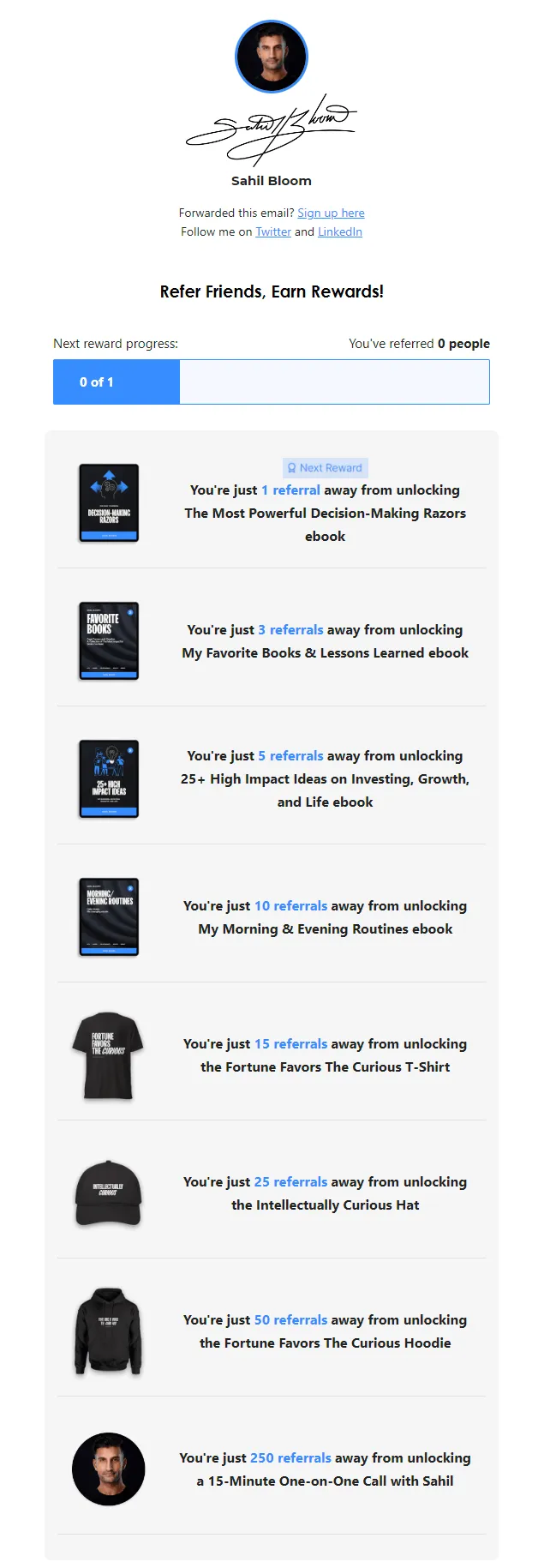
The email above asks in a simple, direct way. If a lighter tone suits your business better, there’s another way to do it. Sahil Bloom, who writes a popular newsletter, used to include a section in it asking readers to refer their friends, and here’s an example of it:
After sending it: When a referral comes in, link the two contacts in OnePageCRM, so you can always see who sent whom.
17. Asking for an introduction
Some of the best leads come through people you already know. If a customer or someone else you know can introduce you to a person you’d like to do business with, you can use this email to ask them for the introduction.
Since you’re asking for a favor, it’s best to keep the email short. Say who you’d like to be introduced to and why that person would want to hear from you. Then let your contact know that a quick two-line email is all it takes. And if they’d rather not, that’s fine too.
Hi [first name],
I’ll keep this short, because I know you’re busy.
I’d like to get in touch with [person’s name] at [their company], and I think you know them. [One line on why you’d be useful to them.]
Would you be happy to introduce us? A two-line email is plenty, and I’ll take it from there.
Thanks,
[your name]
After sending it: When the introduction comes through, add the new person to OnePageCRM and set a Next Action to reach out to them on that same day.
18. Testimonial request email
Many customers are happy to give you a testimonial, but because writing it from scratch takes too much time, they end up not sending one. This email does the writing for them. It takes something they’ve already said about your work, turns it into a short quote, and asks them to approve it or change it.
The time to send it is right after they’ve said something good about your work, so the comment is still fresh for both of you. In the email, show them the quote, tell them where you’d like to use it, and let them know they can change anything or say no.
Hi [first name],
You said some kind things about [what you helped them with] on our last call, and I’d love to use them.
To save you writing anything, I’ve drafted a short testimonial from your words:
[draft testimonial]
Would you be happy for us to publish it, with your name and company? Change anything you like, or tell me if you’d rather not.
Best,
[your name]
Put the sales email templates to work
These sales email templates will save you starting from nothing, but keep in mind that they won’t sound right until you’ve made them yours.
So, put your own words in the brackets, remove anything you wouldn’t say out loud, and keep each email short.
Once a template reads the way you’d write it, you can start sending it out as you like.
And to make your life much easier, you can save it in OnePageCRM. Once it’s there, OnePageCRM can:
- fill in each person’s details for you when you send the email, so you don’t have to type them in every time.
- schedule follow-ups and remind you to follow through.
- send the email out in bulk.
- attach a file to it, so the file goes out every time you send out the email.
- show you who has opened your email and how many times.
- set up the emails to go out automatically when certain conditions are met.