Most of your day is reaching out. Calling a lead, messaging a client, grabbing a number to paste somewhere else.
Tiny tasks. But each one used to start with a little hunt — open a menu, pick how to get in touch, go. Across a full day of contacts, that adds up.
Now the ways you reach someone live right on their page.
Reach out without the hunt
Call from your desktop or cellphone, send a WhatsApp, copy a number to use somewhere else. It's all one click from the contact, no menu to dig through first.
You keep the buttons you actually use and hide the rest, so the row stays as clean as the rest of OnePageCRM.
Set it up without leaving the contact
Changing how you call or message used to send you off to a separate settings page. Now you do it right on the contact.
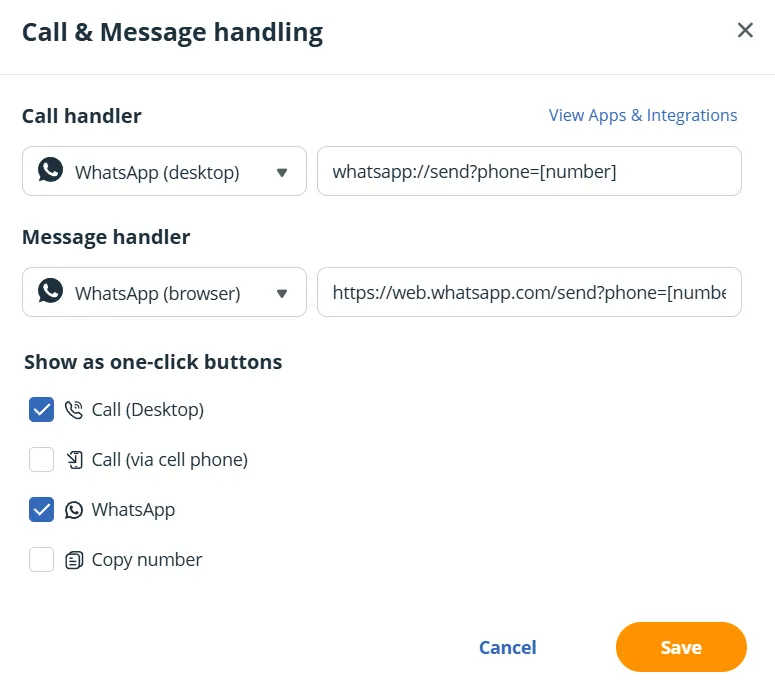
Pick your go-to call and message apps once, and it holds across your whole account. No more hopping between pages to change one thing.
Works with the tools you already use
Quick Buttons sit on top of whatever you've already connected — Aircall, KrispCall, JustCall, your mail app, and WhatsApp. Nothing new to plug in.
And if you sell over messaging, pair them with your saved message templates: open a contact, start a WhatsApp, drop in a template, and send. You can even add new leads straight from WhatsApp.
Open a contact, hover over the phone or email, and they're right where you need them.