A good chunk of your day goes to typing up call notes, rescheduling overdue Actions, and moving deals along.
Now, you can hand all of that to AI.
OnePageCRM connects to ChatGPT or Claude (and other AI tools), so AI handles the busywork while you focus on building relationships with your customers and leads.
 3:15
3:15Tell AI what to do
Connect OnePageCRM to your AI assistant, and you can ask it to work on your CRM the same way you'd ask a colleague.
A few examples of prompts:
- "Turn this call transcript into a note for Jane Doe and add her Next Actions."
- "Reschedule my overdue Actions and spread them across the next few months by priority."
- "Find customers who'd make good upsell targets and create pending deals for them."
Your AI assistant reads your CRM, makes the changes, and tells you what it did.
More than a notetaker
Tidying up is one thing. AI can also dig in.
Send it to research a company before a meeting and write what it finds straight onto the contact. This research can build on the AI contact summaries already in OnePageCRM.
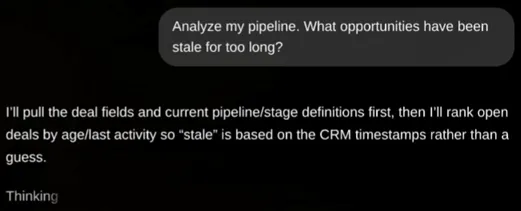
You can also ask which deals have gone quiet and what to do about them. Or build a dashboard of this quarter's pipeline by source, and you'll get actual charts drawn.
No more typing in business cards
Met someone at an event? Snap a photo of their business card and tell your AI: "Add this as a contact, tag them Trade Show, and set a Next Action to call Tuesday."
It lands in your contacts, tagged and scheduled, without you typing a thing.
How does it work?
OnePageCRM connects to AI agents through an MCP connector.
MCP stands for Model Context Protocol. It's a secure doorway between your CRM and your AI. You decide what it's allowed to do, from read-only to full access.
Ready to try it? Add OnePageCRM as a connector in Claude or ChatGPT, sign in, and hand admin over to your AI agent. The same setup works with Perplexity, Grok, and Mistral AI.