
When you're running a small business, selling is only half the job. The other half is everything else that helps your business run smoothly. They're things like lead intake, updating records, scheduling follow-ups, writing up notes, and the like.
Perplexity can take a lot of that work off your hands.
Connect it to the tool you use to manage your business, and it becomes your very own business assistant. It can research prospects, update your records, write your emails, build your reports, and a lot more.
In this article, we'll show you what a Perplexity AI assistant can do for a small business and seven ways to use it every week.

What is Perplexity AI?
Perplexity is an AI answer engine. Ask it a question, and it searches the live web, reads what it finds, and answers with links to its sources. So instead of taking an AI's word for something, you can open the source and check.
The free plan lets you get answers to everyday questions and carry out simple tasks. Paid subscriptions begin with Perplexity Pro ($20 per month), and it gives you Labs for building reports and simple apps, Tasks for scheduled prompts, and the option to connect your own apps.
That last one is what makes it possible for you to use Perplexity as an AI assistant for your small business.
You see, out of the box, Perplexity knows a lot about the world, but it doesn't know anything about your business. It can't tell you which of your deals are stalling or who you promised to call this week, or anything else, really. And that's because all that information lives inside your CRM.
Connect Perplexity to yours, and it becomes your business's own assistant. It can see your leads, sales opportunities, follow-ups, and other business info, and it can help manage them.
What can a Perplexity AI assistant do?
What Perplexity can do for your small business as an AI assistant depends on what kind of AI CRM you're using.
Perplexity will work with any CRM that offers an MCP connection. There are quite a few of those, so your best bet is to go for the most suitable CRM for your business.
For most solo and small businesses, that one is OnePageCRM. After all, it costs very little ($9.95 per user/month) and is simple enough to use without any training or lessons. And best of all, its MCP is easy to set up and use, and it includes features that help you manage leads, sales opportunities, and your overall business more efficiently.
Once connected, here's what your new Perplexity AI assistant can do for your business.
Read your CRM data
To know and/or understand anything in your business is just a question away. Perplexity AI can look up contacts, sales opportunities, notes, and follow-ups, etc., and give you answers to questions you ask about them. Of course, that's only if you've permitted it to do so.
Handle your CRM admin
Your Perplexity assistant can make changes, too. It can add and update contacts, log calls, create and move deals through your Pipeline, set follow-ups, and more. All it takes is a request written in plain English. That said, giving it that much access or not is entirely up to you.
Conduct research
Its ability to carry out in-depth research is what Perplexity is mostly known for, and that ability can be useful for your business. Your Perplexity AI assistant can look up a company, find the right people in it, check their latest news, and even attach the sources (in case you'd like to verify). And since it's connected to your CRM, what it finds can go straight into your account as records and/or notes.
Build sales materials
Perplexity can also write, using your CRM data as its raw material. It can craft emails, call summaries, proposals, and anything else you'd normally put together from your sales data. And it all comes out grounded in what's actually in your account.
Automate repetitive work
Every business has work that needs doing over and over again (like rounding up the week's numbers or building weekly pipeline reports, for example). Your AI assistant can take that kind of work over completely. Just tell Perplexity what you want it to do and how frequently, and it'll automate it.
Perplexity AI use cases for small business
Here are seven ways you can put your new Perplexity assistant to work. Each one comes with an example prompt, so feel free to copy them and adjust the details to fit your own contacts and deals.
Research people & companies
Good prospect research takes a while. You have to look up the company, work out who to talk to there, and find something useful to open the conversation with. Then there's the part where you type it all into your CRM.
Your Perplexity assistant can handle the whole job in one request. For example:
“Research Mountainside Fitness, a gym chain in Arizona. Find the decision-makers, add them to my CRM as contacts tagged Gym Lead, and save a note with anything useful for a first call. Then set a follow-up for each, sooner for the most promising ones.”
Perplexity AI will search the web, find the right people, and create the contacts in OnePageCRM. Each one comes with the tag, a note, and a follow-up reminder attached. And since Perplexity cites its sources, you can check where every detail came from before you make the call.
Prep for sales calls
Before a sales call, you want to know where things left off, what's still open, and what's changed since you last spoke. You could piece that together from old notes and emails, but that takes time you may not have right before the call.
A quicker way is to ask Perplexity for a brief:
“Brief me for my 2pm call with Jordan at YETI. Summarize our past conversations, notes, open deals, and anything still waiting on me, then check whether the company has been in the news this month.”
In response, the AI will pull Jordan's history from OnePageCRM and give you a rundown of your conversations, open deals, and pending follow-ups. It'll also check the web for any recent news about the company, so you go into the call with the full picture.
Find and fix stuck deals
Some deals stall without you noticing. A contact stops replying, a week becomes a month, and by the time you look again, the deal has gone cold.
Perplexity can catch this early. Just ask it something like:
“List every deal in my Pipeline that hasn't moved in over a month. For each one, tell me why it might be stuck and suggest what I can do next to get it moving again.”
Perplexity AI will go through your Pipeline, list every deal that fits, and tell you why each one might be stalling, along with a suggested next step. You can then save the suggestions you like as Next Actions, so the fixes become part of your daily list.
Create and update records
Updating your CRM after every call is easy to put off. But leave it long enough, and your records stop matching what's actually going on in your sales.
With Perplexity, an update is one message, written the way you'd tell a colleague what happened. For example:
“Just got off a call with Priya Nair, log it on her contact. She liked the sample order, so move her deal to Proposal Sent and remind me to send updated pricing on Thursday.”
The AI will log the call, move the deal, and set the reminder in OnePageCRM, all from that one message.
Write personalized emails in bulk
One follow-up email is easy enough to write. But after a trade show or a busy week, you might owe fifteen of them, and writing that many personal emails in one sitting is a big ask.
So let Perplexity draft the whole batch for you:
“Read through my history, activities, and notes with my VIP contacts. Then based on those notes, write a follow-up email to each of those contacts.”
Since your AI tool can read each contact's notes and tags in OnePageCRM, every draft will mention what that person actually cared about, and none of them will read like a template. All that's left for you is to review them and adjust a line here and there.
To send them, you can copy the drafts into your CRM and send them out in bulk. Or you can do the sending from inside Perplexity, too. With your Gmail connected, it can send out the drafted emails on its own, once you've approved them.
Get regular sales reports
Building a sales report by hand takes an hour that most small businesses don't have. So more often than not, it doesn't get built at all.
Your Perplexity assistant can do it for you. Ask it something like:
“Build me a dashboard based on this quarter's pipeline in my CRM. Break it down by stage, show where deals are dropping off, and also show what my whole pipeline is worth. Please make it interactive, with html, not images.”
The AI will pull the numbers from your account and build the dashboard, with charts and filters you can click through in your browser. Keep in mind that it's a snapshot of your data at the moment you ask. So when the numbers change, ask again, and you'll have a fresh one in minutes.
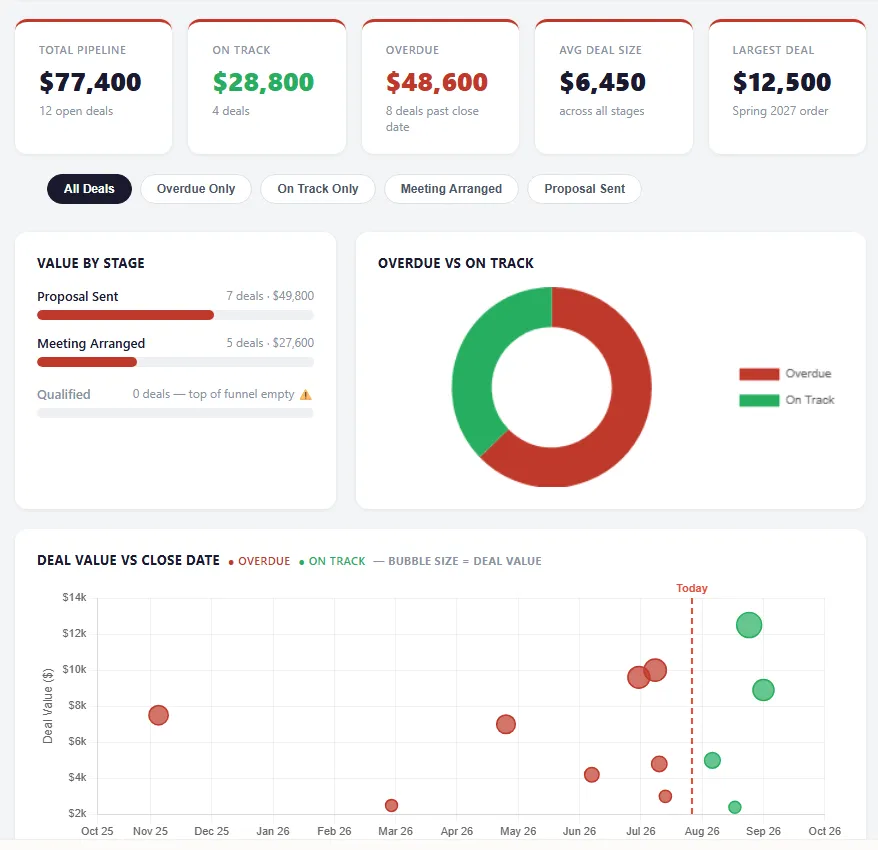
And if it's a report you want regularly, you don't even have to keep asking. Just tell your AI tool, and it'll be ready as and when due.
Bring all your tools together
OnePageCRM doesn't have to be the only tool Perplexity AI works with. It can also connect to your calendar, email, files, and hundreds of other apps. And once you've connected a few of them, one request can get work done across several tools at the same time. For example:
“Find a slot for a follow-up call with Maria from Northside Home & Garden next Tuesday, put it on my calendar, and log the meeting on her contact in OnePageCRM.”
The AI will check your calendar for a free slot, book the call, and log it on Maria's contact in your CRM, all in one go. Work that would normally have you hopping between three different apps gets done from a single chat box.
Alternatives to Perplexity AI assistant
Of course, Perplexity isn't the only AI that can do this job. OnePageCRM's MCP works with any AI tool that supports custom connections, so you can set up the same kind of assistant with Claude, ChatGPT, Grok, or Mistral AI.
The setup follows more or less the same steps everywhere. You add OnePageCRM as a connector, sign in, choose your permissions, and start working. We even have a simple guide on how you can set up an AI sales assistant with Claude and ChatGPT.
As for which AI to pick, it mostly depends on the one you already use and pay for. Perplexity is a great choice when your work leans on research, since its answers come with sources. But if you already use Claude or ChatGPT every day, connect that one. It'll handle the same CRM work just as well.
Get your small business a Perplexity AI assistant
Most small businesses could use an extra pair of hands, but hiring isn't always in the budget. An AI assistant gets you surprisingly close, for the price of a Perplexity subscription and a CRM.
OnePageCRM's MCP comes with every plan, including the free trial. Create your account, connect it to Perplexity, and start handing some work over to your new AI assistant.