Some say AI-first, some say AI-native, and all of them promise to take busywork off your hands.
In one CRM, the AI is a scoring system that tells you which lead to call first. In another, it’s a writing assistant that drafts your follow-up emails. And in the newest group, it’s a connection that lets ChatGPT or Claude open your CRM and update it for you.

Those are three very different products, and they come at very different prices. So this guide starts with what an AI CRM is and works through the types, the benefits, and the drawbacks. After that, you’ll find a comparison of the ten best AI CRMs for 2026 and our pick for small businesses.
What is an AI CRM?
A CRM is where you keep your contacts and track your sales. An AI CRM is the same system with artificial intelligence built in to carry part of the workload. The AI can predict which deals are likely to close, draft and summarize your messages, and keep your records up to date.
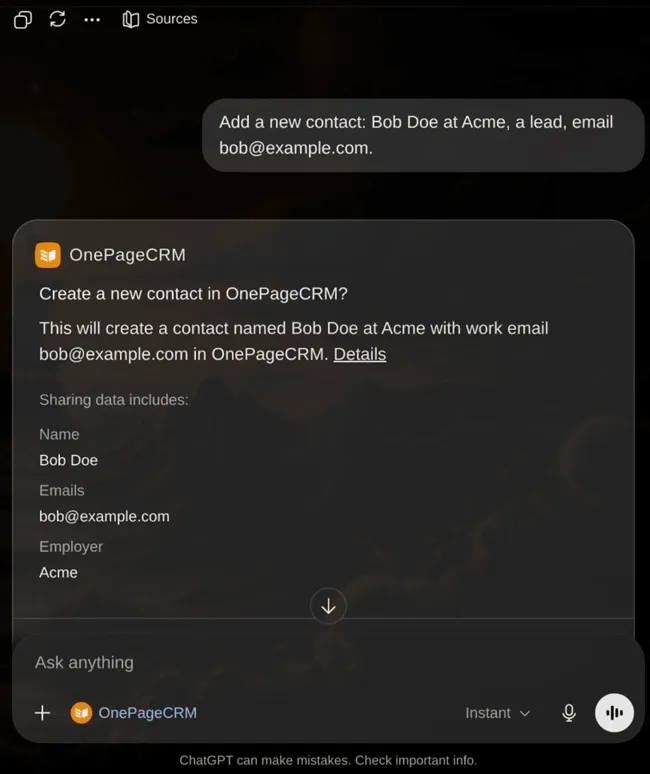
The newest AI CRMs go one step further. Through an open standard called MCP, they let an outside AI like Claude or ChatGPT read your CRM data and update it for you, all in plain conversation.
The types of AI CRM
Most AI CRMs fall into one of three groups, based on what the AI does for you. Plenty of tools mix two or all three, but each group is easier to understand on its own.
Predictive AI CRMs
A predictive AI CRM looks at the data already in your account and works out what’s likely to happen next. Its predictions come from patterns in your past sales, so they get better as your CRM history grows.
Examples of what a predictive AI CRM can do:
- Rank your leads by how likely they are to buy.
- Estimate which deals will close this quarter.
- Warn you when an account has gone quiet.
- Point out a deal that hasn’t moved in weeks.
Generative AI CRMs
A generative AI CRM creates something new from your data, and it’s the type most people picture when they hear AI. It handles the writing, and you review the result before it goes anywhere.
Examples of what a generative AI CRM can do:
- Turn a recorded call into a short summary on the contact’s page.
- Draft a follow-up email in your tone.
- Clean up a rough note into a record anyone can understand.
- Suggest a reply when a prospect asks about pricing.
Agentic and MCP-accessible CRMs
This is the newest group, and it changes how you use a CRM altogether. An agentic AI carries out tasks instead of only suggesting them. MCP is what lets the AI tools you already use do this inside your CRM. It’s short for Model Context Protocol, an open standard that Anthropic introduced in November 2024. A CRM with an MCP server lets an outside AI like Claude or ChatGPT connect to your account, read your data, and update it.
Examples of what an agentic AI CRM can do:
- Find every lead in Dallas you haven’t spoken to in six weeks and set a follow-up for each one.
- Update a batch of contact records while you do something else.
- Pull a pipeline report when you ask for one in plain language.
- Log every change under your name, so you can always check its work.
The benefits of an AI CRM
Set up right, an AI CRM logs your calls, updates your contacts, and reminds you who to follow up with. You get that time back for talking to people. And in a small business, sales is mostly talking to people.
Less manual data entry
Most CRM records go stale because updating them by hand is tedious, so people put it off. And it’s a bigger problem than it seems. In a 2025 Validity survey, 76% of users said less than half of their CRM data was accurate and complete. An AI CRM takes that job over. It logs calls, fills in contact details, and adds summaries on its own, so your records stay current without anyone having to remember to do it.
Knowing who to call first
With a long list of leads and a short day, the hardest question is who to call first. A predictive AI CRM answers that question for you. It ranks your leads by what they do, like who opened your emails or came back to your pricing page. Then you work from the top of the list instead of guessing, and the few selling hours a small team has each day go to the people most likely to buy.
Faster writing and follow-up
Follow-up emails, call notes, and quick replies take up a surprising share of a selling day. A generative AI CRM gives you a solid first draft of each one, written from your own history and in your own tone. All you do is read and adjust. That saves a few minutes on every message, and over a week those minutes turn into hours you can spend talking to customers.
Fewer forgotten follow-ups
When you handle dozens of deals at once, some follow-ups get forgotten, and a forgotten follow-up can cost you the sale. An AI CRM watches your pipeline and points out the deals that have stopped moving and the customers who’ve gone quiet. You get a reminder while the lead is still warm, and that’s a level of attention nobody can keep up by hand across a whole pipeline.
An AI assistant that runs your CRM for you
And then there’s the newest gain, running your CRM by talking to it. With a read-and-write MCP server, you can connect an assistant like Claude or ChatGPT to your account and ask for reports, updates, or new tasks in plain language. For a small business with no ops person, that’s help that used to mean hiring someone.
The disadvantages of an AI CRM
AI genuinely helps in a CRM, but it comes with trade-offs, and knowing them before you buy will save you money and frustration. Here are the five big ones.
The AI can be wrong
AI sounds sure of itself even when it’s mistaken, and its accuracy drops as the amount of information grows. Researchers at Stanford found that language models struggle to use long inputs reliably, and Chroma reached a similar conclusion after testing eighteen models. In a CRM, that can mean a call summary with an error in it or a lead scored too high, so its work still needs your review. And judging by how IBM found that 56% of executives have no process for reviewing AI output, a lot of businesses haven’t built that habit yet.
The advertised price isn’t the full cost
Many AI CRMs sell the AI separately from the plan. The features run on credits or tokens that your team spends with every AI action, so the bill grows in whichever month you’re busiest. On top of that, several vendors reserve their best AI for the higher plans, so getting the feature you wanted can mean upgrading the whole team. Before you commit, price a heavy month, not a light one.
Bad data means bad AI
AI can only work with what your CRM holds. If the records are incomplete, outdated, or full of duplicates, the predictions built on them will be off. The AI will present them with full confidence anyway. And bad predictions cost money. In the same 2025 Validity survey, 37% of CRM users said they lost revenue because of poor data quality. Clean your data before you start using the AI.
It’s easy to trust it too much
When a tool answers fast and sounds certain, it’s easy to stop checking it. That’s the risk, because an AI-drafted email can have the wrong detail in it, and an automated message that goes to an important client unread can do serious damage. Treat the AI as a fast assistant whose work you approve, not a colleague who acts alone, and keep the important decisions yours.
Questions about your data
Connecting AI to your customer records raises fair questions. You should know where the data goes, whether it trains outside models, and which people on your team can trigger AI actions. The good news is that the better AI CRMs answer all three. The AI works under your own permissions, every change gets logged, and you can limit it by role. Check for them before you connect anything.
How to choose an AI CRM
No single AI CRM is right for every team, so the choice depends on your size, your budget, and how much of the work you want the AI to carry. Below are six things to check before you decide.
- Find where the AI starts. Read the pricing page closely and note which plan includes the AI features you want. Scoring, drafting, and agents are often on the middle or top plans, and the entry plan may include none of them.
- Check for an MCP server. If you want Claude or ChatGPT working inside your CRM, look for an official MCP server that allows both reading and writing. Without one, outside AI can’t connect, no matter what the marketing says.
- Match the tool to your team. A five-person business doesn’t need an enterprise platform with months of setup. Pick a CRM that matches the way you sell today, and add more complexity only when you actually need it.
- Trial it on your own data. Sample data in a demo always looks fine, so import your own contacts during a free trial and test whether the scoring, drafting, and summaries hold up on records as messy as yours.
- Price a busy month. Add the plan cost to the credits, tokens, or per-result charges the AI uses, then estimate a heavy month. A flat-rate CRM often ends up cheaper than one with a lower plan price and metered AI.
- Check the controls. Confirm that the AI acts under your own permissions, that its changes are logged, and that roles can limit who triggers it. If something goes wrong, you want to see what happened and reverse it.
The 10 best AI CRMs for 2026
The quickest way to compare these ten is to ask whether an outside AI can actually connect and do the work for you. That’s what the table below shows, and the entries after it go deeper on each tool’s AI features, pricing, and the problem to know about before you buy.
| CRM | Official MCP server? | Read / write | The problem |
|---|---|---|---|
| OnePageCRM | Yes, on every plan | Read + write | No AI chatbot of its own; you connect your own assistant |
| Pipedrive | Yes, all plans | Read + write | Token-metered, with paid top-ups for heavy use |
| HubSpot | Yes | Read + write | Agents need Pro or Enterprise, billed per result |
| Zoho CRM | Yes | Read + write | AI agents start on the Professional plan |
| Freshsales | No | None | No route in for outside AI, and scoring needs Pro |
| Salesmate | No (client only) | Outbound only | Its AI reaches out, but outside AI can’t reach in |
| Attio | Yes | Read + write | AI runs on monthly credit tiers |
| Salesforce | Yes | Read + write | Enterprise Edition only, at enterprise prices |
| Dynamics 365 | Via Copilot Studio | Read + write | Needs Dataverse, and Claude Desktop isn’t supported |
| Creatio | No (community build) | Community only | Official server not due until late 2026 |
Let’s talk about these AI CRMs.
1. OnePageCRM
OnePageCRM is a simple sales CRM for small businesses, solo sellers, and lean teams. Its Next Action system gives every contact a follow-up task, so no one gets forgotten.
When it comes to AI, its answer is open access rather than a built-in chatbot. Every plan comes with an official MCP server, even the free trial. So Claude, ChatGPT, or another assistant can read and update your account for you. There are no AI fees on any plan, and no credits to count.
Best for: Small businesses and solo sellers who want an easy CRM that AI assistants like Claude and ChatGPT can run for them at no extra cost.
AI and agent access: Official MCP server built by OnePageCRM, with read and write access on every plan, including the free trial. It works under the connected user’s own permissions, every change is logged, and restricted roles can be blocked from connecting.
Standout AI features:
- Full MCP access on all plans.
- An assistant suggesting next steps.
- AI contact summaries.
Pros
- Read and write MCP access on every plan, with no AI fees at all.
- No credits or tokens to count, so the price stays the same however much you use it.
- Simple enough that a non-technical team can set up the AI connection.
- The CRM itself is affordable, with plans at $9.95 and $19.95 per user/month.
Cons
- No built-in chatbot or AI writing tools of its own.
- You bring your own AI assistant, like Claude or ChatGPT.
Pricing: $9.95 or $19.95 per user/month, with a 21-day free trial and no card required. MCP access comes with every plan at no extra cost.
G2 rating: 4.7
Capterra rating: 4.8
2. Pipedrive
Pipedrive is best known for its visual pipeline, which shows every deal at a glance. Small sales teams also like how quickly it gets going.
AI is now a big part of the product. A Sales Assistant in beta answers questions about your data on every plan, while the AI email writer and deal-win predictions need Premium or higher. An official MCP server on all plans lets outside AI create and update your deals, contacts, and activities. The access is metered in tokens, though, with limits by plan and paid top-ups for heavy use.
Best for: Small and mid-sized sales teams that want a visual pipeline with official AI access included on every plan.
AI and agent access: Official native MCP server, built by Pipedrive with OAuth. Read and write, available on all plans, and token-metered.
Standout AI features:
- A Sales Assistant (beta) that answers questions about your data.
- An AI email writer and deal-win predictions, on Premium and up.
- Native MCP access for creating and updating records.
Pros
- MCP server included on every plan, with create and update access.
- Deal-win predictions help you focus on the right deals.
Cons
- MCP use is metered in tokens, and heavy months need paid top-ups.
- Costs are harder to predict once the AI becomes part of the routine.
Pricing: From $14 per user/month (Lite). MCP is on all plans, with token limits by plan and paid top-ups. The AI email writer and win predictions need the Premium plan or higher.
G2 rating: 4.3
Capterra rating: 4.5
3. HubSpot
HubSpot covers marketing, sales, and service in one platform, and its free CRM is where many small businesses start. Its built-in AI includes agents that can source leads, resolve support conversations, and draft content. There’s also an official MCP server that gives outside AI read and write access to your main records.
Look closely at the costs, though. The AI agents are only on the Pro and Enterprise plans, and you pay for their work by result. A sourced lead costs about $1 in credits.
Best for: Growing businesses that want one platform for marketing, sales, and service, with AI agents they pay for by result.
AI and agent access: Official MCP server by HubSpot. Read and write on your main records and activity.
Standout AI features:
- Breeze AI agents for prospecting and support.
- AI content drafting.
- MCP read and write access.
Pros
- Official MCP server with read and write on your main records.
- Breeze agents can source leads, handle support, and draft content.
Cons
- The AI agents are only on the Pro and Enterprise plans.
- Billing by result means a busy month costs more.
Pricing: Free tier to start, then Sales Hub Starter $20, Pro $90, and Enterprise $150 per user/month. Breeze agents start on Pro and are billed by result through credits.
G2 rating: 4.4
Capterra rating: 4.5
4. Zoho CRM
Zoho CRM gives you a lot of product for the money, which is why growing teams pick it when they expect to need more features later. Its assistant is called Zia, and it scores leads, forecasts sales, and now includes AI agents that act on your data.
Separate from Zia, an official MCP server lets your own AI assistant in with full read and write access. Zia’s agents do depend on your plan, though, since they only come with Professional and up.
Best for: Teams on a budget that want lots of features, with AI scoring, forecasting, and agents as they grow.
AI and agent access: Official MCP server by Zoho. Read and write.
Standout AI features:
- Zia lead scoring and forecasting.
- Zia AI agents.
- Full MCP access.
Pros
- Official MCP server with full read and write access.
- Zia covers scoring, forecasting, and AI agents in one product.
Cons
- Zia’s agents aren’t included on the Free and Standard plans.
- So many features that a small team can lose time learning it all.
Pricing: Standard $14 and Professional $23 per user/month. Zia’s AI agents are included from the Professional plan up.
G2 rating: 4.1
Capterra rating: 4.3
5. Freshsales
Freshsales aims at small and mid-sized teams that want AI working without much setup. That’s because it has a built-in AI system (Freddy), and it scores contacts and deals, drafts replies, and runs a metered AI agent priced at about $49 per 100 sessions.
Predictive scoring needs the Pro plan, and there’s an even bigger problem for folks who want to use their own AI tools. The CRM has no MCP server at all, so Claude and ChatGPT can’t connect to it. Freshworks’ only MCP server is in Freshservice, which is a different product on its own.
Best for: Small and mid-sized teams that want built-in AI scoring and drafting and don’t plan to connect outside AI.
AI and agent access: No MCP server in the CRM. Freshworks’ MCP server is in Freshservice, on the Enterprise plan of that product.
Standout AI features:
- Freddy predictive contact and deal scoring.
- Reply drafting.
- The Freddy AI agent.
Pros
- Freddy handles predictive scoring and reply drafting in one assistant.
- The entry price is low for a CRM with built-in AI.
Cons
- No MCP server, so outside AI can’t connect at all.
- Predictive scoring needs the Pro plan or higher.
Pricing: Growth $9, Pro $39, and Enterprise $59 per user/month. Predictive scoring starts on Pro, and the AI agent is metered at about $49 per 100 sessions.
G2 rating: 4.5
Capterra rating: 4.5
6. Salesmate
Salesmate bundles calling, email, and automation into an affordable CRM for small teams. Its built-in Sandy AI assistant summarizes calls and meetings, drafts emails in your tone, and suggests next steps. The problem is, none of that is included on the entry Basic plan.
Salesmate also sells Skara, a separate AI agent platform for customer conversations, priced from $79 a month. On outside AI, the connection only goes one way. Salesmate works as an MCP client, so its own AI can reach other tools. Nothing lets an outside AI reach into your account, though.
Best for: Small teams on a budget that want a CRM with its own built-in AI assistant.
AI and agent access: No inbound MCP server. Salesmate is an MCP client, so its own AI can reach other tools, but outside AI can’t connect in.
Standout AI features:
- The built-in Sandy AI assistant.
- Call and meeting summaries.
- Email drafting in your tone.
- Next-step suggestions.
- Skara, a separate customer-facing agent platform.
Pros
- A built-in AI assistant for summaries, drafts, and next steps.
- Calling and email included at a low entry price.
Cons
- Outside AI can’t connect into the CRM, only the reverse.
- The built-in assistant only comes with the Pro plan and up.
Pricing: Basic $23, Pro $39, and Business $63 per user/month. The built-in assistant comes with Pro and up, and Skara is priced separately from $79 a month.
G2 rating: 4.7
Capterra rating: 4.7
7. Attio
Attio is a flexible, data-rich CRM that startups and tech companies shape around their own way of working. AI is central to the product. Its research agent can look up companies on the web, and its call intelligence transcribes calls and pulls out action items.
An official MCP server gives outside AI access, but with certain rules. Reads are approved automatically, and any write asks for your confirmation first. Budget planning matters here. The AI runs on credits, and your workspace gets a set number each month, either 250, 1,500, or 10,000 depending on your tier. Needing more means paying for a higher tier.
Best for: Startups and tech teams that want a CRM they can shape themselves, with permissioned AI access.
AI and agent access: Official MCP server by Attio. Reads are approved automatically, and writes ask for your confirmation first.
Standout AI features:
- A web research agent that saves its findings to your records.
- Call recording and transcription with action items.
- Follow-up email drafting.
- Permissioned MCP access.
Pros
- Official MCP server, with reads approved automatically.
- Writes ask for confirmation first, which protects your data.
Cons
- The AI runs on monthly credit tiers, and heavy use costs more.
- Its flexibility takes time to learn.
Pricing: Free plan to start, then Plus $35 and Pro $79 per user/month at annual rates. AI credit tiers run 250, 1,500, or 10,000 per workspace each month.
G2 rating: 4.5
Capterra rating: 3.8
8. Salesforce
Salesforce is the largest CRM there is. Its AI line is called Agentforce, and it gives big sales teams agents that work across sales and service. An official MCP server is available on Enterprise Edition and above, and writes run under each user’s own permissions.
For a small business, the numbers are the obstacle. Agentforce editions start around $550 per user/month, and the pay-as-you-go alternative charges about $2 for every AI conversation. Either way, you’d have to break the bank in any busy month.
Best for: Large sales teams with the budget and staff for enterprise AI agents.
AI and agent access: Official MCP server by Salesforce, on Enterprise Edition and above.
Standout AI features:
- Agentforce AI agents for sales and service.
- An AI coach that reps can practice their pitch and role-play meetings with.
- Enterprise MCP access.
Pros
- Official MCP server with read and write access.
- Agentforce agents cover deep sales and service work.
Cons
- MCP needs Enterprise Edition, which most small teams don’t have.
- Agentforce editions start around $550 per user/month.
Pricing: Agentforce editions from around $550 per user/month, or about $2 per AI conversation on the consumption option.
G2 rating: 4.4
Capterra rating: 4.4
9. Microsoft Dynamics 365 Sales
Microsoft Dynamics 365 Sales is the CRM inside Microsoft’s business suite, which makes it the obvious option for companies that already run on Microsoft 365 and Teams. Its AI is called Copilot, and it summarizes deals, drafts emails, and pulls useful information out of your data. Outside AI connects through Copilot Studio on Microsoft’s Dataverse.
That said, there are two things to know before you commit. By Microsoft’s own note, Claude Desktop isn’t supported yet. And Copilot credits only come included with the top $150 plan, so everyone below buys them separately.
Best for: Companies already on Microsoft 365 that want Copilot AI inside their CRM.
AI and agent access: Through Microsoft’s Copilot Studio, on Dataverse. Claude Desktop isn’t supported yet.
Standout AI features:
- Copilot deal summaries and email drafting.
- Agents built in Copilot Studio.
Pros
- Copilot summarizes deals and drafts emails from your own data.
- Outside AI can connect through Copilot Studio.
Cons
- The setup needs Dataverse, and Claude Desktop isn’t supported yet.
- Copilot credits are only included on the top plan.
Pricing: $65, $105, and $150 per user/month. Copilot credits come included on the $150 plan and are bought separately below it.
G2 rating: 3.8
Capterra rating: 4.4
10. Creatio
Creatio is a no-code platform for mid-sized and larger businesses that want to build their own workflows across sales, marketing, and service.
On outside AI access, though, it’s behind everyone else on this list. There’s no official MCP server in either direction yet, though one is planned for late 2026. For now, a community-built GitHub connector is the only route in. The AI itself is sold in large credit blocks that start near 500,000 credits for $5,000 a year.
Best for: Mid-sized and larger businesses that want no-code AI automation across custom workflows.
AI and agent access: No official MCP server in either direction, with one planned for late 2026. A community-built GitHub connector is the only current route.
Standout AI features:
- Creatio AI automation across sales, marketing, and service.
- No-code AI workflows.
Pros
- No-code AI automation across all three departments.
- Deep customization for businesses with their own processes.
Cons
- No official MCP server yet, only a community-built connector.
- The AI is sold in large, expensive credit blocks.
Pricing: Around $55 per user/month for a full sales setup (the platform plus the sales product). AI credit blocks start near $5,000 a year.
G2 rating: 4.7
Capterra rating: 4.7
Which is the best AI CRM in 2026?
For a small business, our answer is OnePageCRM, and the main reason is that it’s the only CRM on this list where full AI access costs nothing extra on any plan.
In the other CRMs, though, the strongest AI features are reserved for the higher plans. What’s more is, the AI itself runs on credits or tokens, so the more your team uses it, the more you pay.
OnePageCRM, however, does things differently. Its official MCP server comes with every plan (free trial, too!), and you get full read and write access with no AI charges of any kind.
From the start, you can connect Claude or ChatGPT (or any other AI tool you use) to your account and ask for reports, contact updates, and follow-up tasks in plain language. Every change is logged, and the AI can only do what your own permissions allow.
Since the free trial doesn’t ask for your credit card details, you can easily test the CRM and its AI integration before you commit.