
Every business needs an effective sales process to thrive. But small businesses usually don’t have enough resources for a dedicated sales team.
An AI sales assistant can make things a lot easier for small businesses. You can use it to quickly execute repetitive CRM-related sales tasks, such as scheduling calls, adding notes, setting follow-up reminders, and researching and creating new contacts.
In this article, we’ll show you how to set up an AI sales assistant for your small business and different ways you can use it to execute CRM admin tasks quickly.

How an AI sales assistant works
Claude, ChatGPT, and other AI agents can do a variety of jobs, including some repetitive sales tasks. However, to turn them into sales assistants, you need to connect them to a sales tool.
This is where OnePageCRM comes in.
OnePageCRM is one of the easiest-to-use CRMs for small businesses and solo founders. One reason for this is that it’s super easy to use. And to make things even easier, it also connects to ChatGPT, Claude, and other AI tools, so they can quickly execute repetitive and time-consuming CRM admin tasks for you.
Here’s how you can set up an AI sales assistant.
1. Connect to AI
OnePageCRM offers an MCP server that you can easily connect to an AI tool like Claude, ChatGPT, Perplexity, Grok, or Mistral AI.
MCP stands for Model Context Protocol. It's a secure connection between your AI tool and other apps. It allows AI agents to access and manage the data in your apps.
2. Use plain language prompts
Once connected, you can provide prompts in plain English to execute tasks in OnePageCRM. For example, ask your AI agent to “Research the company Acme Inc., find the key decision-makers, add each as a contact tagged with their role, and save anything else you found as a note”.
AI will quickly execute the task for you. And since it now has access to your sales CRM, it becomes your sales assistant.
You don’t have to manually search for information and enter the data into your CRM. The AI sales assistant does it for you in seconds, which saves you a significant amount of time that you can spend on actual selling.
3. Automate different CRM tasks
You can use your AI sales assistant to automatically execute many CRM-related tasks quickly. For example:
- Move the deals in the sales pipeline
- Reschedule your overdue actions
- Draft emails that sound like you
- Create notes from the transcript of a call you had with a lead or prospect
- Tell you what deals have gone quiet and what you should do about them
With OnePageCRM’s MCP, your AI tool like Claude or ChatGPT can read your OnePageCRM account and access your contacts, follow-ups, deals, notes, and the like.
4. Review and double-check
Once your AI sales assistant executes a task, you can quickly double-check what was changed in your CRM. For example, if you’ve asked it to research a company and add new contacts, those contacts will appear in your CRM.
Different ways to use an AI sales assistant
Here are a few tasks you can give to your AI sales assistant. To make this work, you only need active accounts with an AI tool and OnePageCRM.
1. Automate prospecting
For B2B sales, you’re usually selling to a company, not a single person. So you often need to contact multiple people from that company to close a deal.
Finding key decision-makers from the company, researching their information, and adding them as a contact one by one manually can consume a significant amount of your time.
An AI sales assistant can make this process super quick and easy. You can simply give a prompt like:
“Research the company Notion, find the key decision-makers, add each as a contact tagged with their role, and save anything else you found as a note in my CRM”.
AI will create all the key contacts, tag them with their role, and even add any key information that can be useful to you as a note.
2. Generate call preps
You can have multiple calls, messages, or emails with a prospect. The best way to make the most of your discussions is to save key points as notes in your CRM and go over them before your next call or meeting.
But finding all the notes manually in your CRM can be quite time-consuming. That’s where your AI-powered sales assistant can come in handy.
You can give it a prompt like:
“Prepare a short pre-call brief for Notion. Use CRM data to summarize past interactions, open tasks, and active deals, then check the web for any recent updates. Tell me where we left off, what’s open, and what’s new.”
The AI sales assistant will give you the complete note history for the contact, open deal status, and outstanding Next Actions within seconds. It also checks the web for any recent company news that you should know before the call.
With this information, you walk into the call with complete context, showing the prospect that they are a priority to you.
3. Delegate data entry
Updating your CRM, such as logging a call, moving a deal, or setting a follow-up reminder, can feel tedious. That’s why it’s often pushed aside, especially on busy days.
But a CRM that isn’t updated regularly isn’t very helpful.
With an AI sales assistant, you don’t have to do any of it manually. You can simply give it a prompt like:
"Log my call with Maria: she wants the spring order, move her deal to Proposal Sent, and remind me to follow up Friday."
The sales assistant will do all of this within seconds, and you can see all the updated data in your CRM.
You can also make things quicker by sending a prompt through voice command in your mobile AI.
For example:
"Log my call with Jamie Chen. He wants the spring order, move his deal to Proposal Sent, and remind me to follow up Friday"
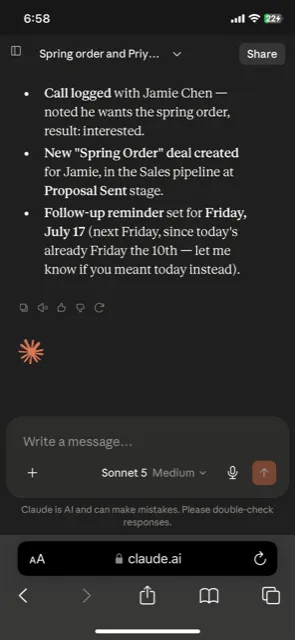
The AI will execute the command and update your CRM.
4. Draft emails in your style
People can easily tell when you’ve carefully written an email just for them and when you’ve used a template. If your prospects don’t find your emails relevant or personal, they are less likely to engage.
But drafting every email by yourself can be pretty time-consuming. An AI sales assistant can help you here.
You can give Claude or ChatGPT (or any other AI tool that you’ve connected the OnePageCRM MCP to) a few examples of your best emails or templates so it can understand your tone and style. You can then ask it to:
"Draft a follow-up email to Joe Bloggs about the renewal, written in my style."
Your AI assistant will write the follow-up the way you would. And because it already has access to Joe’s data in your CRM, it’ll draft an effective email instead of a generic one.
If you also add the Gmail connector, you can directly send the follow-up email by simply clicking “Send via Gmail” inside your AI tool.
5. Automatically create notes from transcripts
During a call with a lead or prospect, they may bring up various points that can be turned into action items. But realistically, you can’t remember everything. You can skim through the call transcript later to pull out action items, but that can take up a lot of time.
Your AI sales agent can do all of this in seconds.
You can paste in the whole transcript from a call in Claude or ChatGPT and ask it to:
"Pull out the action items, add them to the correct contacts as Next Actions, and draft my follow-up email."
The AI will read the whole transcript, pull out the action items, add them as Next Actions against the right contact, and even draft a follow-up email. It simply completes tasks that would take you 20-25 minutes in a few seconds.
You can also connect your AI tool, like Claude, to Zoom MCP and ask it to get your latest transcript, summarize it, and then update your CRM. This will automate the whole process.
6. Clean up messy imports
When you collect leads at events like trade shows, you often end up with a long list of contacts to add to your CRM. And if you spend too much time creating contacts in your CRM, instead of reaching out, you might lose them to your competitors.
That’s where your AI sales assistant can make things quicker and more efficient for you.
You can give your AI assistant the spreadsheet with raw or messy data and ask it to:
"Import this trade show spreadsheet: create each person as a contact, set them as Leads, and tag them Trade Show 2026."
The AI sales assistant will quickly create a contact for each lead in your OnePageCRM, set the status of each contact as “Lead”, and apply the same tag to each contact.
7. Score your leads
Not every lead is the same. Some require faster follow-ups than others.
Prioritizing your leads manually can be time-consuming, especially if you have hundreds of contacts in your CRM. You can ask your sales AI agent to do it for you.
You can give it a prompt like:
"Score my new leads according to the right fit and budget, and tag each one Hot, Warm, or Cold."
AI weighs the details on each contact and tags them, so the best leads rise to the top. You don’t have to go through each contact's details manually and tag them one by one.
8. Segment your database
A contact you are actively negotiating with needs completely different actions from a contact you haven’t spoken to in the past few months. You can filter your contact list based on active deals and deals that have gone quiet to make things easier.
To make things even quicker, you can ask your AI sales assistant to group your contacts.
You can give a prompt like:
"Group my contacts by where they stand in the buying process: active deals, gone quiet, and never contacted."
The AI will automatically review activity and deal status and tag each contact into the right group.
9. Get recommendations
If you have a deal with no “Next Action” attached in your OnePageCRM and you’re not sure what to do next, you can ask your AI sales assistant for suggestions.
For example, you can ask it to:
"Suggest a Next Action for every contact in my Pipeline that doesn't have one."
Your AI sales assistant will review each open deal and suggest a next step based on its history and stage in the pipeline. Once you have reviewed the suggestions provided by the sales assistant, you can ask it to update your CRM.
10. Prioritize your inbound leads
For web form leads, you can ask your AI sales assistant to review each submission and tell you which ones are worth your time, so you don’t have to chase every lead.
You can give a prompt like:
"Go through everyone tagged Web Form Lead, qualify them, and set a Next Action to follow up or flag the ones to close out."
The AI sales assistant will tell you which leads qualify and set the Next Action for each lead.
11. Analyze your lost deals
An effective sales process is one where you learn even from your lost deals and improve over time. Your AI sales assistant can provide you with valuable insights into what went wrong and highlight any patterns with lost deals.
For example, you can ask it to:
"Read the notes on every deal I lost last quarter and list the top objections, and create a report/dashboard for me to analyze."
It’ll read all your notes on lost deals, find top objections, and suggest responses. You don’t have to manually filter lost deals, go through notes for each deal, and identify patterns. The AI does all of this in minutes, and you can double-check its findings against your CRM's reports.
12. Integrate other tools
To make your AI sales assistant even more efficient, you can connect it to other tools like your Calendar, Slack, ActiveCampaign, and Google Drive. This way, your AI assistant can execute more tasks automatically.
For example, you can give it a prompt like:
"Book a follow-up with Maria next Tuesday, add it to my calendar, and log it on her contact in my CRM."
With the calendar connected, the AI will set up the meeting and also update your CRM so you don’t have to do anything manually.
Getting started with OnePageCRM’s AI sales assistant
OnePageCRM MCP is available on every plan, including the free trial.
Create your OnePageCRM account today if you don’t already have one, connect the MCP with Claude or ChatGPT, import your data, and turn your AI into a sales assistant.