
ActiveCampaign is a powerful marketing automation tool. If you pair it up with a sales CRM (for example, OnePageCRM), you’ll be able to manage your sales pipeline alongside marketing campaigns more efficiently.
In this article, we’ll show you practical automations you can run by connecting ActiveCampaign with OnePageCRM and how you can execute different tasks for both by using simple prompts in Claude or ChatGPT.
Can I use ActiveCampaign as a CRM?
No, not on its own. ActiveCampaign does offer a few CRM-focused features, such as a deals pipeline and contact and company records, but it’s still a marketing automation platform.
It mainly focuses on mass marketing communications or one-to-many marketing campaigns, not on building one-to-one relationships with leads and prospects like a dedicated sales CRM.
But building one-to-one relationships is crucial for actually closing a deal. That’s why you need a dedicated sales CRM and not just an email marketing automation tool like ActiveCampaign.
Small businesses usually feel this gap when they try to run sales entirely inside a marketing tool. Marketing automations are great at nurturing 300 leads with the same email sequence, but they are not built to remind you to personally call a contact back because they asked a pricing question. A CRM like OnePageCRM does that.
ActiveCampaign CRM Automations Examples
Once ActiveCampaign is connected to OnePageCRM, you can sync contacts and the fields attached to them, such as Status, Tags, and email ID, from OnePageCRM into ActiveCampaign.
That sync is what makes automation possible. Instead of manually adding contacts or people to lists and sequences in ActiveCampaign, you can trigger campaigns right from your CRM.
The contacts from the CRM are imported into ActiveCampaign with tags, labels, and email IDs:
And when you change something like status or tag in your CRM, it also gets updated in ActiveCampaign.
Here are a few automation examples for using both ActiveCampaign and OnePageCRM together.
Use case 1: Trigger lead-nurturing sequences
Say you have a new lead and you want them to start receiving the “Welcome” email series.
You can build this email sequence on ActiveCampaign, but launch it from OnePageCRM.
For example, once you move a contact’s Status from Lead to Prospect in your CRM, that Status syncs over to ActiveCampaign. It then triggers marketing emails automatically.
Use case 2: Segment new leads by interest using Tags
Say your business offers multiple services like web development and social media marketing, and you want to send every new lead emails only about the services they are interested in.
You can add tags in OnePageCRM that get synced to ActiveCampaign. For example, "Interest: Website Development".
In ActiveCampaign, a "Tag is added" to that contact, a trigger fires, and enrolls the contact in a nurture sequence. A separate lead tagged "Interest: Social Media" enrolls in a completely different sequence.
Use case 3: Re-engage inactive customers
If you have some customers that have gone quiet, you can win them back with an automatic re-engagement email campaign. You can use the Last Activity filter in OnePageCRM to find contacts with no activity in, say, the last 90 days and change their Status to Inactive.
Once you change the Status of contacts in your CRM, the changes sync to ActiveCampaign, and they get enrolled in a pre-built win-back campaign.
If a re-engaged contact opens, clicks, or replies, ActiveCampaign applies a tag like "Re-engaged" automatically.
Use case 4: Kick off a customer onboarding sequence
Say you’ve closed a deal and you want to add the new customer to your onboarding emails. Once the deal is won, OnePageCRM can automatically move the contact from Prospect to Customer.
That new Status syncs to ActiveCampaign and triggers a dedicated onboarding sequence. It can consist of a welcome email, setup instructions, and a check-in email a week later.
Use case 5: Send a different first email depending on how someone found you
A referral, a cold LinkedIn reply, and a webinar signup are three very different relationships. You don't want to send the same generic email to all three.
OnePageCRM has its own free Web Forms builder, so when someone fills one out on your site, a contact is created automatically (with the Tag/Lead Source you configure on the form), and that Lead Source/Tag then syncs automatically to ActiveCampaign.
ActiveCampaign will then send the first-touch email based on the Tag or Lead Source.
ActiveCampaign MCP: Connect to CRM
Both ActiveCampaign and OnePageCRM now have their own MCP (Model Context Protocol) servers.
When you use the two MCPs together, you can easily manage your marketing and sales pipelines together from text prompts, including the above use cases.
Here are a few examples of how to make your marketing and sales workflows more effective.
Example 1: Trial expired follow-up
When a trial expires, the next step isn't always obvious. The contact's marketing activity may be recorded in ActiveCampaign, while their sales history and follow-up tasks live in OnePageCRM. By bringing this information together, AI can help you identify who needs attention and turn that information into a specific follow-up action.
You can use a prompt like this in Claude or ChatGPT:
“Look at contacts in ActiveCampaign tagged “Trial Expired” who haven’t been updated in OnePageCRM in the last 7 days. Create a Next Action for each, and include a short suggested outreach message based on their last recorded interaction.”
Claude will return a response like this:
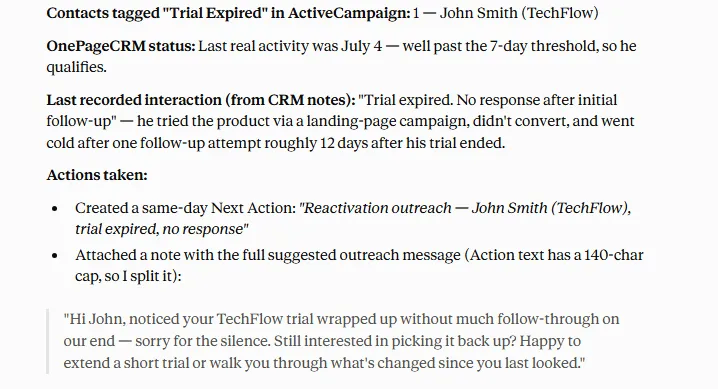
It will also create a Next Action in your OnePageCRM automatically:
Example 2: Deal prioritization
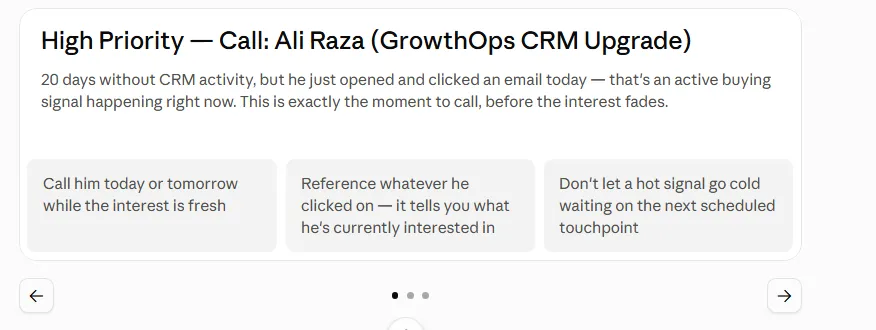
Not every deal that has gone quiet needs the same follow-up. A contact may have been inactive in OnePageCRM but still engaging with your emails in ActiveCampaign, which could be a sign that they're worth prioritizing. By looking at activity across both tools, AI can help you identify deals that need a call, those that need further nurturing, and those that can wait.
You can use a prompt like this in Claude or ChatGPT:
“Find OnePageCRM deals with no activity in 14 days. Check whether those contacts have opened or clicked any recent ActiveCampaign emails, and group them into: (1) high-priority call, (2) nurture via email, (3) low priority with reasoning for each.”
Claude will return a response like this:
Example 3: Engagement tracking
Email engagement can be a crucial sign that a prospect is interested, but that information alone doesn't tell your sales team what to do next. When ActiveCampaign engagement data is combined with OnePageCRM, you can turn actions such as link clicks into timely sales follow-ups. AI can help connect this data and make sure engaged prospects don't get overlooked.
You can use a prompt like this in Claude or ChatGPT:
“Pull the list of contacts who clicked a link in yesterday’s ActiveCampaign campaign. Add them to OnePageCRM (if not already present), tag them as “Engaged Lead,” and create a same-day Next Action with a suggested follow-up message.”
Claude will return a response like this:
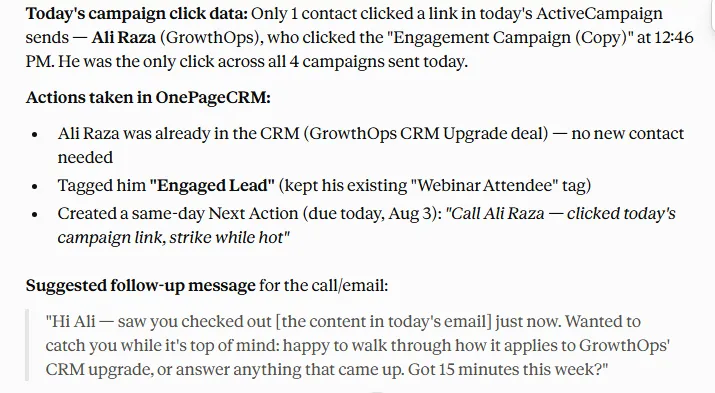
It’ll also update your CRM automatically:
Integrate ActiveCampaign with OnePageCRM
Mass marketing campaigns and one-to-one conversations each have their place in your sales and marketing strategy. Automated campaigns are useful for reaching a larger audience with relevant content, while one-to-one communication allows you to build personal relationships and follow up with individual prospects.
ActiveCampaign is built mainly for marketing automation campaigns that reach hundreds of contacts at once. A CRM like OnePageCRM tells you exactly what to do next for each relationship. Using them together lets you balance the scale of automated marketing with the personal approach of one-to-one follow-ups.