


So you’ve been looking for a way to organize and manage your customers, but traditional CRM software just isn’t in the cards for you right now.
If you don’t have a big database yet, a CRM in Notion might just be worth your while. It’s easy to use, flexible, and free.
In this guide, we take a close look at 7 of the best free Notion templates for customer relationship management (CRM).
You’ll find notes on what makes each one useful, along with screenshots and direct links so you can try them out for yourself.
7 Best Free Notion CRM Templates
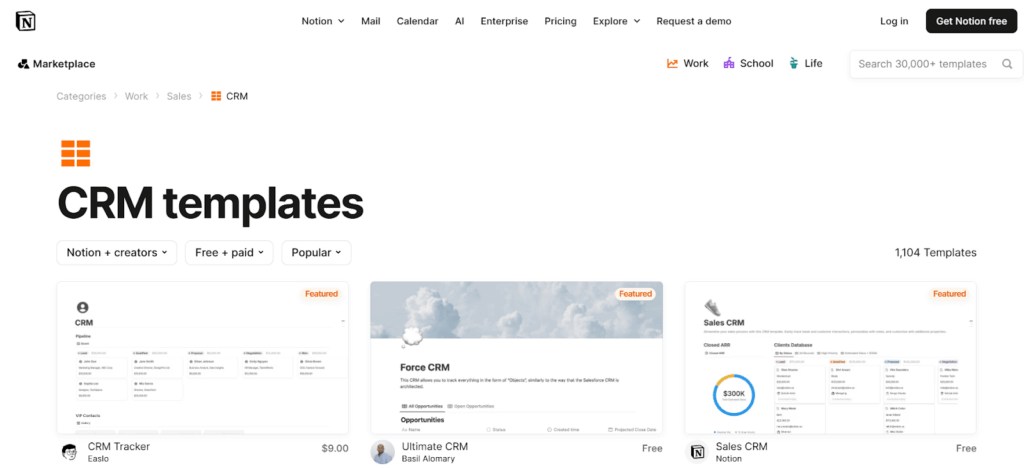
If you visit the Notion website and go to the CRM category, you’ll find over 1,100 templates, built by various Creators.
With so many options, selecting the right CRM template for your small business can be difficult.
To save you the trouble, we spent countless hours testing a wide range of these templates to see which ones actually work well for small businesses.
After careful research and hands-on testing, we put together a list of the best free CRM templates on Notion that are worth trying.
1. Action-Focused CRM Template
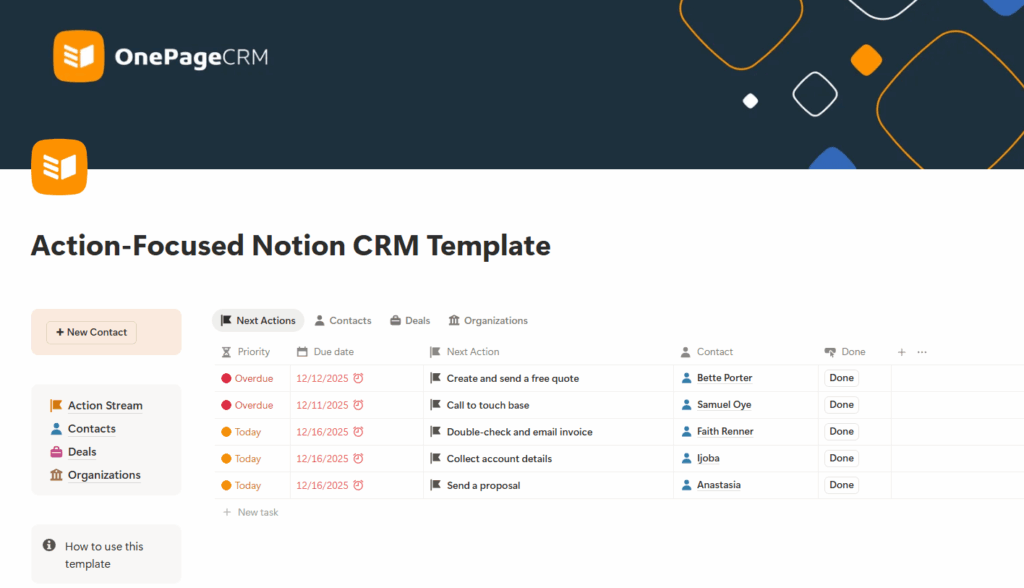
This is the only Notion CRM template that encourages you to follow up on every opportunity and stay in touch with your contacts.
The template has Next Actions. Next Actions are the specific steps you need to take with each contact to move them closer to becoming a customer.
This free Notion template organizes all those next steps in a color-coded list dubbed the Action Stream, so you always know what you need to do to nurture a relationship and close a deal.
It also helps you prioritize. Since some contacts require your attention sooner than others, this Notion template arranges your next steps by due date. The contacts you need to follow up with first appear at the top, while the less urgent ones sit lower on the list.
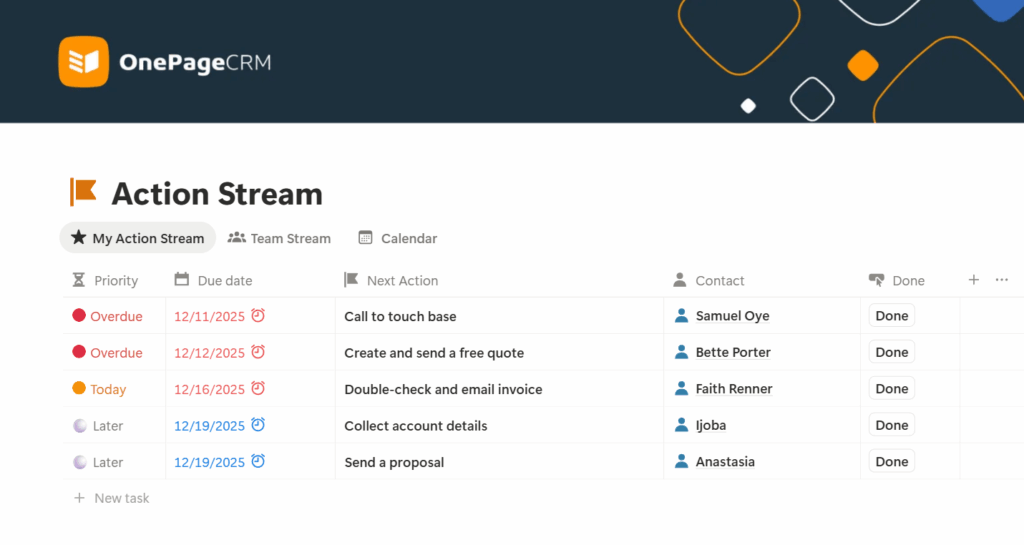
Every follow-up clearly shows which contact it’s associated with. And when you select one of these contacts, you can see their full profile, which contains their details, notes, any deals linked to them, and more.
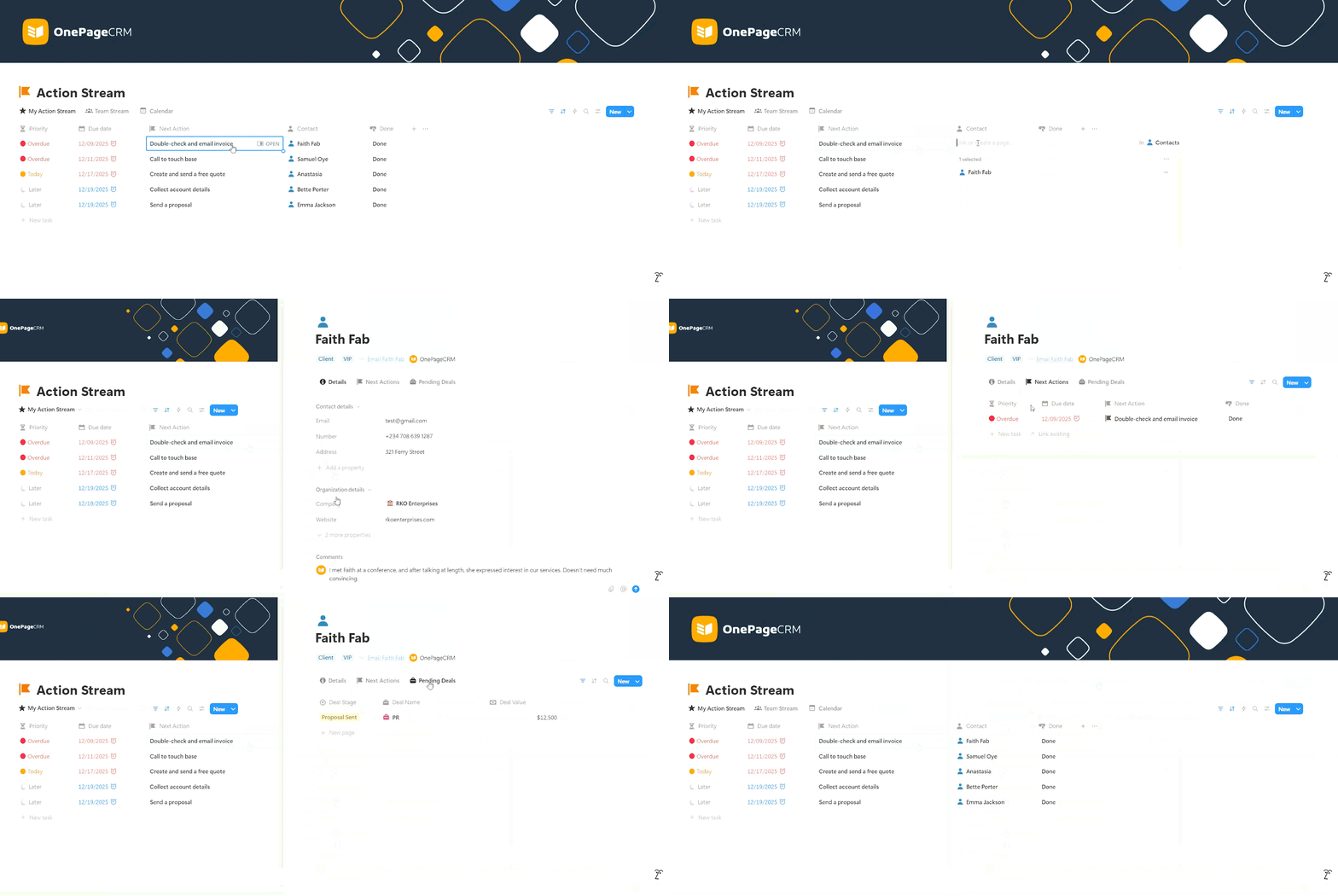
Speaking of deals, the template also includes a simple pipeline. You can view your sales opportunities and move them forward by dragging and dropping them into the next stage.
Main Highlights of This Notion CRM Template:
- Completely free. You don’t need to provide your email address to gain access to the template.
- Includes a free guide. This Notion template comes with a simple guide and a short video walkthrough to help you understand how to not just use, but also get the most value from it.
- It has follow-up reminders. The template organizes contacts by urgency, so the most important follow-ups appear at the top instead of being sorted alphabetically or by the date they were added.
- It has a free web form. To further minimize data entry, there’s a pre-built web form which, when filled by a customer, automatically adds the customer and their info to your Notion CRM.
- It features easy one-click emailing. On the Contacts page, clicking Send Email opens your email app with the contact’s address already filled in. All you need to do is write your message and send it.
- It is beginner-friendly. The layout is simple, the fields and tabs are minimal, and most of the data entry is handled by automations. Even if you have never used Notion before, you can pick it up quickly.
- It has a central workspace. The main page also serves as your main workspace. You can create and manage contacts, track next steps, and work on deals in one place.
- It has a simple dashboard. The Notion CRM provides a visual overview of your sales pipeline’s health. You’ll see your total deal value, as well as how many deals are in what stage of the pipeline. You can also easily drag and drop deal cards between stages.
- Includes built-in automations. This CRM template automatically prioritizes contacts, assigns deals and customers, and calculates the total deal value at each pipeline stage. It also comes with custom formulas that make it easier to understand data, as well as buttons that trigger processes automatically. On top of that, any update made in one place is reflected across the entire system.
2. B2B CRM System by Bozhedaroff
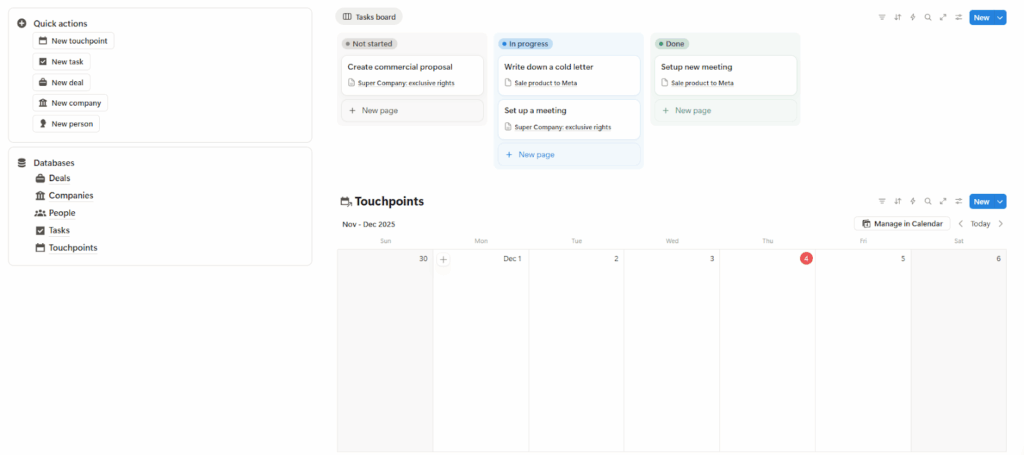
The first thing you’ll notice when you open this Notion CRM template is the task board.
Tasks aside, this is also one of the few Notion CRM templates on this list that includes deal management. Deals are organized by stage, and when you open one, you’ll see the deal value, associated contacts, any follow-up tasks, and any scheduled meetings or events.
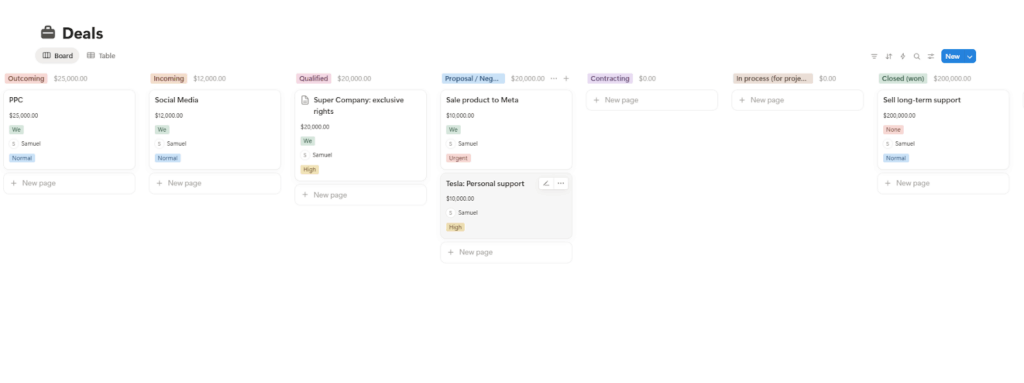
The template also includes a contact management functionality and provides a simple dashboard for both leads and deals.
Main Highlights of This Notion CRM Template:
- It includes a dashboard. The dashboard shows the number of deals in each pipeline stage and the value of those deals. It also displays how many deals come from different sources and the expected revenue from each one.
- It comes with usage guidelines. This CRM template includes explanations of key terms used in the system, as well as instructions on how to use the template effectively.
- Built around sales deals. This is a deal-centric CRM template. That’s why tasks and touchpoints—both of which keep your pipeline moving forward—are linked to Deals, rather than Contacts.
- Follow-ups are not well organized. Although tasks are linked to deals and count as follow-ups, they are not arranged by due date. This can make it harder to follow up with the right person at the right time.
- No email functionality. The CRM template does not allow you to send emails with a single click.
- It doesn’t have a central workspace. Although you can add new records from the main page and view the calendar, you cannot manage the pipeline or update deals from there.
- The CRM template feels a bit cluttered. The Deals, Companies, and Contacts pages show all available columns and fields at once, which can make the interface look busy and cluttered.
- There are no automations. In this Notion CRM, you won’t find any buttons for quick actions, pre-built filters, or any custom formulas to make data easier to understand or work with.
- Tasks and touchpoints require duplicate work. The Tasks and Touchpoints databases serve very similar purposes, and yet, they’re not connected. Because of that, you have to update both separately, which just creates unnecessary extra work.
3. CRM Tracker by Simo
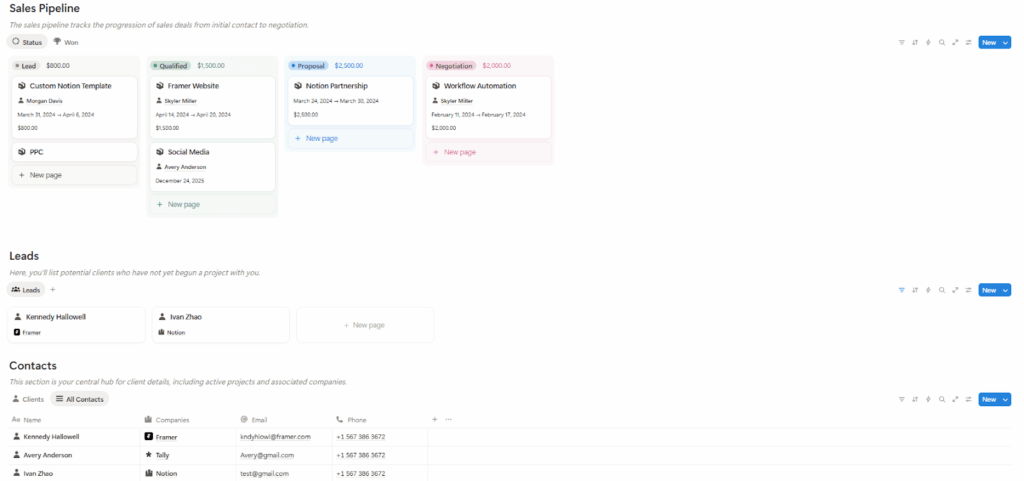
The first thing you’ll notice about Simo’s CRM Tracker is the minimalist interface. This Notion CRM template features just one page where you’ll find your pipeline, contacts, and company databases.
Every new contact you add to this system begins as a lead. When you attach a project to the lead, it becomes a client, and appears in your pipeline as a sales opportunity. The pipeline is in Kanban style, so you can simply drag and drop the opportunity to move it to the next stage.
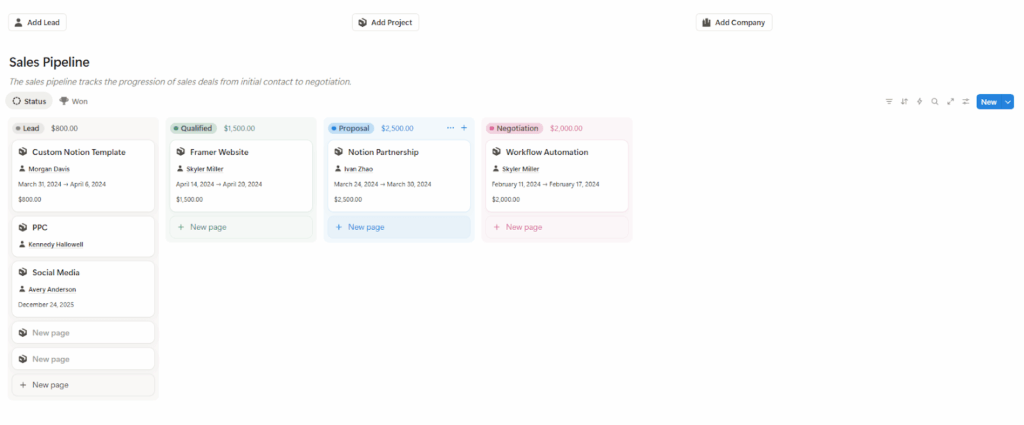
Main Highlights of This Notion CRM Template:
- It’s easy to navigate. It has a one-page layout, and all your databases can be found on that one page.
- Requires little data entry. When you’re adding a new contact, you only have to fill three fields manually; the other two are completed with just a few clicks. It’s two fields for a new project, and for a company, it’s three.
- It focuses on sales. This Notion template was built with sales in mind. That’s why the first database is the sales pipeline. It’s also the reason why every contact’s profile includes the project (or deal) attached to that contact.
- Gets cluttered easily. Instead of a well-sorted list, your leads and clients appear as cards, arranged one after the other from left to right. Because of this, the more contacts you have, the more crowded and overwhelming your system will look.
- No centralized workspace. Though this Notion template has a one-page layout, there’s no way to track follow-ups. This means you may need to monitor interactions some other way, which defeats the whole idea of handling the entire sales cycle in one place.
- There’s no follow-up tracking. This Notion CRM provides no way for you to schedule and track follow-up activities or tasks you need to complete. Even something as basic as a “last contact” field isn’t available.
- No one-click emailing. There’s no button that lets you send emails in one click.
- There’s no dashboard. The template does not include any dashboards or other visual aids to give you an overview of your sales performance.
4. Sales CRM by Notion
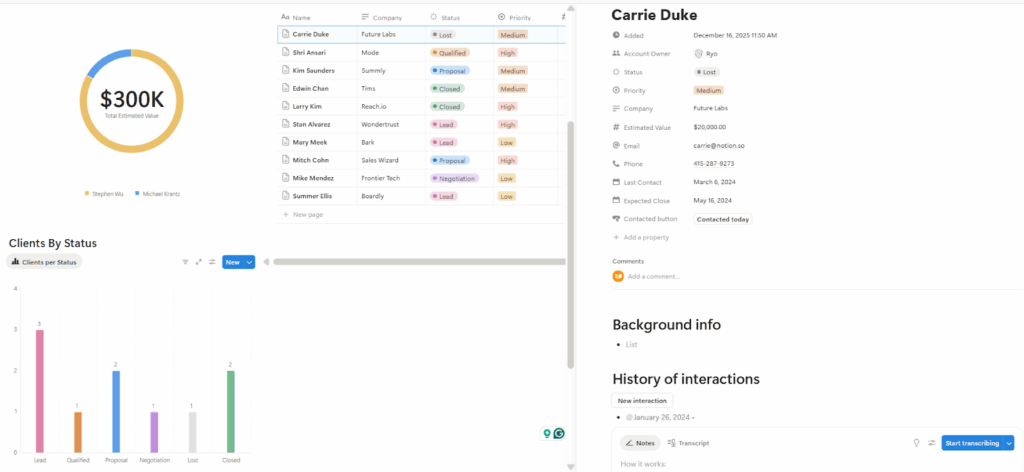
Notion’s Sales CRM was built for simple deal management. That’s why the first thing you’ll see when you open it is the sales pipeline.
The left pane of the sales pipeline features a dashboard showing the total value of your pipeline, and on the right pane, opportunities are organized according to what stage of the sales cycle they’re in. And since it’s a Kanban, you can advance each opportunity to the next stage via drag and drop.
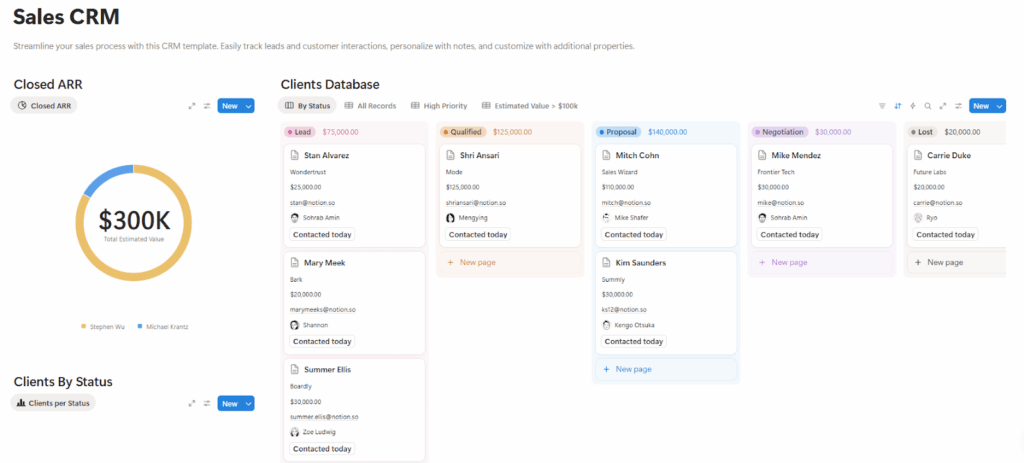
This template also helps prioritize customers. It has a “High Priority” tab showing only contacts you intend to prioritize. In the same vein, there’s a tab that shows only contacts with an estimated value of over $100,000.
Main Highlights of This Notion CRM Template:
- It keeps interaction history. You can keep a record of your interactions with each customer. However, you’ll need to log them in manually.
- Includes an AI note taker. If you often meet up with customers, you can use the AI meeting notes feature to record those meetings and create summaries of them.
- Features a single-page layout. With the whole system built on a single page, this Notion CRM allows you to access all of its functionalities quickly and easily.
- No centralized workspace. While this CRM template houses just one page, its lack of deal management and follow-up tracking features means you’ll need a separate tool. This takes away from it being a central workspace where you can manage the entire sales cycle.
- No proper follow-up system. Like with the Sales CRM Board by FocusWhale, Notion’s Sales CRM also shows you the date you last contacted a customer. However, there’s no way to set your specific next action or follow-up activity.
- Not completely free. Though the template itself attracts no cost, access to the charts and AI notetaker requires a paid subscription.
- There’s no deal management. Despite the emphasis on sales, this CRM template does not have any deal management features.
5. Client List by EdriansNotes
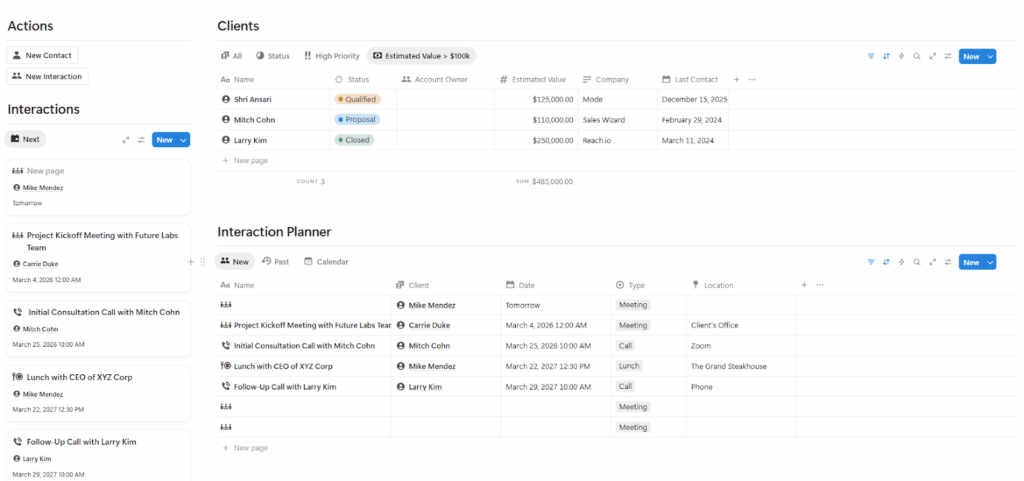
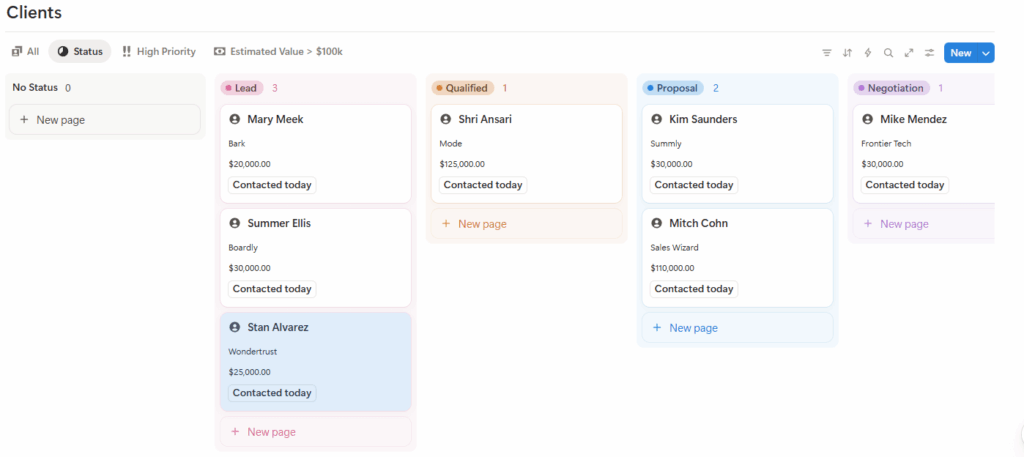
EdriansNotes’ Client List is a Notion template created to help you manage contacts and track your interactions with them. The entire system is built on a single page, which so happens to have a split-screen layout.
On the left side of the page, you’ll find a list of all activities you intend to carry out with a contact, whether that’s a meeting, call, email, or the like. The list is arranged according to due dates, from the closest to the farthest.
And on the right pane, you can organize your contacts, view both pending and past interactions, and advance clients through a Kanban-style sales pipeline.
Main Highlights of This Notion CRM Template:
- It’s completely free. You can use this Notion template without submitting your email or going through any additional process or screens to obtain it.
- Minimalist interface. This Notion CRM comes equipped with just two databases: Contacts and Interactions. And they both live on a single page.
- It has a central workspace. From the template’s single-page layout, you can store and update contacts’ details, keep track of interactions, and manage your sales pipeline.
- Built-in prioritization. This Notion template comes with a “High Priority” view that shows all contacts and interactions you set to “High” priority. There’s also one that displays only those with the potential to bring in over $100k in revenue.
- It tracks interactions. This Notion template has an Interaction Planner that lets you schedule activities you want to carry out with each contact. It organises those activities by due date and also keeps a record of past interactions.
- Doesn’t record completed interactions. There’s no way to mark an interaction or activity as complete. Once the due date passes, the interaction automatically enters the “past” interactions list, whether or not it’s been completed.
- No follow-up system. You can fill in the exact next steps or follow-up activities to carry out with each contact, but you can’t set a date for them. As such, you can’t track said follow-ups unless you go into each contact profile one by one.
- Requires a lot of data entry. You are not just filling in basic contact details. This CRM template also asks for additional information, such as the client’s challenges, desired outcomes, discussion points from the last interaction, decisions made, and any specific next steps or follow-ups.
- No dashboard: The Notion template doesn’t feature any dashboards or any other visual aid for sales insights. In the same vein, there are no analytics or reporting capabilities available.
6. Personal CRM by Notion
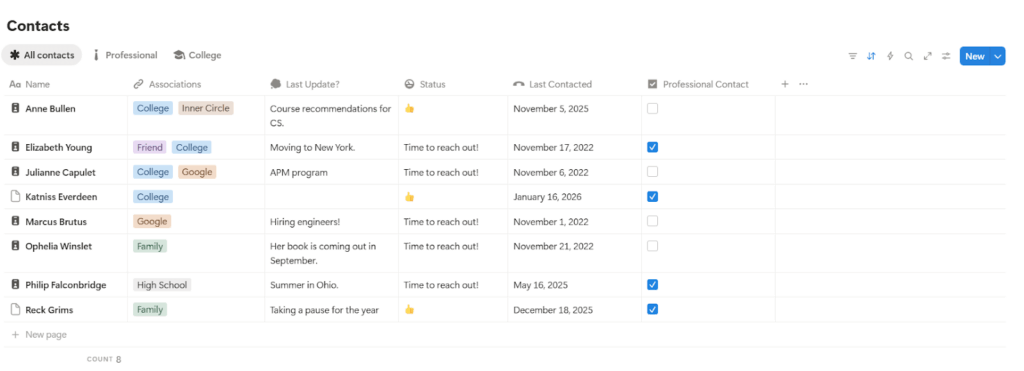
Notion’s Personal CRM is designed to help you keep relationships from going cold, whether those relationships are personal or professional. Because of that, the template houses just a single database: Contacts.
You can add contacts, note how you know them (family, friend, or college, for example), and record the latest updates or interactions with them.
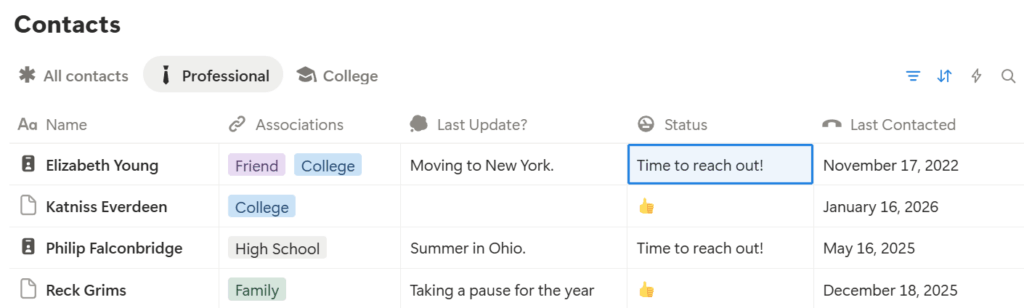
What stands out the most about this Notion template is its reminder to reach out. It comes equipped with a custom formula that shows “Time to reach out!” when you haven’t interacted with a contact in a certain period of time (which you can adjust).
Main Highlights of This Notion CRM Template:
- It’s completely free. There’s no need to submit any email address or go through any extra steps if you want to access this Notion template.
- Interface is lean. The whole system is built on a single page, with very few tabs and a minimal set of functions.
- Requires little data entry. There are only a few fields to fill when creating a contact. Even if you’re looking to add more valuable data, you still won’t have much to fill in manually.
- Works for both personal and business use. This CRM template comes with different tabs for managing different types of contacts.
- Reminds you to reconnect. This Notion CRM template comes with a custom formula that alerts you when you haven’t interacted with a contact within a set period of time.
- It lacks follow-up tracking. Although the template lets you know when to reconnect, it does not allow you to schedule follow-up activities that you’d like to carry out with each contact.
- Stores very basic data. By default, this Notion CRM stores very basic data like the contact’s name, connection, and last update. To record more valuable data (i.e, family members, likes, gift ideas) about a contact, you’ll need to use another template dubbed “New Person”.
- It lacks sales functionalities. This Notion CRM has no deal or pipeline management functionality. It also doesn’t come equipped with any reporting, forecasting, or insights functionality for sales.
- There is no dashboard. This Notion template does not include any dashboard or visual aid that summarizes your CRM system.
- Limited to one user. As the name suggests, this really is your personal CRM template. There’s no field for assigning contacts to another user. Neither are there any teamwork nor collaboration functionalities.
7. Sales CRM Board by FocusWhale
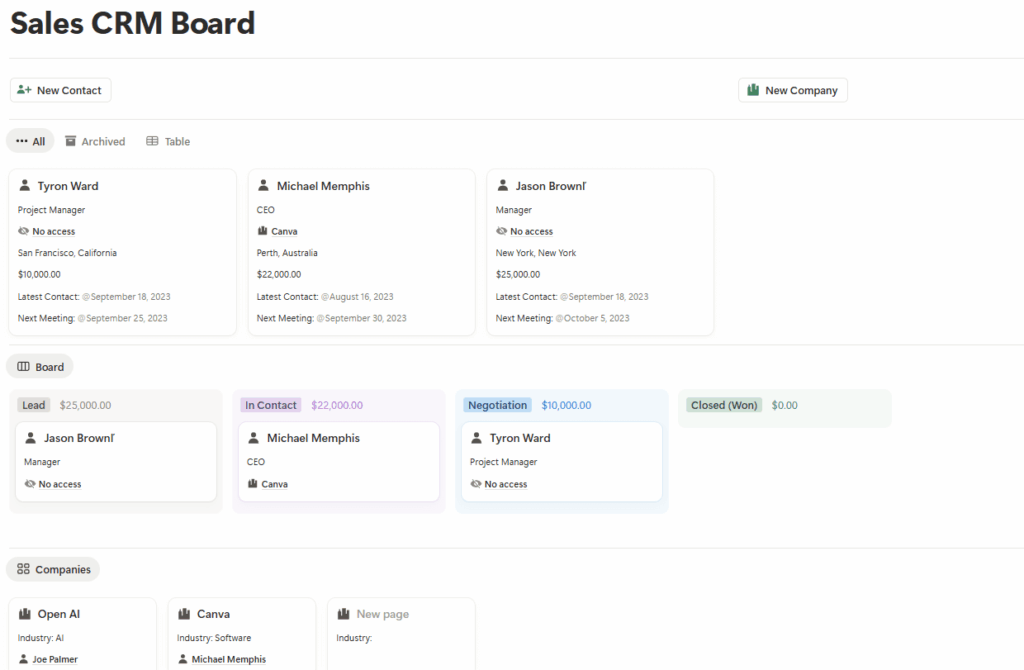
The Sales CRM Board by FocusWhale gives you the basic tools you need to manage your sales process. It includes a contacts database, a companies database, and a simple sales pipeline.
The Contacts database lets you view and update each person’s details, along with sales information such as potential value and their current stage in the process. You also get fields for noting the most recent interaction and the next meeting date.
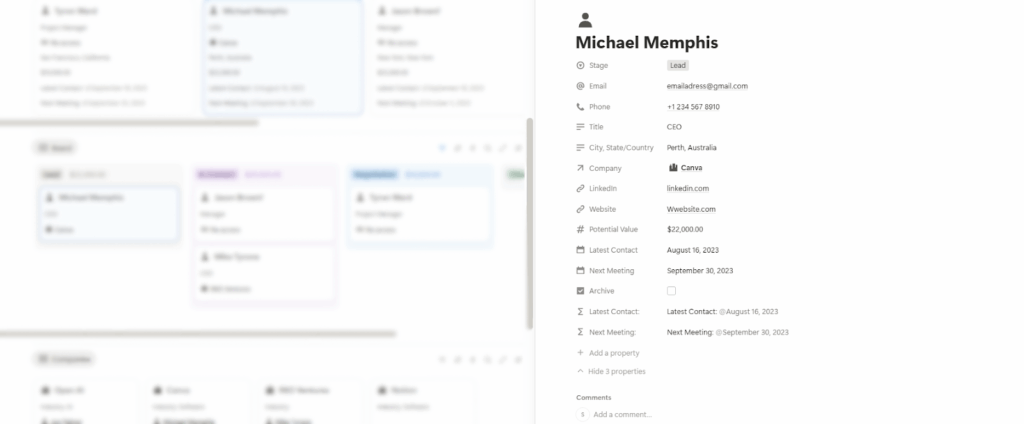
The sales pipeline is set up as a board for contacts, with each column representing a stage in the sales cycle. You can move contacts forward by dragging and dropping them into the next stage.
Main Highlights of This Notion CRM Template:
- There is no preview. You can’t get a good look at the CRM template before deciding to use it.
- It is gated. You must provide your email address to access this Notion template.
- The follow-up system is limited. You can set a date for your next interaction, but you cannot specify what action you need to take, which can leave you guessing about the next step to take.
- No dashboard. This Notion template doesn’t have a dashboard for getting sales insights and visualizing your sales performance.
- Email functionality is poor. There is no button to send emails directly from inside the CRM template.
- Deal management is missing. There is no dedicated space for managing sales opportunities, which makes it less suitable for businesses that rely on formal deal tracking. Instead, the template organizes leads on a Kanban board.
- It has a clunky interface. All three databases are placed together on a single page, so you’ll have to constantly scroll up and down to find the information you need to work. And as your database grows, the system becomes more clunky and, in the end, harder to manage.
Why Use a Free Notion CRM Template?
Most people turn to Notion for a CRM because it is free.
Traditional CRM software charges you per user every month, which adds up quickly for a small business. With Notion, you can build your own CRM system for free. And if you do not want to create one from scratch, there are hundreds of ready-made CRM templates that you can copy at no cost.
Ease of use is another major reason why people opt for Notion CRM templates. Notion feels familiar and is very simple to work with if it’s been a big part of your everyday workflow.
Notion also works well as a starting point. If you’re just getting used to the idea of a CRM, a Notion template helps you understand the basics and what to expect from the real thing.
And then, there’s the flexibility. If you enjoy DIY projects, you can customize a Notion CRM to match the way your small business works and even reshape it over time.
Drawbacks of Notion CRMs
Its benefits aside, using a Notion CRM template does have certain limitations.
The first is that Notion was never designed as a CRM system in the first place. As such, some important CRM features just aren’t possible to recreate inside it.
To be specific, you cannot run email sequences or set up marketing automations as you would in a traditional CRM for small business. Even basic things like integrations and email sync are very limited.
Scaling is another problem. A Notion CRM template works great when you have a small number of contacts or deals. But as your small business and database grow, you’ll start to have more records to manage inside the same old Notion template. This makes the system slower, cluttered, and harder to maintain.
Even collaboration isn’t so smooth. In Notion, everyone works inside the same shared template. Over time, it becomes easy to overwrite work done by another team member or accidentally duplicate contacts.
Moreover, there’s a risk of over-customizing. Since Notion is flexible, it is easy to spend more time building and tweaking your CRM system than actually using it to sell and talk to customers.
Which is the Best Notion CRM Template?
The best Notion template for customer relationship management (CRM) should be free, simple to use, built around the features you actually need, and capable of helping you follow up with contacts and close more sales.
Based on all of those requirements, the strongest option is the action-focused Notion CRM template.
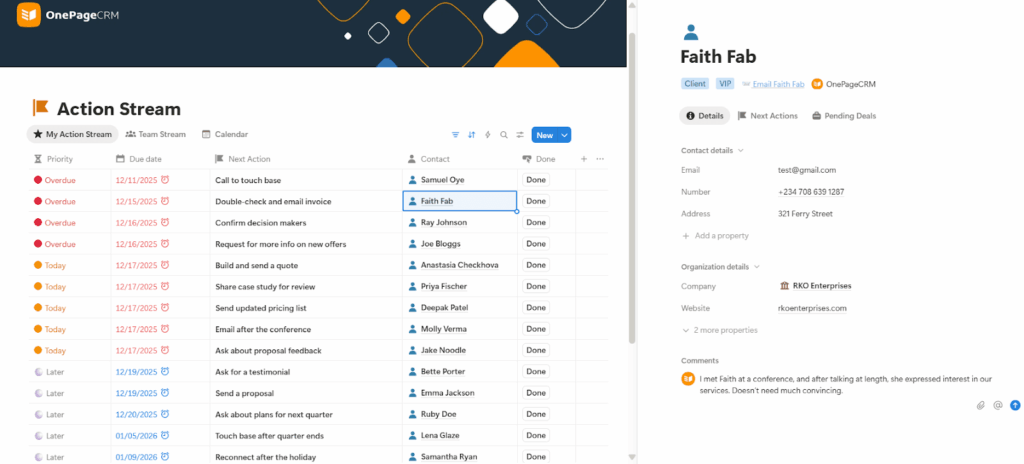
It makes it super easy to track leads and follow up with each contact, which is what builds stronger relationships and leads to more sales. It also organizes your next steps by due date, so you always know who needs attention first.
On top of that, it lets you send emails with a click. Get the free Notion CRM template today.

Samuel Oyebode

More than just a writer, Samuel is a communications expert. He understands how confusing and overwhelming SaaS products can be. That's why he's spent 6+ years helping SaaS brands deliver simple, actionable content that makes their products easy to understand.



