Top 7 Free Notion CRM Templates
Samuel Oyebode
January 22, 2026
21 min read


When you’re running a small business, a simple customer relationship management (CRM) tool is the best way to nurture connections and grow sales. But there’s a problem.
There are so many options out there that it takes ages to try them all. In many cases, a small business doesn’t have time for that.
That’s why we thoroughly tested 17 tools to help you find the right small business CRM.
To make things fair, every CRM is compared across the exact same criteria that we deem relevant for small businesses.
Below, we cover some of the best small business CRM software on the market.
However, if you prefer not to read through a slew of research findings, screenshots, and comparisons, here’s a summary table of the best small business CRM tools reviewed in this post.
This table includes their starting price (the lowest paid annual plan per user/month) and how many of the core CRM features they offer as per the criteria above (including any type of human-assisted Customer support):
| CRM tool | Starting price | Core features |
|---|---|---|
| OnePageCRM | $9.95 | 11/12 |
| Agile CRM | $9.99 | 10/12 |
| Nimble CRM | $24.9 | 10/12 |
| Salesforce Starter | $25 | 10/12 |
| Breakcold | $29 | 10/12 |
| Bigin CRM | $7 | 8/12 |
| Freshsales CRM | $9 | 8/12 |
| Zoho CRM | $14 | 8/12 |
| Salesmate CRM | $23 | 8/12 |
| Pipedrive | $14 | 7/12 |
| Capsule CRM | $18 | 7/12 |
| Folk CRM | $20 | 7/12 |
| Pipeline CRM | $25 | 7/12 |
| Insightly CRM | $29 | 7/12 |
| HubSpot | $15 | 6/12 |
| Monday CRM | $36 | 5/12 |
| Less Annoying CRM | $15 | 4/12 |
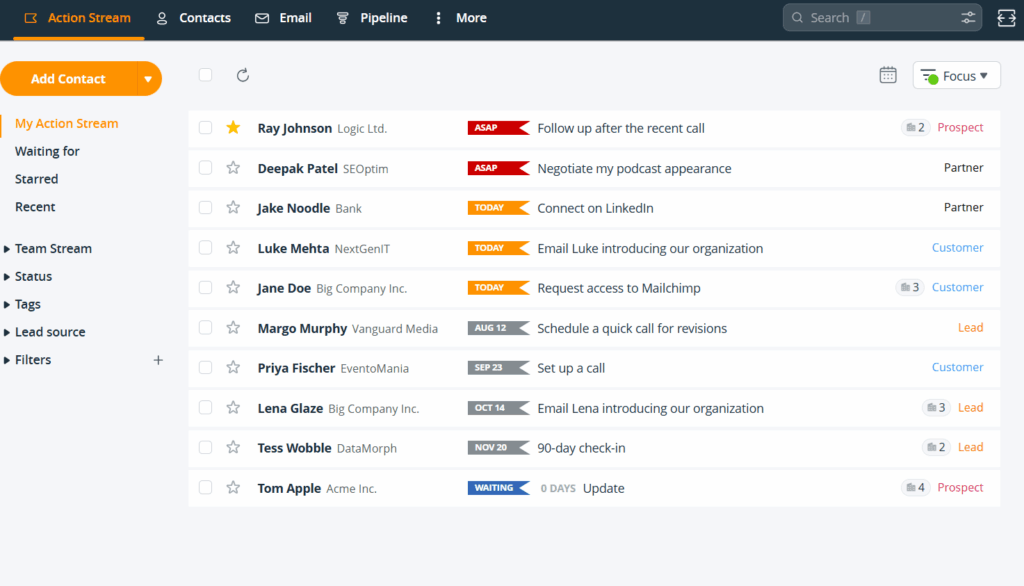
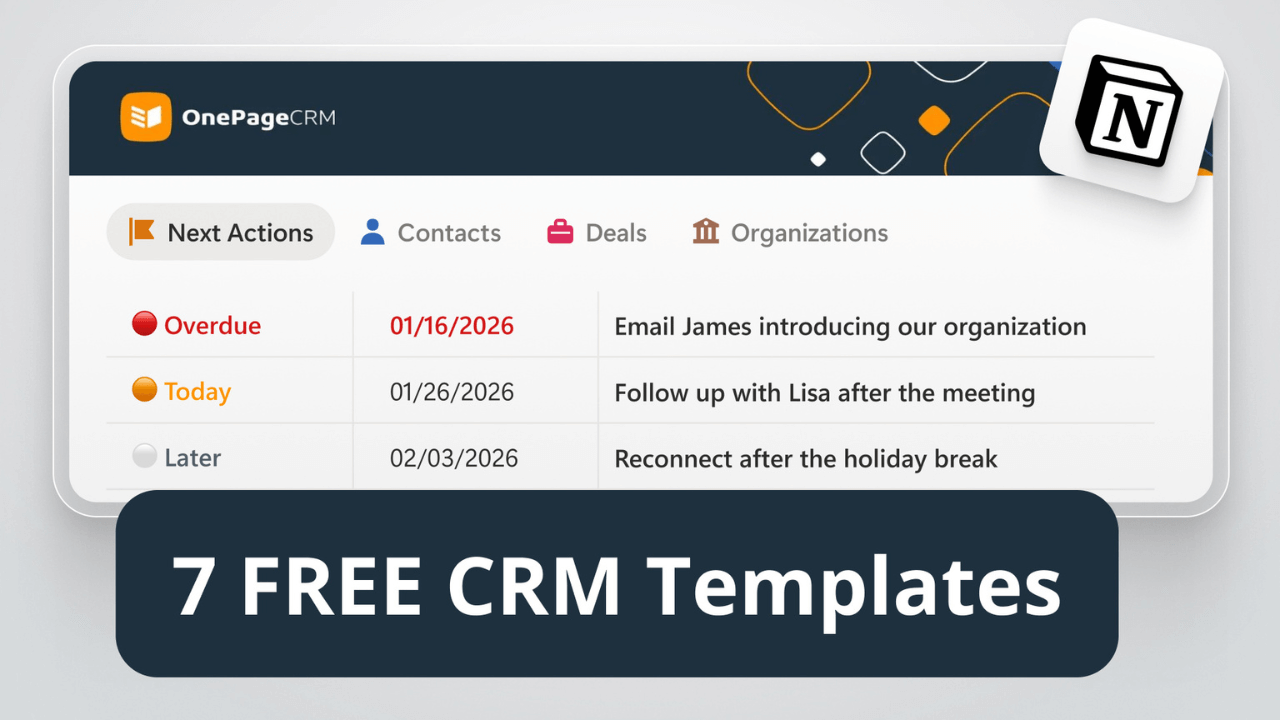
OnePageCRM is Best for: Small businesses & salespeople that never want to miss a follow-up.
As the most intuitive CRM on the market, OnePageCRM lets you manage your entire sales cycle from a single page. With its follow-up reminders, this CRM helps fast-moving small businesses and sales teams consistently carry out sales actions, stay in touch with leads, close deals, and deliver client projects.
OnePageCRM has a 4.7/5 rating on G2. However, if you need sophisticated analytics or comprehensive marketing automations, this CRM tool might not be the right fit for you.
OnePageCRM Pros:
OnePageCRM Cons:
Here’s what’s included in OnePageCRM’s lowest plan:
| OnePageCRM | |
| CORE FEATURES | |
| Mobile app | ✅ |
| Contact management | ✅ |
| Follow-up tracking | ✅ |
| Pipelines | ✅ One |
| Duplicate management | ✅ Only find & merge |
| CENTRALIZATION TOOLS | |
| Centralized workspace | ✅ |
| Dashboard | ✅ Simple analytics |
| COMMUNICATION TOOLS | |
| Two-way email sync | ✅ Gmail and Outlook |
| SIMPLE AUTOMATION | |
| CRM workflows | ✅ |
| Sales email sequences | ✅ |
| Browser extension for auto lead capture | ✅ Email, social media, websites, etc. |
| CUSTOMER SUPPORT | |
| Email support | ✅ Free trial & paid plans |
| Live chat | ✅ Free trial & paid plans |
| Phone support | ✅ Free trial & paid plans |
| PRICING | |
| Price | $9.95 per user/month |
| Free trial | ✅ 21 days |
| Free plan | ❌ |
| Next plan | ✅ Affordable ($19.95 per user/month) |
Frequently Asked Questions About OnePageCRM:
Yes. OnePageCRM is the simplest CRM on the market. The layout looks and feels like an email inbox, so it’s familiar, clean, and easy to figure out. There’s practically no learning curve, even for complete beginners.
Yes. OnePageCRM comes with great sales tools, but you can turn them off and use the CRM strictly for managing contacts, follow-ups, and client relationships.
OnePageCRM is one of the best CRM software options a small business can pick. Small business pricing, only the features you’ll actually use, a dead-simple interface, and you can be up and running in minutes.
Not at all. Plans start at $9.95 per user/month, making it one of the most affordable CRMs available. Moreover, there are no hidden fees or gated features.
Yes, you can. OnePageCRM works really well as a personal CRM for anyone who wants to stay in touch with friends, family, former colleagues, or professional contacts.
The follow-up tasks, stay-in-touch reminders, and color-coding (to show urgency) all make it easier to keep relationships from going cold.
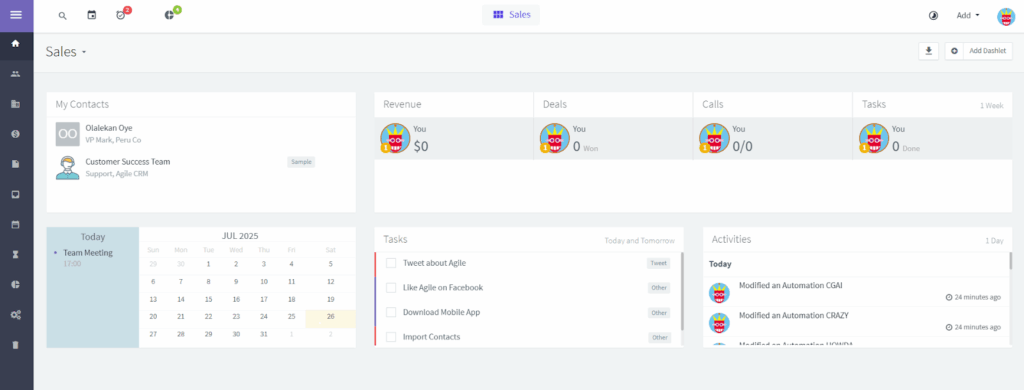
Agile CRM is Best for: Small teams needing marketing, sales, and support in one place.
Agile CRM is one of the most feature-rich CRMs for small and medium-sized businesses with limited budgets. Both the free and Starter plans offer tools for managing not just contacts, but also sales, marketing, and customer service. Makes you wonder why its rating on G2 isn’t higher than 4.0/5.
However, if you’re going to need a lot of automations and integrations on a small budget, Agile CRM is not for you. Likewise, if you want a lean tool that doesn’t take much time and brain cells to learn, this one’s not for you.
Agile CRM Pros:
Agile CRM Cons:
Here’s what’s included in Agile CRM’s lowest plan:
| Agile CRM | |
| CORE FEATURES | |
| Mobile app | ✅ |
| Contact management | ✅ |
| Follow-up tracking | ❌ |
| Pipelines | ✅ |
| Duplicate management | ✅ |
| CENTRALIZATION TOOLS | |
| Centralized workspace | ❌ |
| Dashboard | ✅ |
| COMMUNICATION TOOLS | |
| Two-way email sync | ✅ |
| SIMPLE AUTOMATION | |
| CRM workflows | ✅ |
| Sales email sequences | ✅ |
| Browser extension for auto lead capture | ✅ Gmail, LinkedIn, Facebook, etc. |
| CUSTOMER SUPPORT | |
| Email support | ✅ Weekdays only |
| Live chat | ❌ |
| Phone support | ✅ Weekdays only |
| PRICING | |
| Price | $9.99 per user/month |
| Free trial | ❌ |
| Free plan | ✅ Up to 10 users |
| Next paid plan | ❌ Expensive ($39.99 per user/month) |
Frequently Asked Questions About Agile CRM:
The free plan covers up to 10 users and includes basic contact management, deals, and one pipeline. However, email sync and most integrations require a paid upgrade.
Kind of. Agile CRM starts off affordably, with an entry plan of $9.99 per user/month. However, the next tier jumps to $39.99, so plan carefully around what features you’ll need long-term.
Not really. With three separate workspaces for sales, marketing, and service—each with many tabs—Agile CRM’s learning curve is steep compared to simpler CRMs.
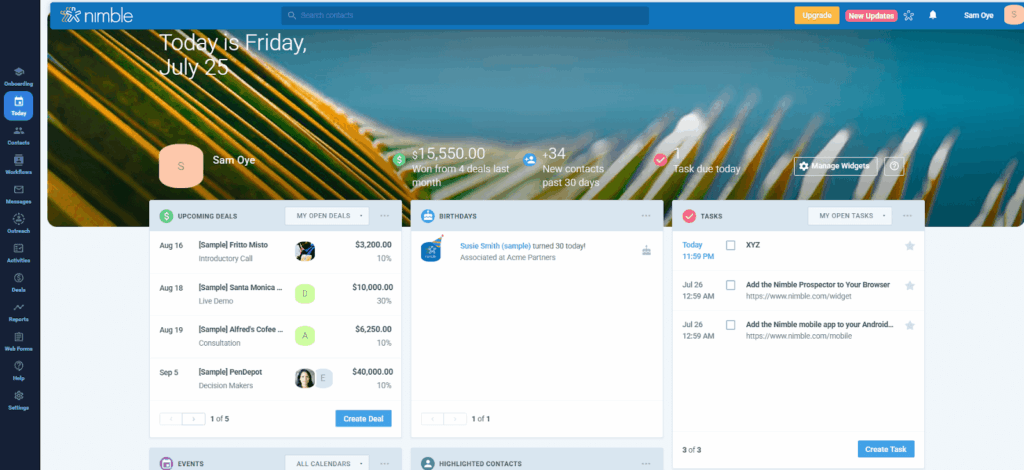
Nimble CRM is Best for: Small businesses that sell by networking on social media.
As a social CRM, Nimble focuses on helping small businesses and entrepreneurs build better relationships with their customers. It pulls contacts and messages directly from social media accounts, automatically enriches contact data, and puts all interactions in one place.
Nimble has a 4.5/5 rating on G2. However, in addition to being more pricey than many other CRMs, Nimble limits the usage of features — automations, enrichment, sequences, etc. — and puts up a paywall for more access.
Nimble CRM Pros:
Nimble CRM Cons:
Here’s what’s included in Nimble CRM’s lowest plan:
| Nimble CRM | |
| CORE FEATURES | |
| Mobile app | ✅ |
| Contact management | ✅ |
| Follow-up tracking | ❌ Only reminders |
| Pipelines | ✅ Unlimited |
| Duplicate management | ✅ |
| CENTRALIZATION TOOLS | |
| Centralized workspace | ❌ No contact creation |
| Dashboard | ✅ |
| COMMUNICATION TOOLS | |
| Two-way email sync | ✅ |
| SIMPLE AUTOMATION | |
| CRM workflows | ✅ 25 per month |
| Sales email sequences | ✅ 1,000 per user/month |
| Browser extension for auto lead capture | ✅ LinkedIn, Facebook, X, and other websites |
| CUSTOMER SUPPORT | |
| Email support | ✅ |
| Live chat | ✅ |
| Phone support | ✅ 1:1 screenshare (15 minutes) |
| PRICING | |
| Price | $24.9 per seat/month |
| Free trial | ✅ 14 days |
| Free plan | ❌ |
| Next paid plan | ❌ None |
Frequently Asked Questions About Nimble CRM:
It can be. Nimble CRM costs $24.90 per seat/month, but with usage caps on features like data enrichment, automation, and sequences, you may end up paying more for add-ons.
Not really. Nimble CRM’s interface has quite a few subtabs, which makes it feel more cluttered and harder to use than simpler, more minimal CRMs.
Only for a 15-minute screen share. Day-to-day support is email and live chat only, with no weekend availability.
Learn more about Salesforce Starter ➤
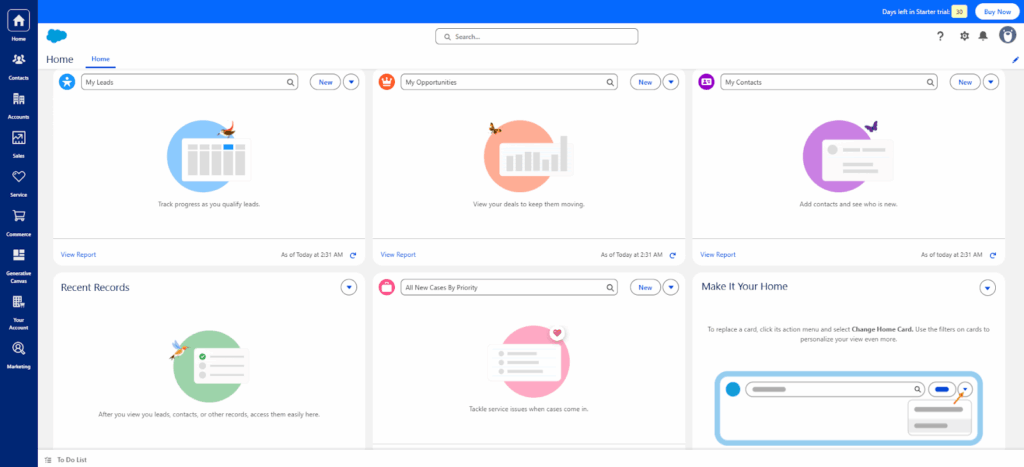
Salesforce Starter is Best for: Growing businesses that need tons of customizations and integrations.
A product of Salesforce, the Starter Suite was designed to serve small businesses. This CRM features tools to help you manage sales opportunities, run marketing campaigns, handle customer tickets, build an e-commerce storefront, and house your team’s Slack communications.
Salesforce has a 4.5/5 rating on G2, but with so many functionalities, the small business CRM has a steep learning curve. It’s also more expensive than most of its counterparts.
Salesforce Starter Pros:
Salesforce Starter Cons:
Here’s what’s included in Salesforce Starter’s lowest plan:
| Salesforce Starter | |
| CORE FEATURES | |
| Mobile app | ✅ |
| Contact management | ✅ |
| Follow-up tracking | ❌ |
| Pipelines | ✅ Unlimited |
| Duplicate management | ✅ |
| CENTRALIZATION TOOLS | |
| Centralized workspace | ✅ |
| Dashboard | ✅ |
| COMMUNICATION TOOLS | |
| Two-way email sync | ✅ Gmail and Outlook |
| SIMPLE AUTOMATION | |
| CRM workflows | ❌ |
| Sales email sequences | ✅ With Flow Builder |
| Browser extension for auto lead capture | ✅ Only for creating company records, not individual contacts |
| CUSTOMER SUPPORT | |
| Email support | ✅ Support tickets |
| Live chat | ✅ |
| Phone support | ✅ |
| PRICING | |
| Price | $25 per user/month |
| Free trial | ✅ 30 days |
| Free plan | ❌ |
| Next paid plan | ❌ Expensive ($100 per user/month) |
Frequently Asked Questions About Salesforce Starter:
Not particularly. The interface has many menus and options. Most small teams and owners need time—and possibly help—to configure or use it for their business.
No. Workflow automation requires upgrading to the $100/month Pro plan. The Starter plan focuses on contact, pipeline, and email management.
Not really. First off, at $25 per user/month, it already costs more than most small business CRMs. Moreover, the next tier is $100, and priority support adds 30% on top of your license fees.
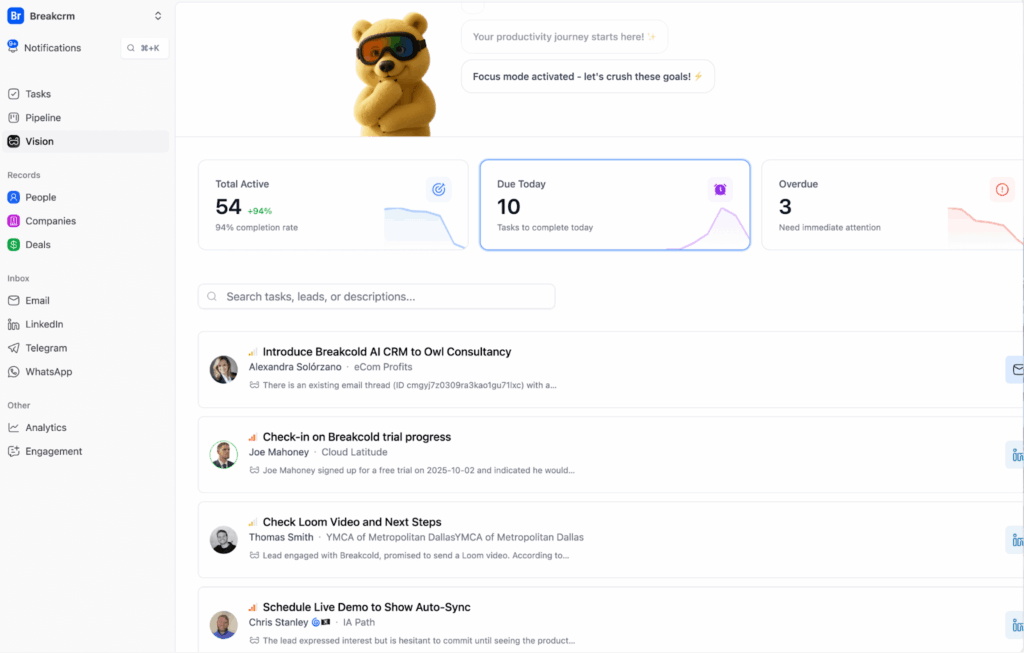
Breakcold is Best for: Teams that want AI to automate their sales pipeline.
Breakcold is an AI-native sales CRM built to eliminate admin work so you can focus on selling. Designed for startups, agencies, and modern sales teams, Breakcold removes the friction that slows deal velocity by automating repetitive tasks across your entire sales workflow.
Powered by Breakcold Vision (its next-generation AI), the platform can automatically move leads through your funnel, generate daily actions, and centralize conversations across Email, LinkedIn, WhatsApp, Telegram, and calls. No wonder the CRM has a 4.7/5 rating on G2.
Breakcold Pros:
Breakcold Cons:
Here’s what’s included in Breakcold’s lowest plan:
| Breakcold | |
| CORE FEATURES | |
| Mobile app | ❌ |
| Contact management | ✅ |
| Follow-up tracking | ✅ |
| Pipelines | ✅ Unlimited |
| Duplicate management | ✅ Automated |
| CENTRALIZATION TOOLS | |
| Centralized workspace | ✅ |
| Dashboard | ✅ |
| COMMUNICATION TOOLS | |
| Two-way email sync | ✅ |
| SIMPLE AUTOMATION | |
| CRM workflows | ✅ |
| Sales email sequences | ❌ |
| Browser extension for auto lead capture | ✅ LinkedIn, Sales Navigator, Instagram, Gmail, YouTube, X (Twitter), Facebook, and WhatsApp. |
| CUSTOMER SUPPORT | |
| Email support | ✅ |
| Live chat | ✅ |
| Phone support | ✅ |
| PRICING | |
| Price | $29 per seat/month |
| Free trial | ✅ 14 days |
| Free plan | ❌ |
| Next paid plan | $59 per seat/month |
Frequently Asked Questions Breakcold:
Yes. Breakcold’s plans start at $29 per seat/month, which is already more than the average cost of a small business CRM. Moreover, the next tier is $59, which is a lot more expensive than other CRMs of equal or greater value.
Yes. Breakcold is amongst the quickest CRMs to get running. The setup process is lightweight, and the interface is intuitive.
No. Breakcold is desktop-only for now. If you need to manage contacts while on the go, you’ll need to opt for a different tool.
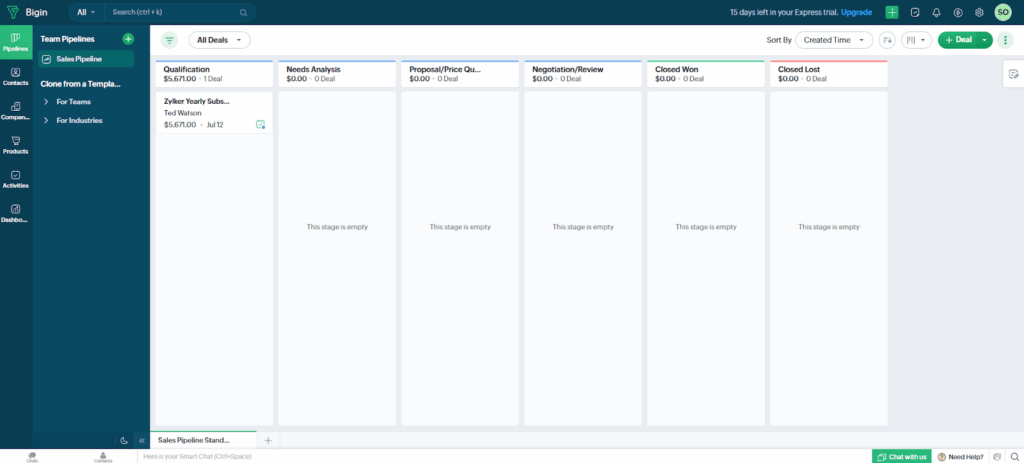
Bigin CRM is Best for: Teams who need a cheap, no-fuss deal management tool.
Created by Zoho CRM, Bigin CRM is a software designed for small businesses, lean teams, and solopreneurs. It’s a simpler, more affordable, and quicker-to-learn alternative to the robust and full-featured Zoho CRM. No wonder it has an average rating of 4.6/5 on G2.
As a pipeline-centric CRM, Bigin focuses more on managing business deals. That means it might not be the best fit if you’re looking for a small business CRM that prioritizes contacts (or leads) and tracks tasks.
Bigin CRM Pros:
Bigin CRM Cons:
Here’s what’s included in Bigin CRM’s lowest plan:
| Bigin CRM | |
| CORE FEATURES | |
| Mobile app | ✅ |
| Contact management | ✅ |
| Follow-up tracking | ❌ Only task management |
| Pipelines | ✅ Three |
| Duplicate management | ✅ |
| CENTRALIZATION TOOLS | |
| Centralized workspace | ❌ |
| Dashboard | ✅ |
| COMMUNICATION TOOLS | |
| Two-way email sync | ✅ |
| SIMPLE AUTOMATION | |
| CRM workflows | ✅ Instant, not scheduled |
| Sales email sequences | ❌ |
| Browser extension for auto lead capture | ❌ Limited to Gmail |
| CUSTOMER SUPPORT | |
| Email support | ✅ |
| Live chat | ✅ |
| Phone support | ✅ |
| PRICING | |
| Price | $7 per user/month (if paid annually) |
| Free trial | ✅ 15 days |
| Free plan | ✅ Max. 1 user |
| Next paid plan | ✅ Affordable ($12 per user/month) |
Frequently Asked Questions About Bigin:
Yes. Bigin is Zoho’s stripped-down CRM. It’s simpler, cheaper, and built specifically for solopreneurs and lean teams that fancy Zoho CRM, but don’t need its full feature set.
For most people, it is. Bigin CRM has a user-friendly interface, simple features, and offers free training and onboarding resources to help you get started quickly.
Yes. Bigin CRM has a free plan that supports one user and includes basic pipeline and contact management features. However, email sync, which most small businesses need, isn’t included in this free plan.
Learn more about Freshsales CRM ➤
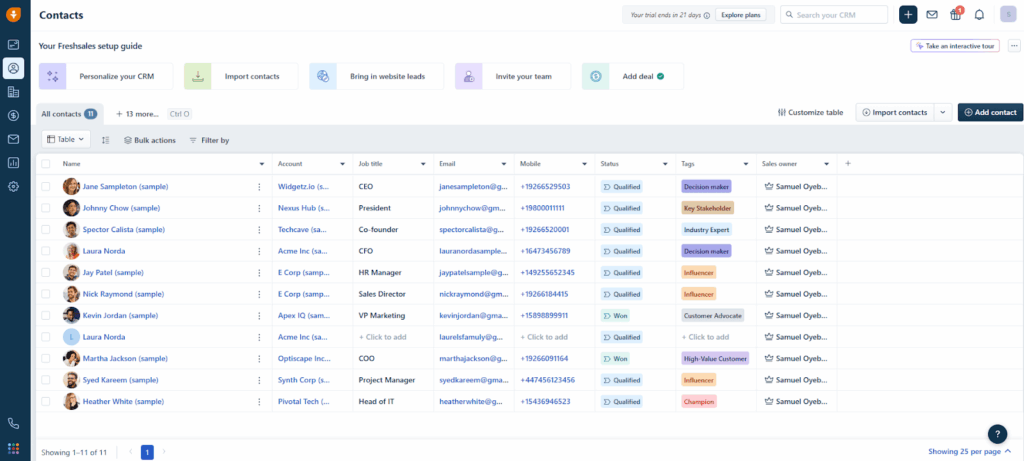
Freshsales CRM is Best for: Small teams wanting AI assistance and multi-channel messaging.
Freshsales CRM gives small businesses just the right amount of tools they need to manage customer relationships, even on the lowest plan. Beyond the essentials, this CRM has a built-in AI copilot (Freddy AI) and comes with up to 8 communication channels. It also has an average rating of 4.5/5 on G2.
However, Freshsales CRM isn’t the best at tracking follow-ups. If you need a CRM with dedicated modules for constantly following up with leads, this software might not be the best fit.
Freshsales CRM Pros:
Freshsales CRM Cons:
Here’s what’s included in Freshsales CRM’s lowest plan:
| Freshsales CRM | |
| CORE FEATURES | |
| Mobile app | ✅ |
| Contact management | ✅ |
| Follow-up tracking | ❌ Only activity management |
| Pipelines | ✅ One |
| Duplicate management | ❌ |
| CENTRALIZATION TOOLS | |
| Centralized workspace | ✅ But doesn’t track follow-ups |
| Dashboard | ✅ |
| COMMUNICATION TOOLS | |
| Two-way email sync | ✅ |
| SIMPLE AUTOMATION | |
| CRM workflows | ✅ |
| Sales email sequences | ❌ |
| Browser extension for auto lead capture | ❌ |
| CUSTOMER SUPPORT | |
| Email support | ✅ Weekdays only |
| Live chat | ✅ Weekdays only |
| Phone support | ✅ Weekdays only |
| PRICING | |
| Price | $9 per user/month |
| Free trial | ✅ 21 days |
| Free plan | ✅ Max. 3 users |
| Next paid plan | ❌ Expensive ($39 per user/month) |
Frequently Asked Questions About Freshsales:
Yes. The free plan supports up to 3 users and includes basic contact management and a Kanban pipeline view.
Yes. Freshsales has built-in phone, email, chat, SMS, and other channels, giving you up to 8 ways to communicate with contacts from inside the CRM.
Despite its clean interface, Freshsales can still be mentally draining to work with. Since Freshsales was built by Freshworks, an enterprise-first company, its UI is data-heavy and can be overwhelming for solopreneurs and small teams without much CRM experience.
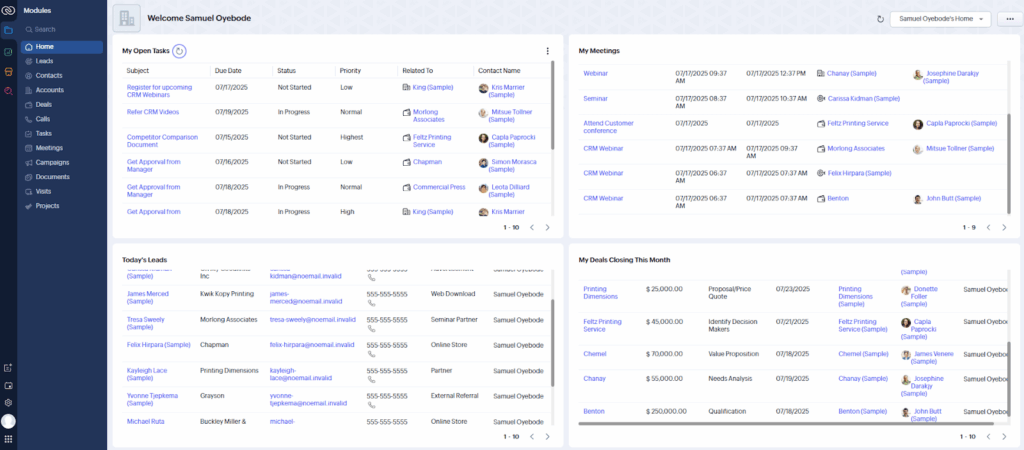
Zoho CRM is Best for: Experienced teams that need a powerful, all-in-one CRM platform.
Zoho CRM is a 360º CRM platform for businesses in all industries and verticals. As one of the most comprehensive CRMs on the market, it offers a wide range of advanced features, integrations, and customization options. That may be why it has an average rating of 4.1/5 on G2.
However, being so robust by nature, Zoho CRM is not ideal for small businesses or sales professionals who only need an agile and fast tool with the core CRM features.
Zoho CRM Pros:
Zoho CRM Cons:
Here’s what’s included in Zoho CRM’s lowest plan:
| Zoho CRM | |
| CORE FEATURES | |
| Mobile app | ✅ |
| Contact management | ✅ |
| Follow-up tracking | ❌ Only task management |
| Pipelines | ✅ Five |
| Duplicate management | ✅ |
| CENTRALIZATION TOOLS | |
| Centralized workspace | ❌ |
| Dashboard | ✅ |
| COMMUNICATION TOOLS | |
| Two-way email sync | ❌ Only email send and logging |
| SIMPLE AUTOMATION | |
| CRM workflows | ✅ |
| Sales email sequences | ✅ |
| Browser extension for auto lead capture | ❌ |
| CUSTOMER SUPPORT | |
| Email support | ✅ Limited |
| Live chat | ✅ Limited |
| Phone support | ✅ Limited |
| PRICING | |
| Price | $14 per user/month |
| Free trial | ✅ 15 days |
| Free plan | ✅ Max. 3 users |
| Next paid plan | ✅ Affordable ($23 per user/month) |
Frequently Asked Questions About Zoho CRM:
Yes, Zoho CRM can be overwhelming, especially if you’re new to CRMs. The interface has many menus and modules, and the learning curve is steeper than that of simpler tools.
Yes. The free edition supports up to 3 users and includes basic sales and contact management features, which are often enough for very small teams.
Yes. Zoho CRM integrates with over 1,000 business apps, and Zoho’s own ecosystem offers dozens of complementary products for marketing, finance, and support.
Learn more about Salesmate CRM ➤
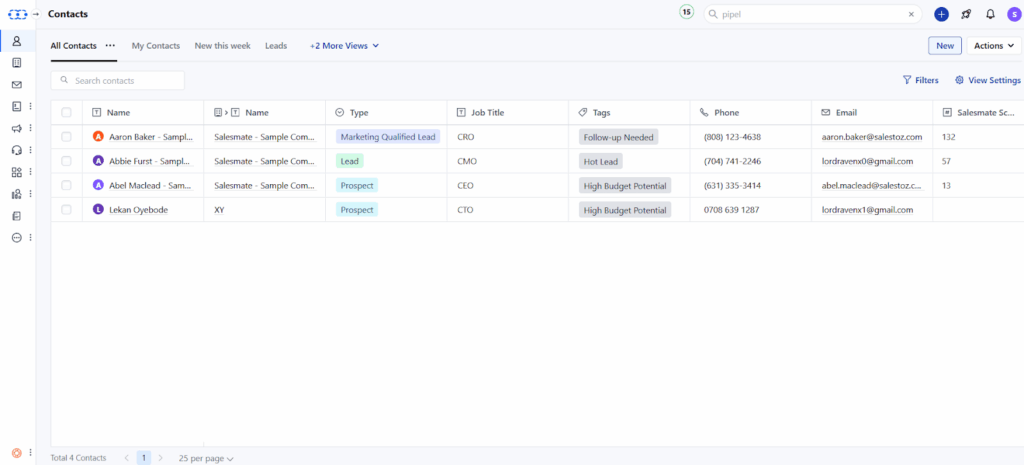
Salesmate is Best for: Sales teams that close deals over phone and text.
Salesmate CRM focuses on the core features of a small business CRM, but also includes tools for marketing and customer success. The CRM is popular for its advanced automation and AI (Sandy), both of which allow you to automate the entire customer journey. It has a 4.6/5 rating on G2.
That said, Salesmate CRM’s automation functionality is so elaborate that many users might find it difficult and time-consuming to learn. It’s also not the best tool if you’re looking for all the CRM basics on a $10 – $15 budget.
Salesmate CRM Pros:
Salesmate CRM Cons:
Here’s what’s included in Salesmate CRM’s lowest plan:
| Salesmate CRM | |
| CORE FEATURES | |
| Mobile app | ✅ |
| Contact management | ✅ |
| Follow-up tracking | ❌ Only task management |
| Pipelines | ✅ Unlimited |
| Duplicate management | ✅ |
| CENTRALIZATION TOOLS | |
| Centralized workspace | ❌ |
| Dashboard | ✅ |
| COMMUNICATION TOOLS | |
| Two-way email sync | ✅ |
| SIMPLE AUTOMATION | |
| CRM workflows | ✅ |
| Sales email sequences | ❌ |
| Browser extension for auto lead capture | ❌ Limited to Gmail |
| CUSTOMER SUPPORT | |
| Email support | ✅ Weekdays only |
| Live chat | ✅ Weekdays only |
| Phone support | ✅ Conferencing with screen share + audio |
| PRICING | |
| Price | $23 per user/month |
| Free trial | ✅ 15 days |
| Free plan | ❌ |
| Next paid plan | ❌ Expensive ($39 per user/month) |
Frequently Asked Questions About Salesmate:
Yes, you can. Salesmate has built-in voice calling and texting, so you can reach leads by phone or SMS without leaving the CRM.
Yes. Through its built-in AI assistant (dubbed Sandy), Salesmate can automate repetitive tasks, suggest actions, and streamline your sales workflow.
Not really. Although Salesmate has a clean design, it has too many tabs, modules, and features, which can make the learning curve steeper than the average CRM.
Learn more about Pipedrive CRM ➤
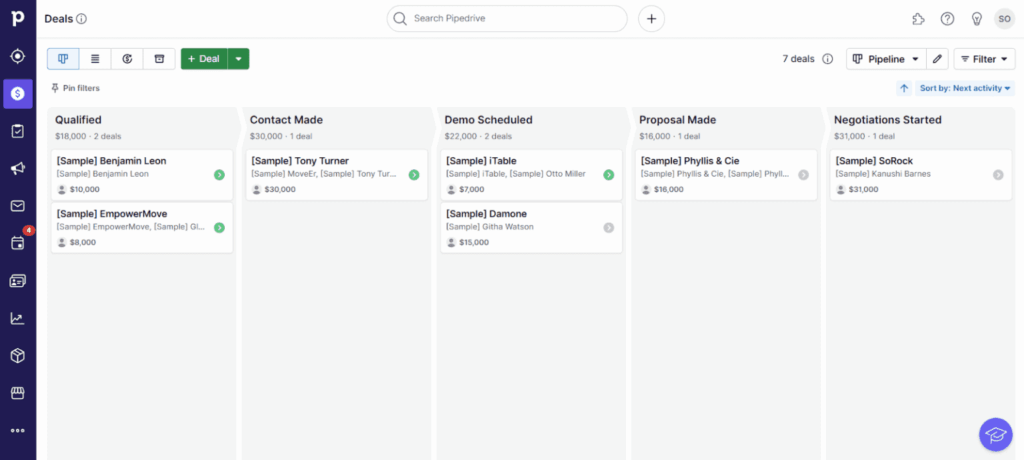
Pipedrive is Best for: Salespeople who want a visual pipeline to track every deal.
Pipedrive is a deal-focused CRM with an average customer rating of 4.3/5 on G2. It is a sales CRM designed to help sales professionals visualize sales cycles and close more deals.
If you’re looking for a small business CRM that’s not too hard to use and affordable, yet effective enough to improve your sales process, Pipedrive may be right for you. The same applies if you have a medium-sized company with sales-heavy processes.
Pipedrive Pros:
- The lowest pricing plan is affordable for small businesses.
- One of the few CRMs that lets you track follow-ups, not just tasks.
- Pipedrive has a mobile app for Android and iOS devices.
- All plans come with a free, personalized onboarding service.
Pipedrive Cons:
- Support is limited to chatbot and email support.
- No two-way email sync, which is a core feature of a small business CRM.
- You can’t automate your workflow or your sales outreach.
- Some features are buried under multiple tabs, so they’re hard to reach.
Here’s what’s included in Pipedrive’s lowest plan:
| Pipedrive | |
| CORE FEATURES | |
| Mobile app | ✅ |
| Contact management | ✅ |
| Follow-up tracking | ✅ |
| Pipelines | ✅ Unlimited |
| Duplicate management | ✅ |
| CENTRALIZATION TOOLS | |
| Centralized workspace | ❌ Can’t create new contacts or deals |
| Dashboard | ✅ |
| COMMUNICATION TOOLS | |
| Two-way email sync | ❌ |
| SIMPLE AUTOMATION | |
| CRM workflows | ❌ |
| Sales email sequences | ❌ |
| Browser extension for auto lead capture | ❌ |
| CUSTOMER SUPPORT | |
| Email support | ✅ |
| Live chat | ❌ |
| Phone support | ❌ |
| PRICING | |
| Price | $14 per seat/month |
| Free trial | ✅ 14 days |
| Free plan | ❌ |
| Next paid plan | ❌ Expensive ($39 per seat/month) |
Frequently Asked Questions About Pipedrive:
Not on the entry plan. Full email integration (or sync!) is only available from the costlier Advanced plan ($39/month), which is a notable problem for small businesses.
Only if you’re on the higher-tier subscription plans. In Pipedrive’s entry plan, customer support is limited to chatbot and email. There’s no live chat with a human or phone support.
Not very. The pipeline view is intuitive, but some features are buried under multiple tabs, which can make them harder to find and use. And because there are tons of features (some of which are more cumbersome than others), the learning curve is steeper than the usual CRM for small business.
Learn more about Capsule CRM ➤
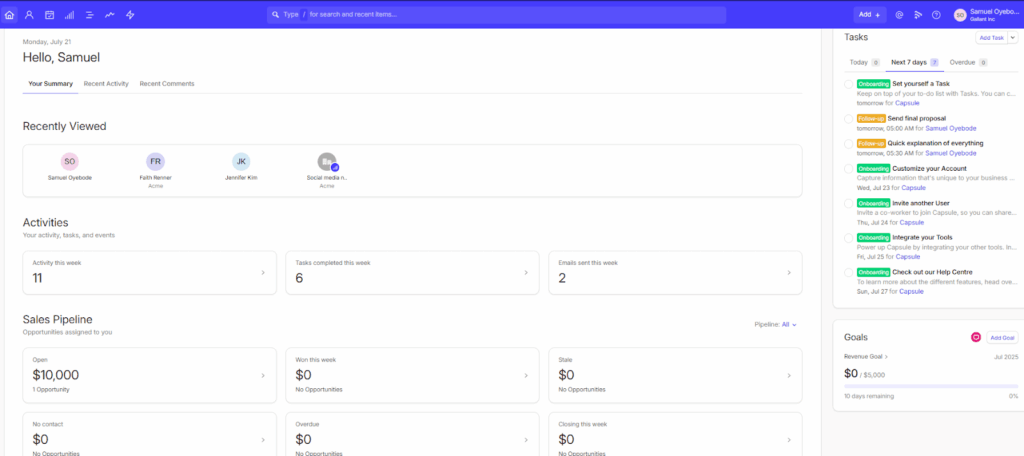
Capsule CRM is Best for: Field teams in need of a CRM that works offline.
Capsule CRM helps small businesses manage sales opportunities. In addition to contact and pipeline management, this software also features simple project management tools. It has an average rating of 4.5/5 on G2.
That being said, Capsule CRM doesn’t provide much customer support, has limited automation and reporting features, and offers between one to five pipelines on the lowest plans.
Capsule CRM’s Pros:
Capsule CRM’s Cons:
Here’s what’s included in Capsule CRM’s lowest plan:
| Capsule CRM | |
| CORE FEATURES | |
| Mobile app | ✅ |
| Contact management | ✅ |
| Follow-up tracking | ❌ Only task management |
| Pipelines | ✅ One |
| Duplicate management | ✅ |
| CENTRALIZATION TOOLS | |
| Centralized workspace | ❌ |
| Dashboard | ✅ |
| COMMUNICATION TOOLS | |
| Two-way email sync | ❌ |
| SIMPLE AUTOMATION | |
| CRM workflows | ❌ |
| Sales email sequences | ❌ |
| Browser extension for auto lead capture | ✅ LinkedIn, WhatsApp, Gmail, Outlook |
| CUSTOMER SUPPORT | |
| Email support | ✅ Weekdays only |
| Live chat | ❌️ |
| Phone support | ❌️ |
| PRICING | |
| Price | $18 per user/month |
| Free trial | ✅ 14 days |
| Free plan | ✅ (250 contacts max.) |
| Next paid plan | ❌ Expensive ($36 per user/month) |
Frequently Asked Questions About Capsule CRM:
Yes. Capsule’s mobile apps for iOS and Android can function offline, syncing your changes once you’re back online.
Yes. Capsule CRM has an intuitive interface with very few tabs to navigate. There aren’t that many buttons to click through, and since the CRM focuses on the basic features, the learning curve is minimal.
No, you can’t. None of the Capsule CRM plans include two-way email sync, which means you can’t receive emails directly inside the CRM.
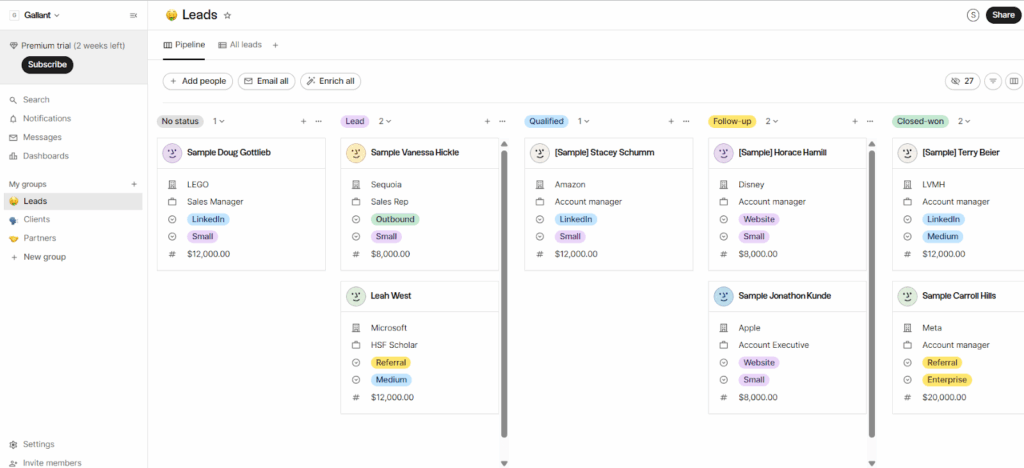
Folk CRM is Best for: Notion fans who want a flexible, minimalist CRM.
Folk CRM comes with the tools small businesses need for selling. It lets you capture leads directly from websites and features data enrichment and communication history for each lead. It also has reminders, notes, and drag-and-drop pipeline management.
This may be why it’s dubbed “the sales assistant you never had” and has an average rating of 4.5/5 on G2. That being said, Folk CRM falls short when you start needing deal management and automated workflows.
Folk CRM Pros:
Folk CRM Cons:
Here’s what’s included in Folk CRM’s lowest plan:
| Folk CRM | |
| CORE FEATURES | |
| Mobile app | ❌ Only for desktop |
| Contact management | ✅ |
| Follow-up tracking | ✅ Limited |
| Pipelines | ✅ Unlimited |
| Duplicate management | ✅ |
| CENTRALIZATION TOOLS | |
| Centralized workspace | ❌ |
| Dashboard | ❌ |
| COMMUNICATION TOOLS | |
| Two-way email sync | ✅ |
| SIMPLE AUTOMATION | |
| CRM workflows | ❌ |
| Sales email sequences | ❌ |
| Browser extension for auto lead capture | ✅ LinkedIn, WhatsApp, X, and other websites |
| CUSTOMER SUPPORT | |
| Email support | ❌️ |
| Live chat | ✅ |
| Phone support | ❌ |
| PRICING | |
| Price | $20 per user/month |
| Free trial | ✅ 14 days |
| Free plan | ❌ |
| Next paid plan | ❌ Expensive ($40 per user/month) |
Frequently Asked Questions About Folk:
Yes. Its interface closely resembles Notion, so if you’re comfortable with that layout, you’ll find Folk intuitive and easy to navigate.
Yes, especially if you’re familiar with Notion. Folk’s layout is intuitive, and the learning curve is shallow, though the lack of automation means you can’t avoid manual work.
Not on the base plan. Deal management—a feature many CRMs include for less—is only unlocked at the $40/month tier.
Learn more about Pipeline CRM ➤
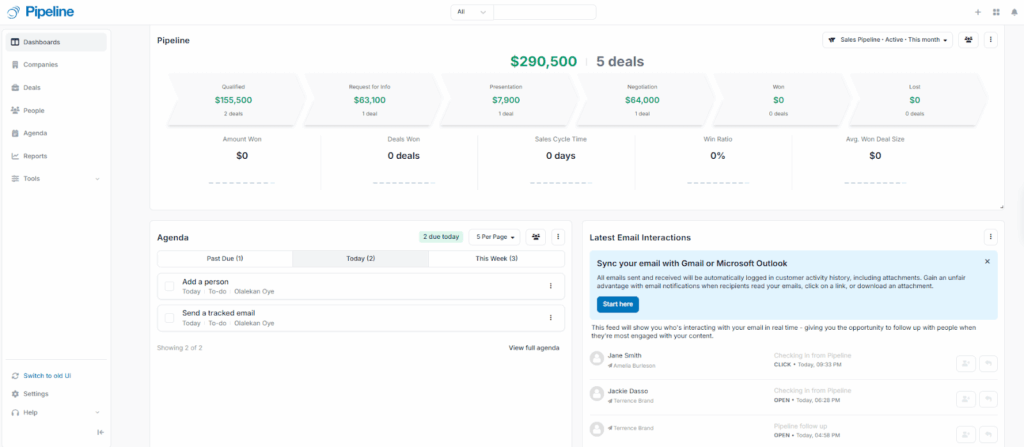
Pipeline CRM is Best for: SMBs focused on deals and sales pipelines.
Pipeline CRM was designed for small and medium-sized businesses (SMBs) sales teams in the construction, manufacturing, distribution, consulting, and professional services industries.
Well-known for its responsive customer support, Pipeline CRM has a 4.4/5 rating on G2. However, if you need multiple pipelines, over 250 active deals, and simple automations while on a modest budget, you’ll need another CRM.
Pipeline CRM Pros:
Pipeline CRM Cons:
Here’s what’s included in Pipeline CRM’s lowest plan:
| Pipeline CRM | |
| CORE FEATURES | |
| Mobile app | ✅ |
| Contact management | ✅ |
| Follow-up tracking | ❌ |
| Pipelines | ✅ One |
| Duplicate management | ✅ |
| CENTRALIZATION TOOLS | |
| Centralized workspace | ❌ |
| Dashboard | ✅ |
| COMMUNICATION TOOLS | |
| Two-way email sync | ✅ Gmail and Outlook |
| SIMPLE AUTOMATION | |
| CRM workflows | ❌ Just 1 |
| Sales email sequences | ❌ |
| Browser extension for auto lead capture | ❌ Limited to Gmail |
| CUSTOMER SUPPORT | |
| Email support | ✅ |
| Live chat | ✅ |
| Phone support | ❌ |
| PRICING | |
| Price | $25 per user/month |
| Free trial | ✅ 14 days |
| Free plan | ❌ |
| Next paid plan | ❌ Expensive ($33 per user/month) |
Frequently Asked Questions About Pipeline CRM:
Mostly, yes. Pipeline CRM is sales-focused, which makes it harder to adopt company-wide if non-sales teams need CRM access.
Yes. Pipeline offers a custom, free migration service, so switching from another CRM doesn’t cost you anything extra.
Yes. Pipeline’s interface houses just a few tabs. And since there aren’t too many features, the CRM is much easier to learn, set up, and use.
Learn more about Insightly CRM ➤
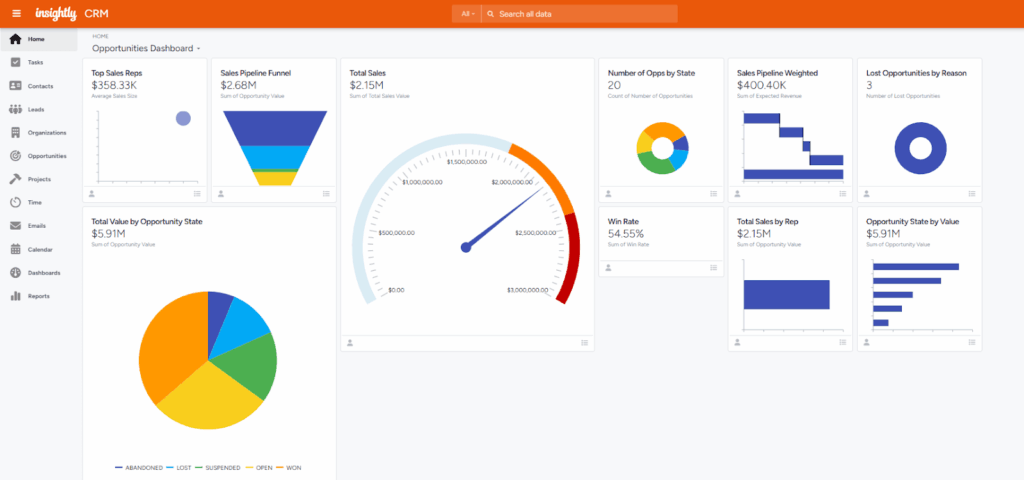
Insightly CRM is Best for: Businesses that want to track sales and project delivery in one tool.
Insightly CRM helps businesses with lead, email, pipeline, and even project management—so you can nurture prospects, advance sales opportunities, and deliver the sold products or services all in one place.
Insightly CRM has a decent 4.2/5 rating on G2, but it’s pricier than many other small business CRMs. It also doesn’t offer built-in email sequences or omnichannel communication.
Insightly CRM Pros:
Insightly CRM Cons:
Here’s what’s included in Insightly CRM’s lowest plan:
| Insightly CRM | |
| CORE FEATURES | |
| Mobile app | ✅ |
| Contact management | ✅ |
| Follow-up tracking | ❌ |
| Pipelines | ✅ Unlimited |
| Duplicate management | ✅ |
| CENTRALIZATION TOOLS | |
| Centralized workspace | ❌ |
| Dashboard | ✅ |
| COMMUNICATION TOOLS | |
| Two-way email sync | ✅ |
| SIMPLE AUTOMATION | |
| CRM workflows | ❌ |
| Sales email sequences | ❌ |
| Browser extension for auto lead capture | ❌ Limited to Gmail |
| CUSTOMER SUPPORT | |
| Email support | ✅ |
| Live chat | ✅ |
| Phone support | ✅ Weekdays only |
| PRICING | |
| Price | $29 per user/month |
| Free trial | ✅ 14 days |
| Free plan | ❌ |
| Next paid plan | ❌ Expensive ($49 per user/month) |
Frequently Asked Questions About Insightly:
Yes. Insightly lets you manage projects alongside your sales pipeline, so you can deliver sold products or services without leaving the CRM.
It can be. Initial setup on Insightly can be difficult and time-consuming. Many users find onboarding requires more effort compared to simpler CRM tools.
Yes. The entry plan starts at $29 per user/month, which is more expensive than most small business CRMs. Yet, it lacks workflow automation, which many CRM software include for $9.9 – $20 per seat/month.
Learn more about HubSpot CRM ➤
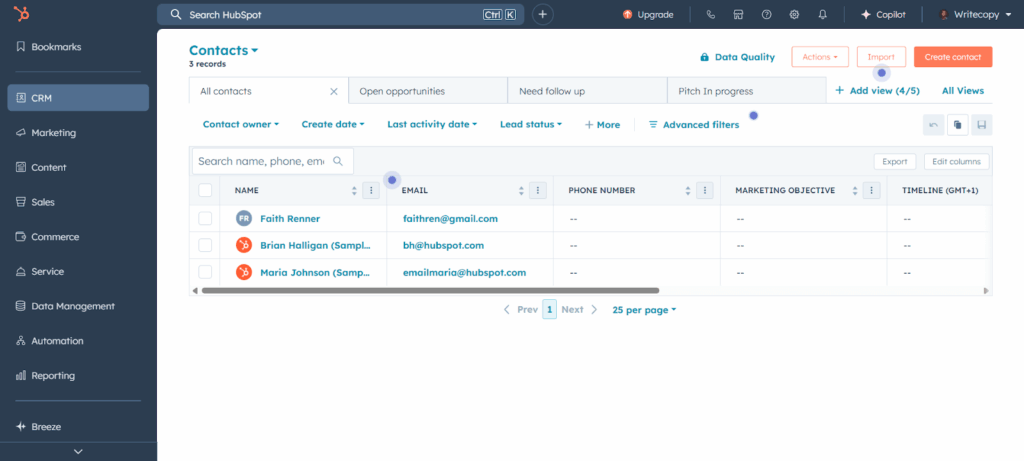
HubSpot CRM is Best for: Growing teams in need of sales, marketing, and customer service tools.
HubSpot is one of the most well-known CRM software. To help businesses improve the customer journey, it puts their marketing, sales, and service tools in one place. With a free plan and an average rating of 4.4/5 on G2, it’s not surprising that many small businesses choose it as their first CRM system.
HubSpot is a powerful marketing automation platform rather than a CRM software. Unless your small business will need a comprehensive marketing solution soon, HubSpot CRM might not be the perfect choice for you in the long term.
HubSpot Pros:
HubSpot Cons:
Here’s what’s included in HubSpot’s lowest plan:
| HubSpot CRM | |
| CORE FEATURES | |
| Mobile app | ✅ |
| Contact management | ✅ |
| Follow-up tracking | ❌ |
| Pipelines | ✅ Two |
| Duplicate management | ❌ |
| CENTRALIZATION TOOLS | |
| Centralized workspace | ❌ |
| Dashboard | ✅ |
| COMMUNICATION TOOLS | |
| Two-way email sync | ✅ |
| SIMPLE AUTOMATION | |
| CRM workflows | ❌ |
| Sales email sequences | ❌ |
| Browser extension for auto lead capture | ❌ Limited to Gmail and Outlook |
| CUSTOMER SUPPORT | |
| Email support | ✅ |
| Live chat | ✅ |
| Phone support | ❌ |
| PRICING | |
| Price | $15 per user/month |
| Free trial | ✅ 14 days |
| Free plan | ✅ Max. 2 users |
| Next plan | ❌ Expensive ($90 per user/month) |
Frequently Asked Questions About HubSpot CRM:
Yes, HubSpot does have a free plan. You get basic contacts, two pipelines, and email tracking, but to access features like sequences, duplicate management, and extra pipelines, you’ll need to pay for an upgrade.
Yes, on the Professional plan. Onboarding typically costs four figures, which adds a significant upfront investment on top of the monthly subscription.
No. It has over 10 tabs with multiple sub-sections, and many features are spread across different “Hubs.” This makes navigation harder compared to simpler CRMs. It’s also more time-consuming and difficult to grasp the CRM’s full functionality.
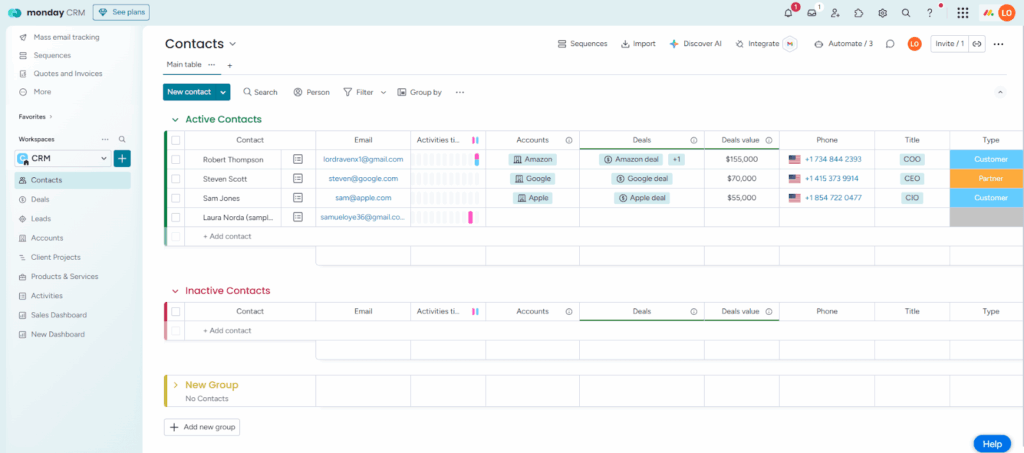
Monday CRM is Best for: Experienced teams who want a fully customizable CRM system.
Monday CRM was built to help businesses manage their sales cycles from first contact to post-sales. As a fully customizable platform, Monday CRM can accommodate all kinds of industries and verticals. It has an average rating of 4.6/5 on G2.
However, all that flexibility can make Monday harder to learn and unsuitable for teams without much CRM experience. The CRM is also not ideal for small businesses that need omnichannel communication and mass emailing on a small budget.
Monday CRM Pros:
Monday CRM Cons:
Here’s what’s included in Monday CRM’s lowest plan:
| Monday CRM | |
| CORE FEATURES | |
| Mobile app | ✅ |
| Contact management | ✅ |
| Follow-up tracking | ❌ Only task management |
| Pipelines | ✅ Unlimited |
| Duplicate management | ❌ |
| CENTRALIZATION TOOLS | |
| Centralized workspace | ❌ |
| Dashboard | ✅ |
| COMMUNICATION TOOLS | |
| Two-way email sync | ❌ |
| SIMPLE AUTOMATION | |
| CRM workflows | ❌ |
| Sales email sequences | ❌ |
| Browser extension for auto lead capture | ❌ Limited to Gmail |
| CUSTOMER SUPPORT | |
| Email support | ❌ |
| Live chat | ✅ |
| Phone support | ❌️ |
| PRICING | |
| Price | $36 per month (3 seats min.) |
| Free trial | ✅ 14 days |
| Free plan | ❌ |
| Next paid plan | ❌ Expensive ($51 per month) |
Frequently Asked Questions About Monday CRM:
No. It’s a separate sales product built on the Monday.com platform. Same look and feel, but purpose-built for managing customer relationships and sales.
Yes, but not on the entry plan. To access Monday CRM’s two-way email integration, you’ll need to pay for a higher-tier plan, costing at least $51 per month.
Yes, Monday CRM is pricey for most small businesses. The entry plan costs $12, but requires a minimum of 3 seats. That’s at least $36 per month, which is almost double what the average small business CRMs charge each month.
Only if you already know Monday.com. For new users, the fully customizable boards and absence of a traditional CRM layout create a steep learning curve. You’ll spend significant time building before you can start selling.
Learn more about Less Annoying CRM ➤

Less Annoying CRM is Best for: Non-technical teams that want a simple CRM experience.
After struggling with over-designed and over-bloated CRMs, the founders of Less Annoying CRM realized that it was easier to just build their own. This CRM tool keeps the interface, pricing, and functionalities very simple, which is why it has an average rating of 4.9/5 on G2.
However, as your small business grows and your work becomes more robust and complex, the absence of more advanced features in Less Annoying CRM (LACRM) can start to feel limiting.
Less Annoying CRM Pros:
Less Annoying CRM Cons:
Here’s what’s included in Less Annoying CRM’s lowest plan:
| Less Annoying CRM | |
| CORE FEATURES | |
| Mobile app | ❌ |
| Contact management | ✅ |
| Follow-up tracking | ❌ Only task management |
| Pipelines | ✅ Unlimited |
| Duplicate management | ✅ |
| CENTRALIZATION TOOLS | |
| Centralized workspace | ❌ Only overviews of your sales funnel |
| Dashboard | ❌ |
| COMMUNICATION TOOLS | |
| Two-way email sync | ❌ Only email logging |
| SIMPLE AUTOMATION | |
| CRM workflows | ❌ |
| Sales email sequences | ❌ |
| Browser extension for auto lead capture | ❌ |
| CUSTOMER SUPPORT | |
| Email support | ✅ |
| Live chat | ❌ |
| Phone support | ✅ |
| PRICING | |
| Price | $15 per user/month + tax |
| Free trial | ✅ 30 days |
| Free plan | ❌ |
| Next paid plan | ❌ None |
Frequently Asked Questions About Less Annoying CRM:
Yes. There are only a few core tabs. The workspace gives you a quick overview of everything on one screen. Since the CRM has minimal features, there’s very little to figure out.
No. Less Annoying CRM does not have two-way email sync capabilities or built-in emailing tools. You can log emails manually, but you can’t send or receive them directly inside the CRM.
Probably. Without automation, email sync, or advanced features, most growing businesses may eventually need to switch to a more capable CRM.
The best CRM for your small business will depend on what you’re looking for.
For most small businesses, that means software that not only focuses on the functionalities they need, but also has productivity tools (e.g., a centralized workspace), a user-friendly design, excellent customer support, and most of all, doesn’t cost more than $20 per user/month.
OnePageCRM meets these requirements the most.
This CRM software allows you to manage the entire sales cycle from first contact to close—all from one page. It also syncs with your email (2-way email sync), offers world-class customer support, and lets you build automated workflows and email sequences. Moreover, its built-in AI assistant summarizes contact data and helps figure out your next steps.
Beyond that, it has an easy-to-use interface and offers affordable plans.
That’s why OnePageCRM is the best CRM for small businesses, solo founders, and sales professionals.


More than just a writer, Samuel is a communications expert. He understands how confusing and overwhelming SaaS products can be. That's why he's spent 6+ years helping SaaS brands deliver simple, actionable content that makes their products easy to understand.