Whether you need to stay in touch, increase sales, or run operations on the go, mobile CRM comes to the rescue.
OnePageCRM built a powerful mobile CRM that lets you track leads and keep in touch with your customers.
Prior to using a mobile CRM, the address book on your phone could’ve doubled up as your CRM. However, there was no easy way to set follow-up reminders. With OnePageCRM, you can easily transfer your phone contacts to the CRM.
Top 6 Mobile CRM Features
Mobile CRM lets companies interact with their customers using mobile devices (phones and tablets). It helps businesses keep track of customer information, communicate better, and provide a great customer experience.
1. Real-time access to sales data
A mobile CRM allows you to manage sales quickly and stay connected with customers and prospects. According to Forbes, sales reps spend 50% of their working day selling remotely. This statistic highlights the value of a mobile CRM.
Having access to real-time data helps sales reps sell smarter and find new opportunities while aiding them to make faster decisions.
With a mobile sales CRM, sales teams can easily view and manage their sales pipeline and move deals through each pipeline stage helping you to reach targets even on the go.
High-performance sales teams are keen to use software that enables them to be more prepared for meetings, more responsive to customers, and sell more.
Mobile CRM is what sales reps need.
“Businesses witnessed 10% increase in cash flow by using a CRM mobile app.”Algo Works
With the ability to be able to update and receive new leads from anywhere, this ultimately leads to better customer retention and shorter sales cycles.
2. Quick data entry
A mobile CRM helps salespeople get things done and sell more on the go.
Being able to update information on the go is key to maximizing your time.
Notes and contact information at your fingertips
You can easily access your contacts and organizations, track your call results, and notes history, and view and update your sales pipeline. This gives you the extra confidence to personalize your outreach: you have all the information before a sales call or meeting.
Having the ability to update the most relevant information about a lead at any time also allows you to make sure that all important data is logged in.
Call, send SMS and access maps on the go
With a mobile CRM, a salesperson can quickly search for a contact and then call that person directly from within the app (see Speed Dialer). After completing the call, the user can easily log that activity and then schedule a follow-up activity.
They can also open up Google Maps if you have an address saved for a contact, perfect for when they are on the road and need to do a site visit.
With a mobile CRM, you can also send emails without having to leave the app. A copy of that email will be stored in your CRM account for future reference. It works as a refresher on past conversations while giving you the confidence to communicate with customers on the go.
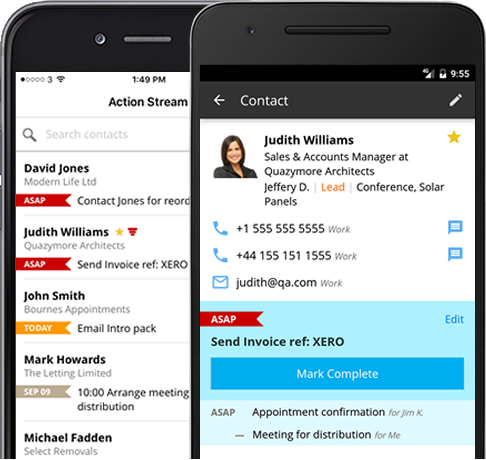
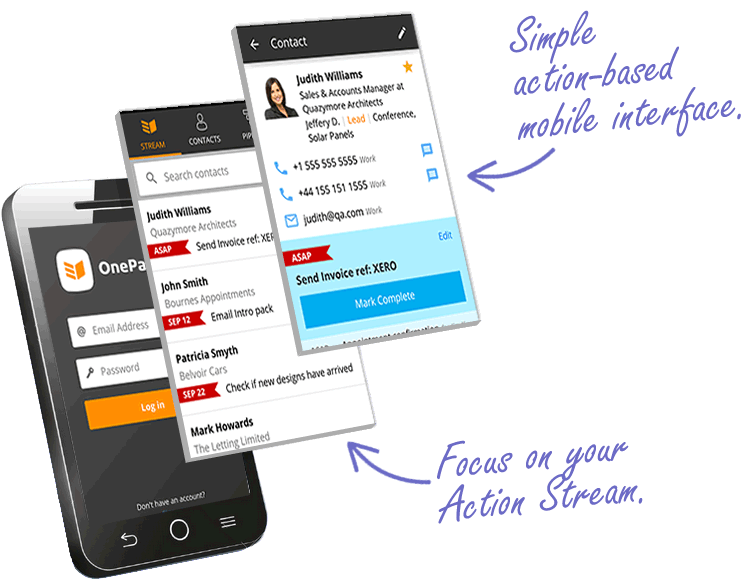
Pro Tip. OnePageCRM has a mobile CRM app that is a combination of both: a simple database and a dynamic to-do list. When you log in to the app, you are welcomed with the Action Stream—your upcoming sales tasks for today. This enables you to get straight to work knowing who to follow up with and when, ensuring you never miss a follow-up even when you’re on the go.
3. Push notifications
Another important feature of a mobile CRM is push notifications and in-app messages.
They can be highly effective if they are sent at the right time and contain relevant information. For example, OnePageCRM uses push notifications to remind users of time-sensitive actions.
Salespeople are busy nurturing leads and closing sales, these notifications are spot on. They are sent at the right time (when an action or follow-up is required) and only include the information required such as contact name and the action due.
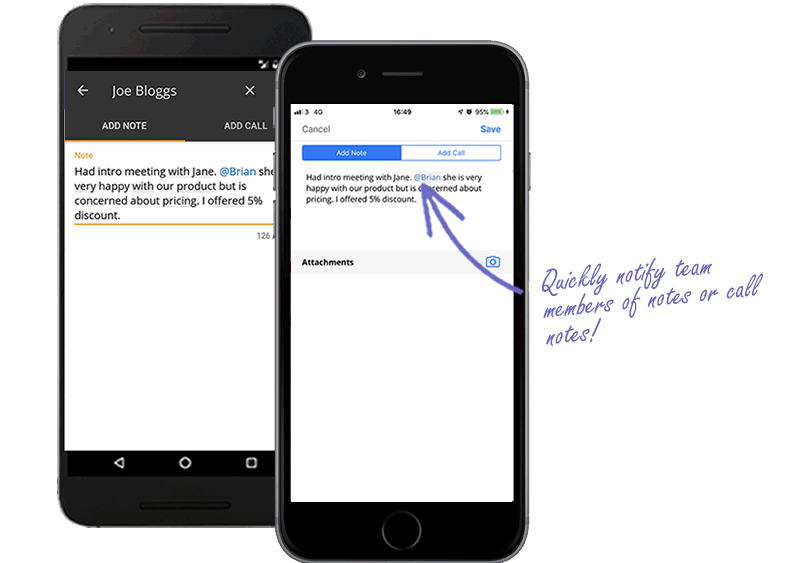
If a team member assigns you a task or a contact, or mentions you in a note, a push notification will be sent to your mobile device.
4. Voice-to-text feature
Having a mobile CRM can reduce data entry immensely.
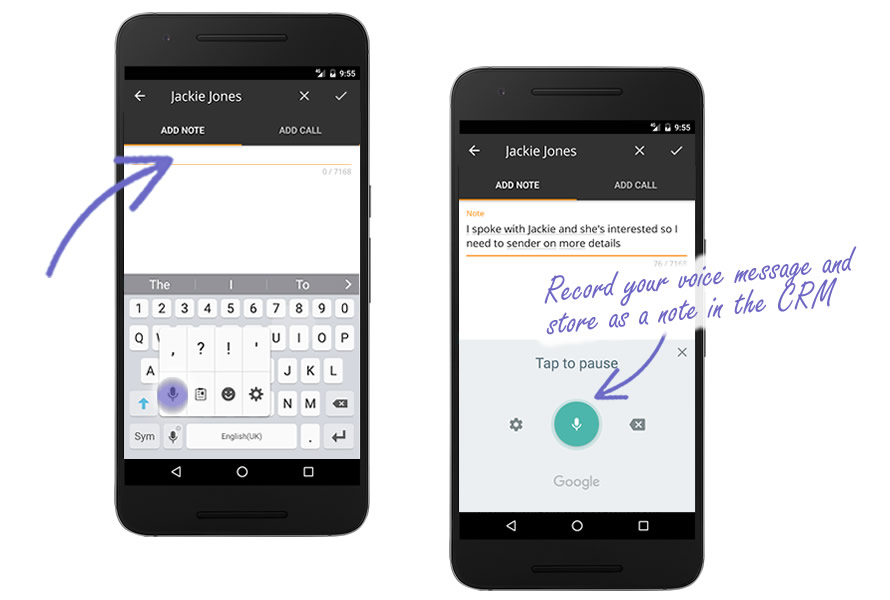
You can use voice typing for notes, add contacts whilst at a sales conference and tag them, or import contacts directly from your address book, really handy if you have connected with prospects at recent events or networking meetings.
It takes 30 seconds, eliminating a huge task when you return to the office.
A large sales team can find themselves following up with the same people twice or maybe not following up at all. This is mainly due to customer information not being updated in real-time often leading to extra admin work. Time can be wasted checking if other colleagues have reached out and when.
5. Mentions and tags
Sales reps are on the go and out of the office the majority of the time.
In large sales teams, it can be difficult to get everyone into a meeting to discuss their sales activity and overall business sales strategy. A mobile CRM allows everyone the ability to view other team members’ activity.
This is very useful if you are unable to meet in person or have a conversation. From their mobile CRM, sales reps can view any notes, calls, and deals associated with their team members’ contacts.
If you’re just out of a killer meeting and want to inform another team member of how it went, simply add your notes in the Add Call or Add Note section and include @Brian (for example) and Brian will then get a notification of the details of that note. Thus, eliminating the need to call/email them separately.
Pro Tip. You can also add tags and filters to your contacts to help other team members easily find and manage while on the go. Find contacts based on different criteria; e.g: leads from online advertising. Save the filter in the desktop app and run it on mobile.
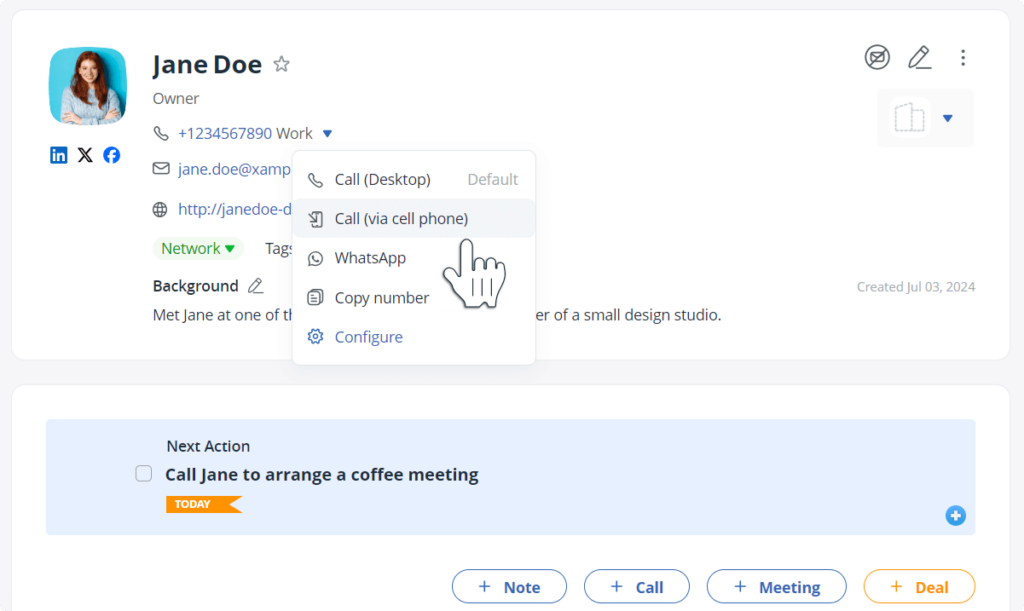
6. Easy phone calls
It’s great when there’s seamless communication between different apps. Especially between your web CRM and its mobile app.
While you’re working from your computer, find a contact you want to call and click on the Call via cell phone button.
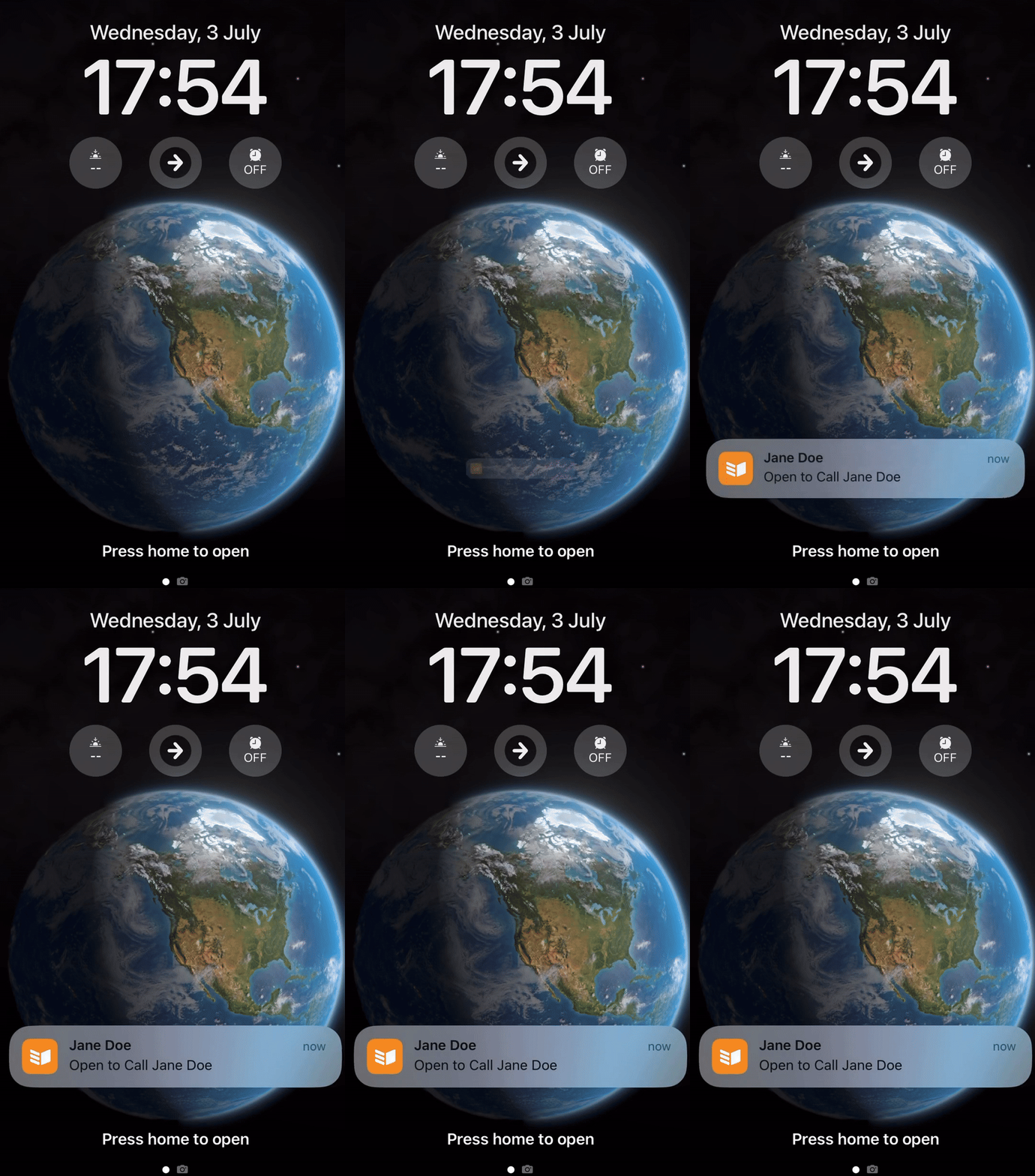
You’ll get a notification on your mobile CRM straight away and see this contact popping up on your phone screen:
With this feature, you don’t need to search for the contact’s phone number manually, your mobile CRM will automatically find it and bring it to your attention.
Once you finish the call, quickly type your notes and save them in your CRM.
7. Manage B2B customers
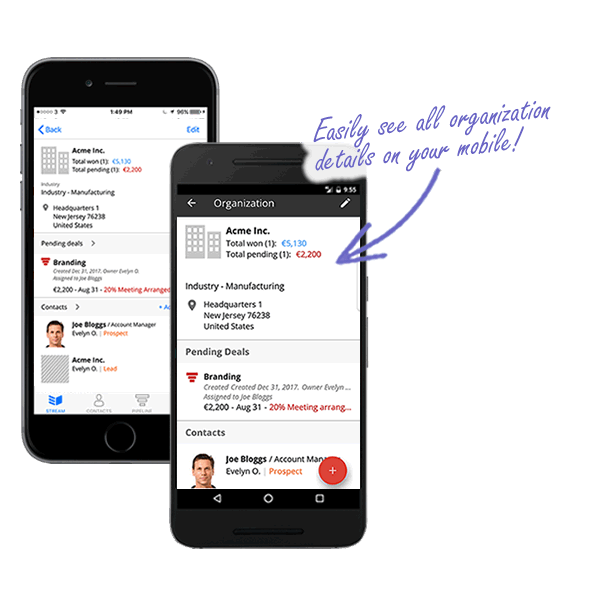
In mobile CRM, you have organization details at hand.
The organization view includes details such as description, phone, URL, and address, plus any custom fields, a deal summary, and pending deals, along with a list of contacts and linked contacts.
In addition, it’s easy to add, import, or link a contact to a company from your iOS or Android device.
Best Mobile CRM Apps
A mobile CRM is not just a database.
Ideally, it should work as your assistant and work seamlessly with other apps.
Here are the top three mobile CRM apps that can make your life much easier:
Mobile CRM with follow-up reminders
AI business card scanner for trade shows
Sales route planner for field trips
Let’s look closer into each one of them.
1. OnePageCRM’s mobile app
With our mobile CRM, you can use key OnePageCRM features wherever you go.
This mobile CRM is very simple and syncs seamlessly with the desktop version, ensuring that your data is always accurate.
Key features of this mobile app:
See Contact details in your CRM.
Receive push-up notifications (reminders and tasks).
Call straight from your mobile CRM app.
Log in notes with the voice-to-text feature.
Send emails directly from this mobile CRM (emails will be automatically stored in your account).
Pricing: Free for OnePageCRM users. The pricing for OnePageCRM starts at $9.95 per month.
2. Business Card Scanner (free)
Besides mobile CRM, our handy Business Card Scanner can help you quickly gather leads.
Just snap a pic of a business card, and this mobile feature will instantly grab the contact info, creating a new contact in your CRM.
No more dusty business cards cluttering your desk or left forgotten at hotels by accident!
This simple mobile CRM solution works perfectly with your OnePageCRM account.
Key features of this mobile app:
Convert physical business cards into digital CRM contacts.
Take photos of business cards or select them from your phone gallery.
Pricing: Free for OnePageCRM users. The pricing for OnePageCRM starts at $9.95 per month.
3. Route Planner (with built-in AI)
We’ve also built an AI-powered Route Planner that automatically maps out the best routes for you.
It seamlessly syncs with OnePageCRM’s mobile CRM app, calculating travel time using the latest traffic data and considering average meeting times.
Key features of this mobile app:
Select the contacts you want to visit during your field trip.
Automatically calculate the optimal route.
Access the most up-to-date traffic data.
Get accurate time estimates for your field trips.
Speed Dial your Starred contacts.
Log call results and notes in your mobile CRM.
Pricing: Free for OnePageCRM users. The pricing for OnePageCRM starts at $9.95 per month.
What is a mobile CRM?
Mobile CRM is an app on a phone or tablet that helps businesses keep track of their customers and communicate with them better. It’s both a digital address book and messaging system. A mobile CRM helps companies stay organized and provide better customer experience.
Mobile CRM stands for Mobile Customer Relationship Management.
When businesses refer to mobile CRM, they generally mean an app designed to track customer interactions and nurture customer relationships on the go.
For a mobile CRM to work effectively, both tracking customer data and nurturing relationships are equally important.
According to its definition, a mobile CRM system has three core features:
Store: A mobile CRM lets you store various types of data: phone numbers, notes, sales deals, and more.
Organize: A mobile CRM isn’t just a cloud storage app, like Google Drive or iCloud. It doesn’t simply save data but also organizes it into categories such as Contacts, Deals, or Organizations. For example, you can save two phone numbers: one under the Contact category and another one under the Organization category.
Notify: In addition to storing and organizing data, a mobile CRM reminds you when to engage with a customer or follow up with a lead. While you input data, your mobile CRM should prompt you to put it into action.
A mobile CRM is a mobile app that records past interactions and drives future customer engagement.
Why is mobile CRM important?
The average person spends over 4 hours each day on their phone. If they work 9-5, then these 4 hours account for approximately 50% of their working day. In other words, mobile devices have become an important part of our lives.
In 2016, access to the web via mobile devices finally overtook desktop usage according to StatCounter.
“Sales reps saw productivity increase by 26.4% upon adding mobile access to their CRM application.”Nucleus
That’s why it’s so important to have a mobile CRM. It gives you instant access to your client and lead database even when you are not in the office.
Here are the top three reasons why having a mobile CRM is important:
Data is no longer confined to one location. You can get data everywhere, not only while sitting at your desk. When your sales team is out in the field, they still need to log updates about their interactions with prospects. With a mobile CRM app, your team can access information, record interactions, or even close deals right from their phones.
You can have both: an asynchronous team and undistorted information. If you have one team in the office and another out meeting clients, it can be difficult to keep everyone in the loop without a mobile CRM. In this case, your communication could resemble a game of telephone gone wrong. But with a mobile CRM app, updates are real-time.
Great service starts with up-to-date customer data. With a mobile CRM, any team member can access the customer’s history, understand the context, and provide a solution on the spot.
Who needs a mobile CRM
A mobile CRM helps you stay connected with leads and customers on the go. It is an essential app in several situations:
1. Field sales teams
Field sales reps, real estate agents, or insurance brokers are among the first ones to benefit from having a mobile CRM app. They often have client meetings outside the office and need to access customer info and take notes quickly from their mobile phones.
2. Home service businesses
If you run a home service business, you likely have several technicians (repair technicians, plumbers, or electricians). They provide on-site services. That’s why your technicians also need access to some customer-related data from their phones. For example, job details, or service history, or any other notes.
For home service businesses, having a mobile CRM not only saves time but also improves customer experience.
If you have only an in-house team who doesn’t need to leave the office, you probably don’t need a mobile CRM. A simple web solution will likely be enough.
3. Consulting businesses
Any business with frequent in-person client meetings will benefit from a mobile CRM. Especially consultants, lawyers, or marketing professionals who meet new and existing clients regularly.
Consultants need to prepare for in-person client meetings that often happen outside of their offices. A mobile CRM helps quickly save notes after every meeting and set follow-up reminders.
The best mobile CRM for your business
A mobile CRM helps your team be more prepared when it comes to sales pitches and meetings, be more organized, and be in constant contact with customers and prospects, focusing you on the sale and ensuring you react to follow-ups in a timely manner.
By incorporating a mobile CRM today, you will ensure sales reps have the tools they need readily available to achieve their overall sales goals when in front of potential customers.
Working on the go is becoming increasingly common in sales, so you need a CRM that can keep up with you. Here’s what one of our customers said after using OnePageCRM’s mobile app:
“I use my Cell phone for 90% of my business. To be able to put the information in from my phone is PERFECT. Thank you, Roger”.
The mobile CRM ensures you focus on taking action while you’re on the go. Try it out for yourself!
Note. This blog post was first published in November 2017 and updated for relevance in December 2025.
This is an excellent product that helps users to work in a more effective way and eventually improving the app, as well as the user experience.
Great Content!! Thank you for sharing this helpful information as it would be very much helpful for the beginner in app development sector. Here is yet another top-notch service provider “X-Byte Enterprise Solutions” who render feasible and credible solutions to global clients that help global brands design and build superior digital products, enabling seamless user experiences across all modern platforms and devices.
OnePageCRM is a simple and easy-to-use CRM software for small businesses and solo founders. Affordable and fast, this intuitive CRM system has a minimal setup, zero bloat, and no learning curve.
To provide you with the best possible experience on our website, we may use cookies as described in our Cookie Policy. You can enable or disable optional cookies as desired.
These cookies are strictly necessary to provide you with services available through our Site and to use some of its features, such as access to secure areas. They cannot be turned off.
These allow us to recognize and count the number of visitors and to see how visitors move around our Site. This helps us to improve the way our Site works, for example, by ensuring that users are finding what they are looking for easily.
These cookies are needed to provide performance and functionality of our site and monitor system availability, stability and error reporting.
These are non-essential cookies but if disabled certain functionalities will become unavailable to you.










This is an excellent product that helps users to work in a more effective way and eventually improving the app, as well as the user experience.
Great Content!! Thank you for sharing this helpful information as it would be very much helpful for the beginner in app development sector. Here is yet another top-notch service provider “X-Byte Enterprise Solutions” who render feasible and credible solutions to global clients that help global brands design and build superior digital products, enabling seamless user experiences across all modern platforms and devices.
Know more here: Mobile App Development