Top 7 Free Notion CRM Templates
Samuel Oyebode
January 22, 2026
21 min read



Lead management software makes it easier for you to close more sales. But how do you know which specific tool to choose?
To save you precious time, energy, and money, we’ve done all the testing and compiled this list of the 5 best lead management software in 2026.
You’ll find descriptions of each software, as well as the cost, customer ratings, and top lead management features. We also share screenshots to help you visualize what using each software might look like.
Lead management software is a tool that helps you capture, organize, and manage potential customers from the moment they show interest to the point they become paying clients.
That’s the general idea, but it’s worth noting that the ‘lead management process’ can vary depending on how you run your business.
For instance, if you’re doing outbound sales, your lead management process will typically focus on you reaching out, tracking conversations, and consistently following up until you can close the deal. And if you run a project-based business, your process will typically involve guiding leads from inquiry to onboarding, and eventually into delivery.
In any case, the goal is to turn leads into clients.
People use lead management software for different needs. And to be realistic, you’d hardly find a tool that not only caters to every one of these needs, but does so very well.
That’s why this list focuses on different tools that are best suited for distinct lead management needs.
Best lead management tool for: Staying on top of follow-ups and turning leads into clients. It’s especially ideal for solopreneurs, agencies, and small to medium-sized businesses.
OnePageCRM is a CRM, but it’s perfect for tracking and managing leads. Once you log in, you’ll see your leads, arranged in order of how urgently you need to interact or follow up with them. You’ll also see the exact follow-up task required for each lead.
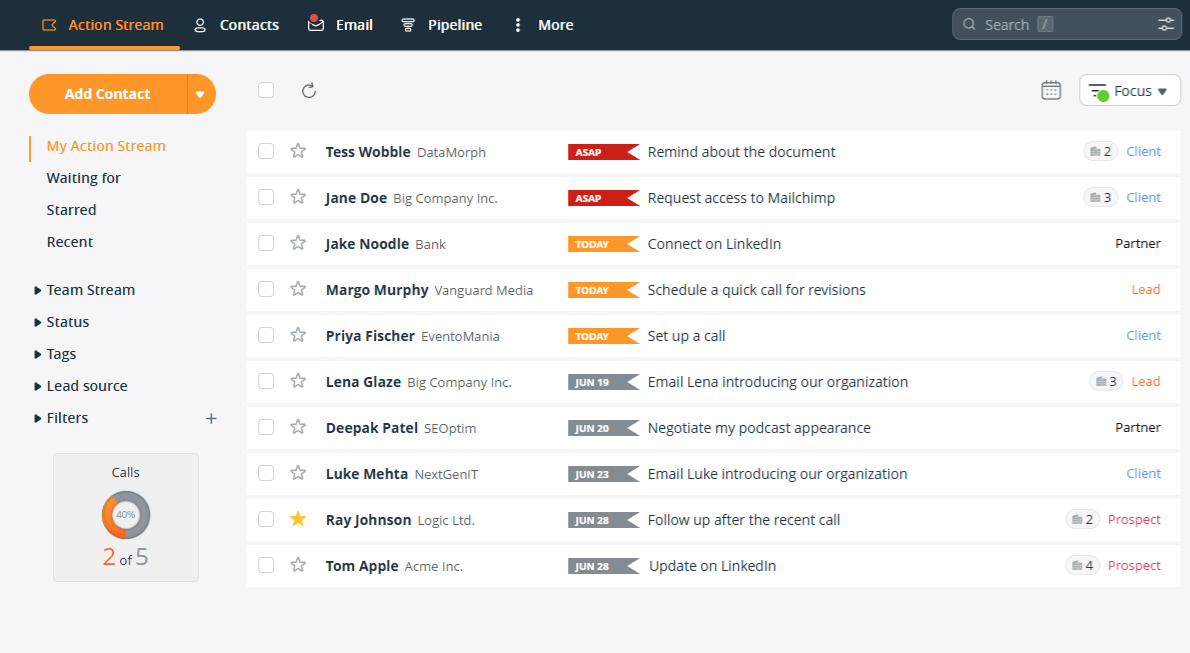
Every lead in OnePageCRM has a dedicated page. On this single page, you can manage all of your interactions with the lead:
OnePageCRM also makes it quick and easy to add new leads. You can automatically gather leads’ data via web forms or from websites, emails, or social media profiles. The leads appear together with to-do items (follow-up reminders) and are sorted based on the urgency of each follow-up.
Features OnePageCRM Offers (on the lowest plan):
Pricing starts from: $9.95 per user/month (if paid annually).
Free trial: 21-day free trial. No credit card info needed.
Customer rating: OnePageCRM has an average rating of 4.7/5 on G2.
Best lead management tool for: Tracking sales deals. It’s especially suitable for businesses that have larger sales teams, complicated sales processes, and deeper pockets.
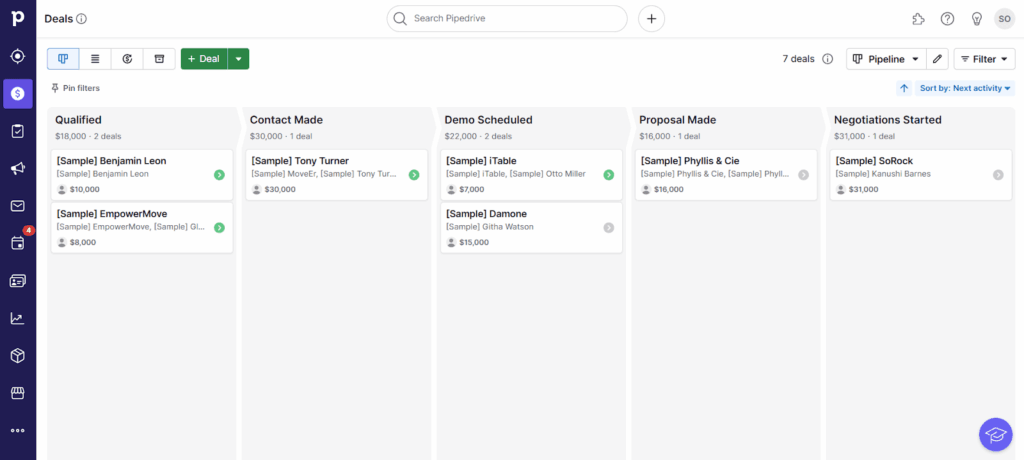
Pipedrive is more focused on tracking deals, rather than leads. Instead of a list of contacts, the first thing you’ll see when you open this CRM is the pipeline containing all deals at various stages of your sales cycle.
Pipedrive also features an “Activity Calendar” where you can schedule and view all calls, meetings, and other tasks you have on your plate. The calendar syncs with your Google Calendar and Outlook, and even sends reminders for every activity.
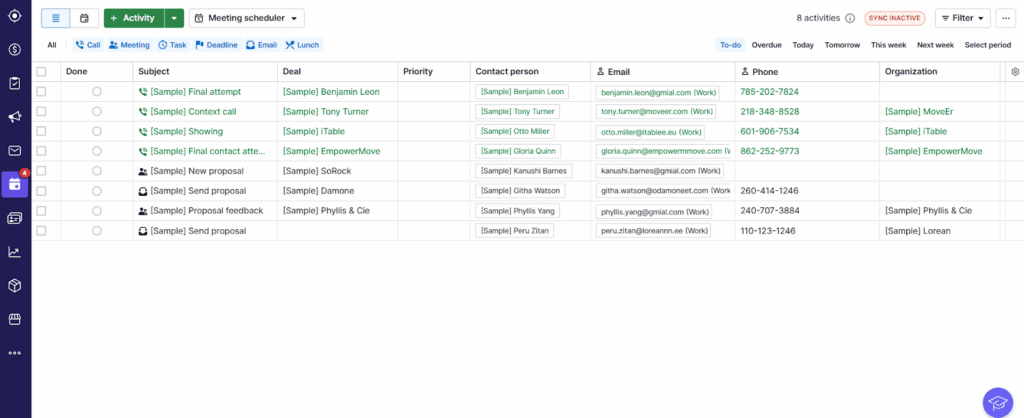
Features Pipedrive Offers (on the lowest plan):
Pricing starts from: $14 per user/month (if paid annually).
Free trial: 14-day free trial. No credit card info required.
Customer rating: Pipedrive has an average rating of 4.3/5 on G2.
Best lead management tool for: Tracking client projects and managing tasks across large teams. Especially useful for bigger agencies and businesses that already use Monday.com for project management.
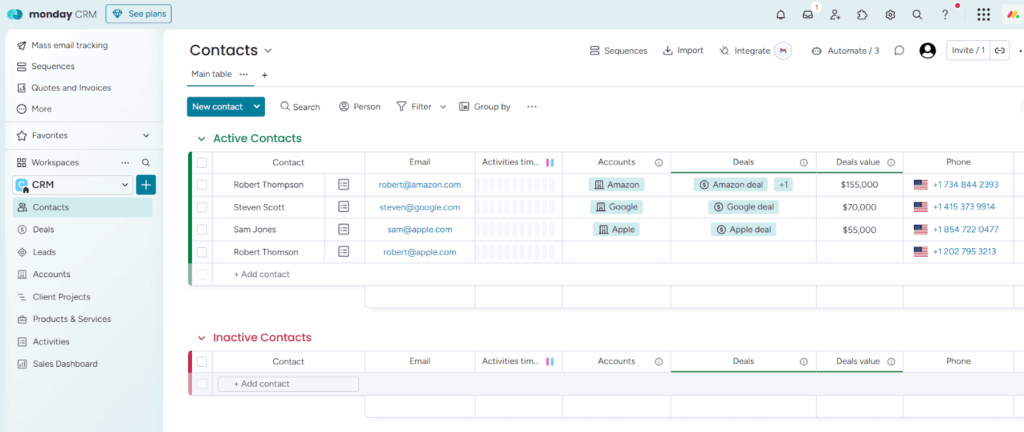
Although Monday.com is mostly known for work management, it also has a CRM template for sales. This Sales CRM comes with ready-made boards for tracking leads and deals, but it’s more suitable for the latter.
Each deal is like a project. It gets its own page, where you can view contact details, manage the deal’s journey through your pipeline, and keep track of all communications.
As a fully customizable platform, Monday.com gives you building blocks to shape your lead management system as you like. However, if you’re not experienced in CRM setup, you may end up building a system that’s too complex or inefficient.
Luckily, there’s a tutorial video explaining how to use the CRM:
Features Monday CRM Offers (on the lowest plan):
Pricing starts from: $36 per month for the Sales CRM (if paid annually), with a minimum of 3 users per plan. Keep in mind: The Sales CRM and the work management tool have separate pricing plans, both of which have a starting limit of 3 users.
Free trial: 14-day free trial. No credit card info needed.
Customer rating: Monday.com’s CRM has an average rating of 4.6/5 on G2.
Best lead management tool for: Freelancers or solopreneurs who like DIY and want a tool that lets them build their own system for organizing leads.
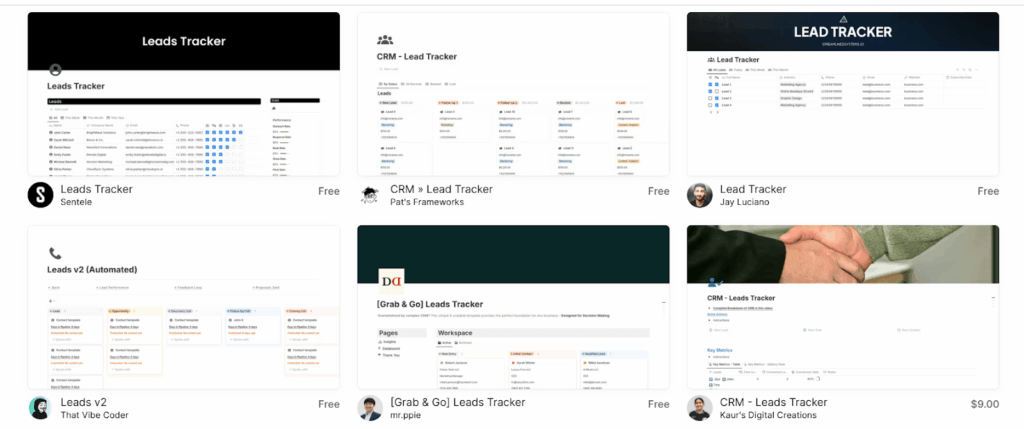
Notion is an all-in-one workspace where you can organize and manage all kinds of projects. It’s not a dedicated sales tracking tool. Rather, it’s a customizable platform with templates that you can use to track leads.
There are tons of CRM templates to choose from, but you might have to customize them to suit your business and specific sales pipeline. So, if you’re not a fan of setting up your own lead management system, this might not be for you.
Features Notion Templates Offer (on the lowest plan):
Since Notion isn’t a CRM, they don’t have a lead-capturing browser extension or contact enrichment functionality.
Pricing: There’s a free plan, but paid plans begin from $10 per user/month (if paid annually).
Free trial: 30-day free trial. Needs credit card info.
Customer rating: Notion has an average rating of 4.7/5 on G2.
Best lead management tool for: Micro businesses that are heavily reliant on spreadsheets (especially Google Sheets) and are not ready to make a move to dedicated lead management software.

Sheetify CRM is the only tracker on this list of tools that doesn’t require any subscription. You pay once and get lifetime access to the Google Sheet.
This spreadsheet CRM has a tab for tracking all your leads’ information. It also features a tab for scheduling and managing sales tasks, a calendar to track your deals and sales tasks, and an email marketing add-on that allows you to send emails directly from within the tracker.
However, since Sheetify CRM is a spreadsheet, it won’t be able to keep up once your business grows.
Likewise, the tool only works if you’re managing leads on your own. If you have a small team, you might need a better option like SheetGo. It gives each rep their own sheet and feeds data into a master dashboard for the manager.
And if you’d rather not pay for a spreadsheet at all, OnePageCRM has a free lead tracker template on Google Sheets and Excel, with built-in follow-up reminders.
Here’s a short video tutorial on how Sheetify CRM works:
Features Sheetify CRM Offers (on the lowest plan):
Pricing starts from: $97 (a one-time purchase).
Free trial: None.
Customer rating: Sheetify CRM is not featured on G2 or other review websites.
Your lead management software does not need to include every feature under the sun. Rather, it should house just the tools you need (and will actually use) to manage your leads and turn them into paying clients.
Below, we’ll walk through those essential features.
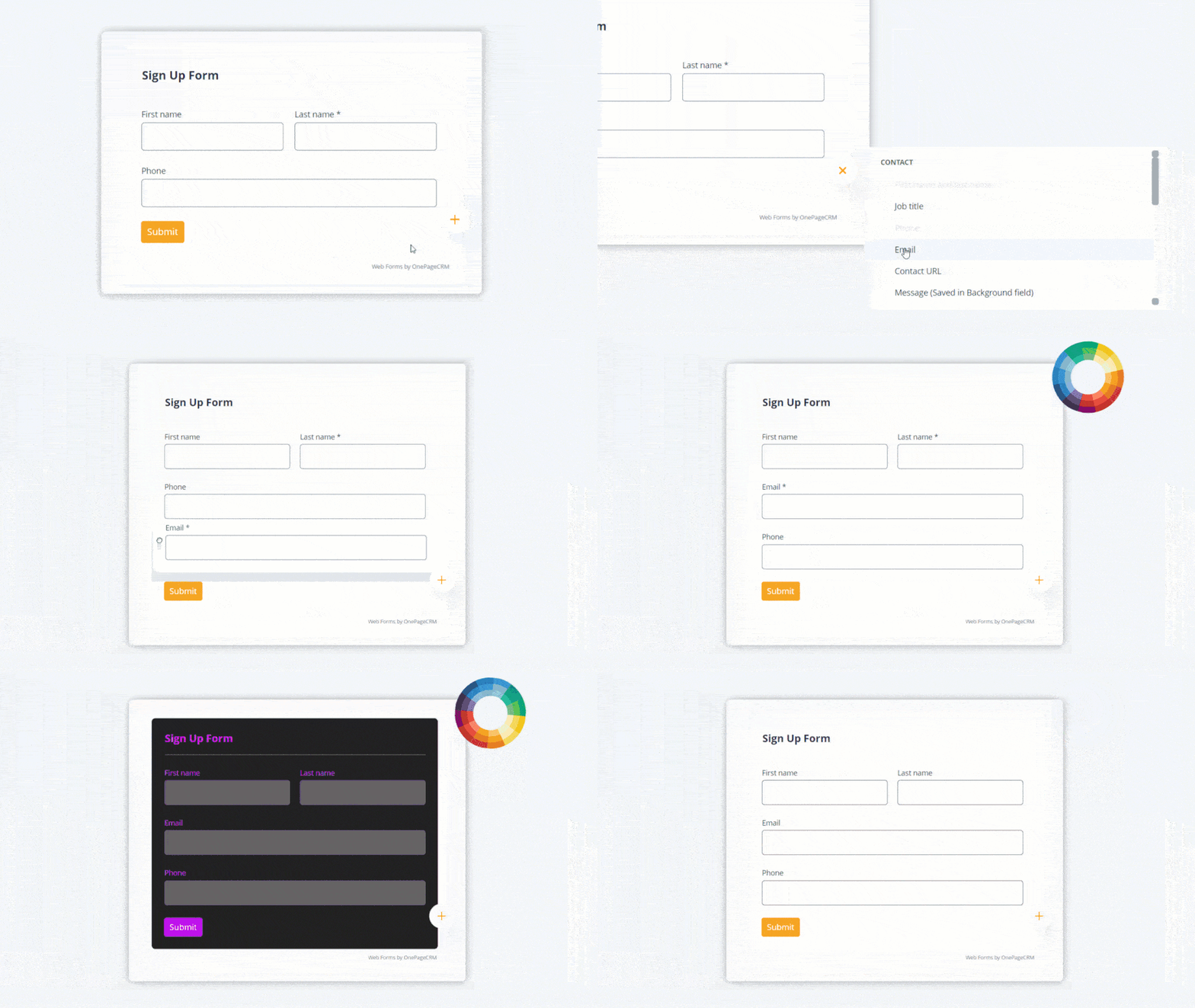
Adding new leads to your database should be quick and easy. That’s why automatic or instant lead capture is so important for lead management software.
This lets you pull contacts’ details from your email, social media profile, or any website—and add them to your database in just a few clicks.
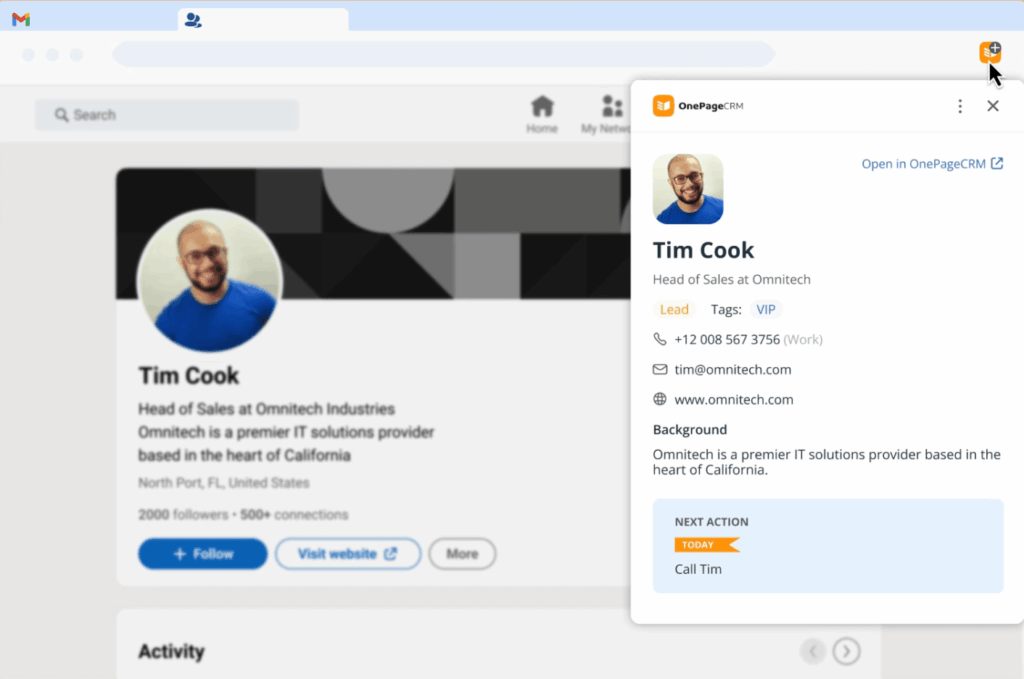
It also allows you to build web forms that automatically send leads into your system the moment someone fills them out.
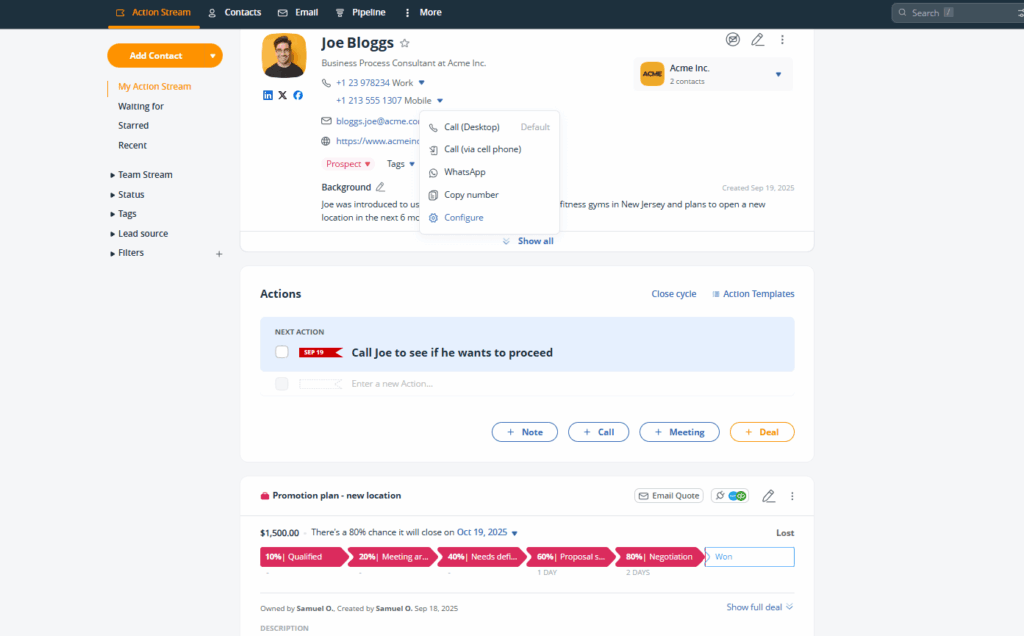
Every lead should have a profile page where you can find all their information. “Information” here includes things like their contact details, notes, past conversations, emails, any follow-ups you’ve planned, and the like.
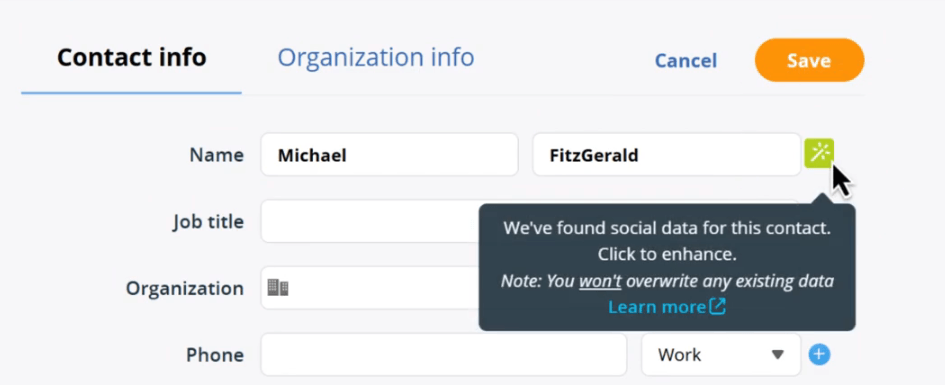
When managing leads, it’s quite common for some of their information to be missing. Which is why, in addition to profiles, the best lead management software also include enrichment tools.
With this, you can find a lead’s publicly available information—like their social media profiles or company information—and automatically add it to the lead’s profile.
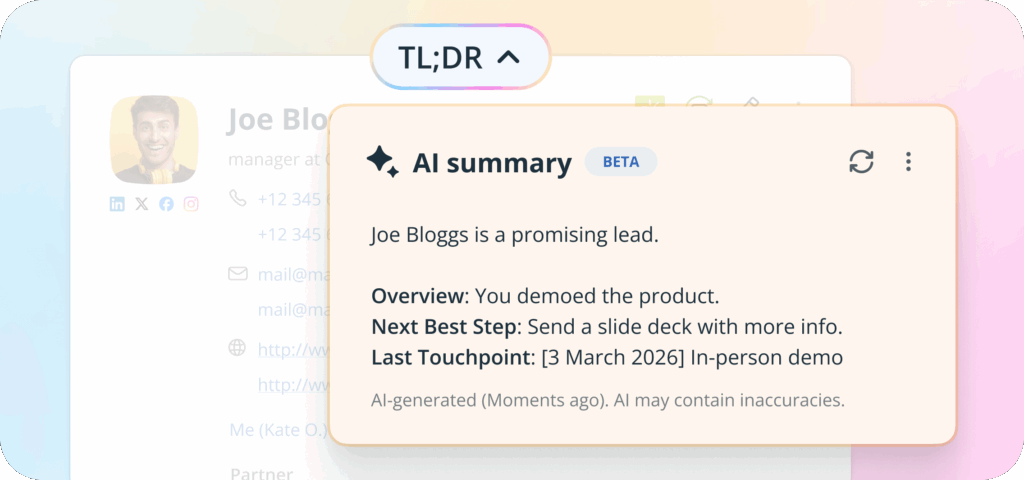
A good lead management software should have an AI assistant (or something similar) to make your work easier.
Ideally, this assistant should be able to summarize a lead’s history, tell you when you last reached out to them, and even suggest what to do next to move the lead forward.
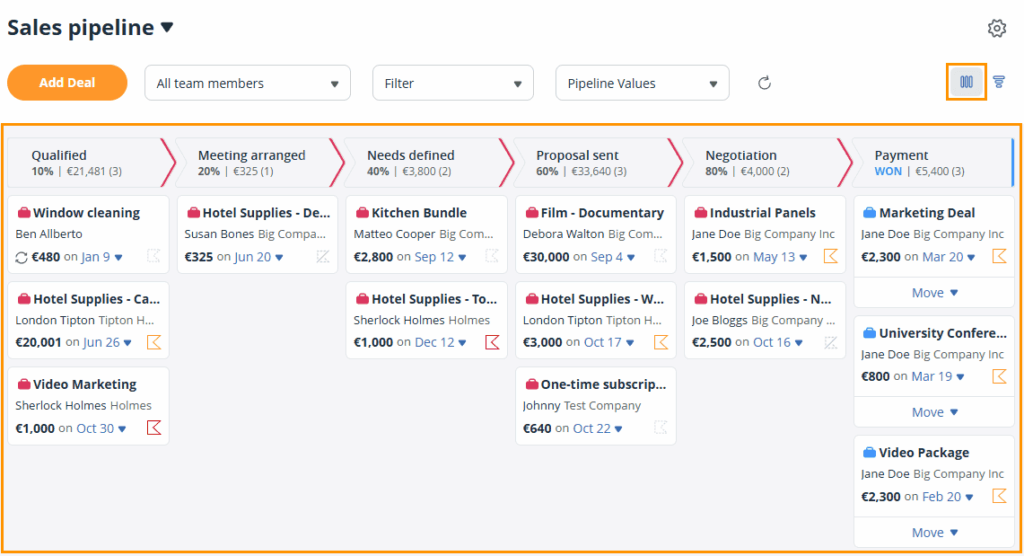
The best lead management tools give you a Kanban-style pipeline to work with. Each lead shows up as a card on the board, and you can move them from one stage to the next with a simple drag and drop.
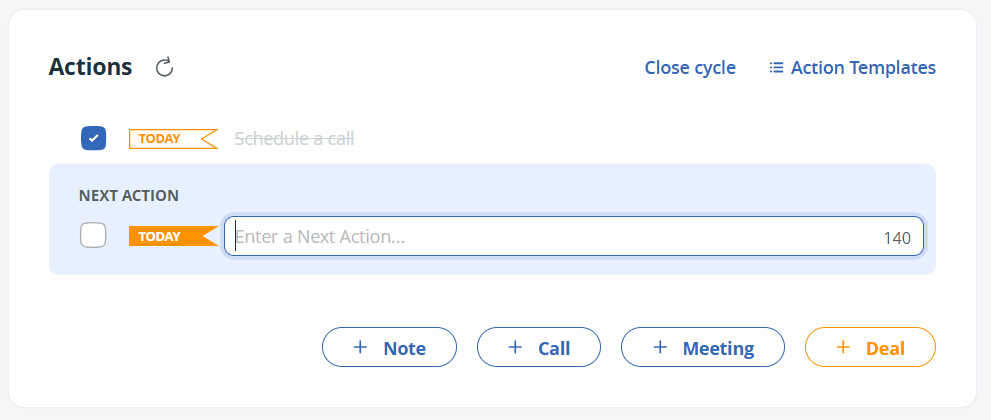
Leads go cold if you don’t reach out to them as and when due. That’s why your lead management software should let you schedule follow-up activities and set deadlines for them.
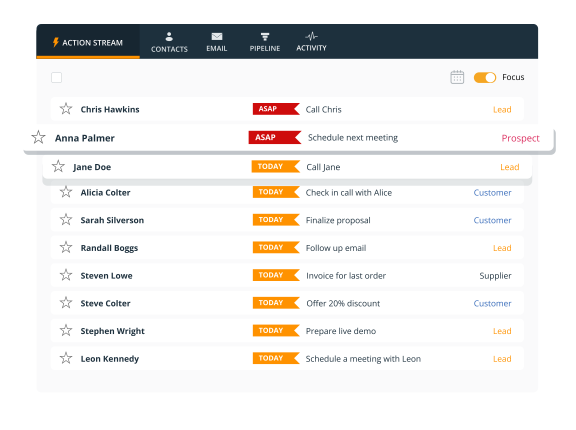
The tool should also remind and nudge you to carry out those activities. This usually involves organizing and color-coding your leads in order of how urgently they need your attention.
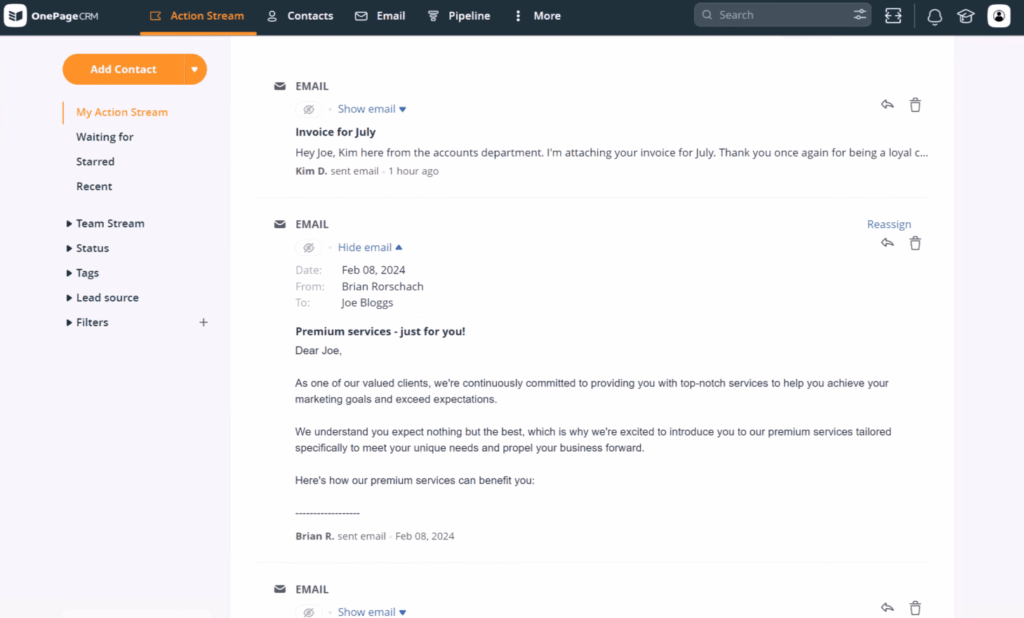
So you can communicate with leads more easily, the best lead management tool provides you with two-way email sync.
With this, you can send and receive emails without leaving the platform. You also get to see if a lead opens your emails, and keep a full record of all communications.
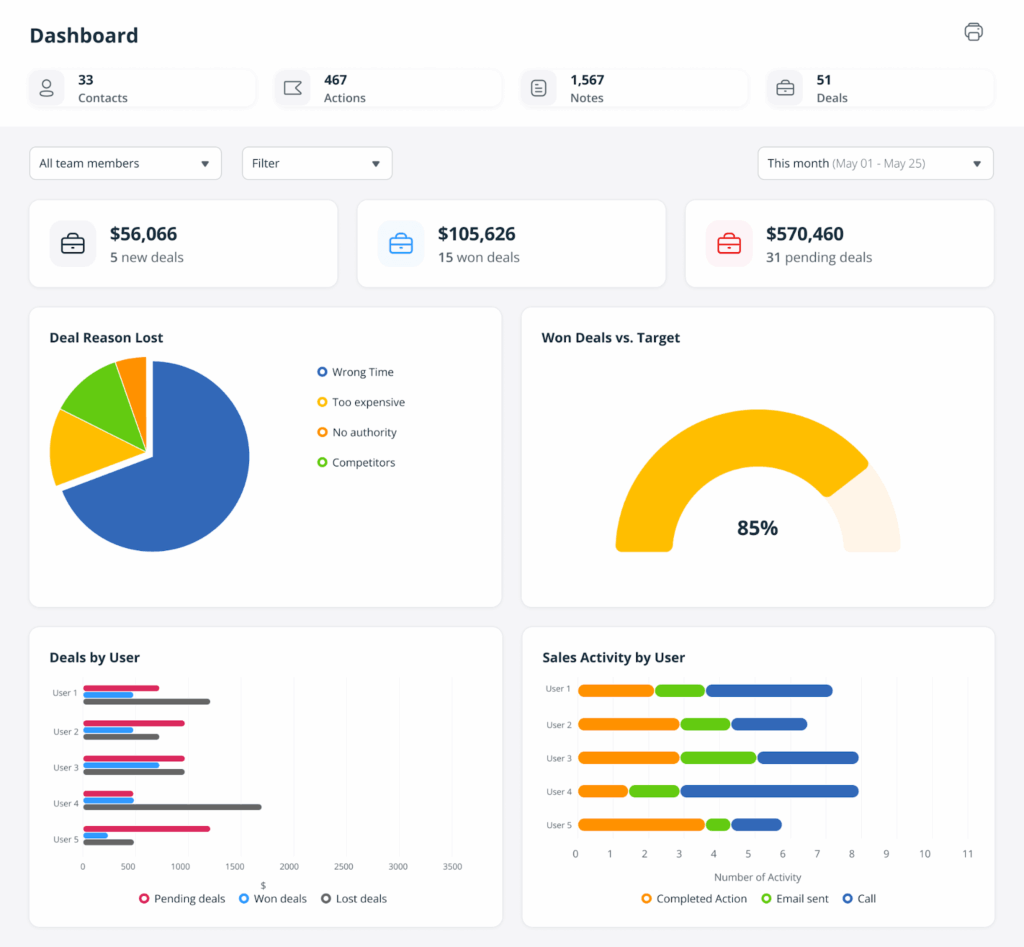
A good lead management software should come equipped with a lightweight dashboard that gives you an overview of how your business is performing.
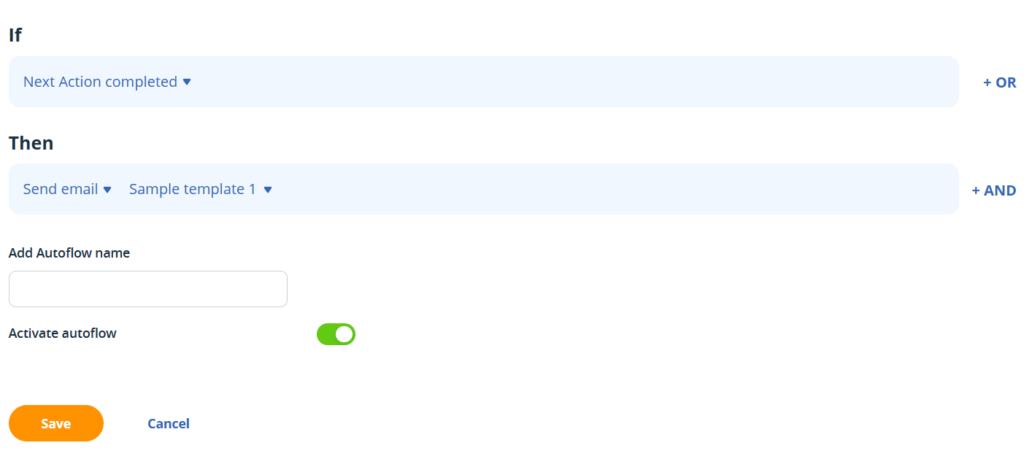
The more time you spend carrying out repetitive tasks—like data entry, assigning leads, updating deal stages, etc.,—the less time you have for actual sales work.
That’s why the best lead management tools come with automation features that handle these mundane tasks for you.
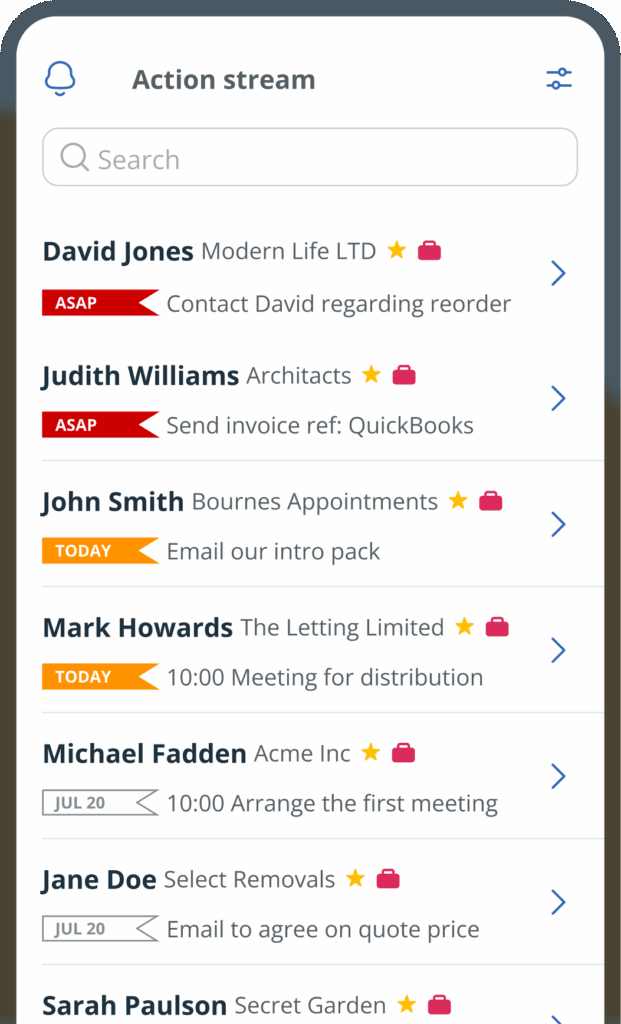
Your business keeps running even after you leave your desk. That’s why the best lead management tools have mobile apps.
With this, you can check on your leads, follow up, and move deals forward—from anywhere, and at any time.
Lead management software can be incredibly helpful, but that doesn’t mean you should jump into it blindly. There are a few things you’ll want to think about and some questions you need to ask yourself before choosing a tool.
Before anything else, think about what your day-to-day work actually looks like. Are you focused on sales, project delivery, or both?
If it’s mainly sales, you’ll want features like lead capture, follow-up reminders, email sync, and a pipeline to track deals. OnePageCRM is a great fit here. Pipedrive can also work, though some of its key features require higher-tier plans.
If your focus is project delivery, then you’re less concerned with chasing leads and more interested in managing ongoing client work. In which case, Monday.com makes more sense, as project and task management is what the work OS is built for.
And if you’re doing both, OnePageCRM still works. You can nurture leads through the Action Stream and also track delivery using its light project management feature.
Whichever lead management tool you choose must be suitable for the size of your team.
If you’re going solo or it’s just you and maybe one other person, spreadsheet tools like OnePageCRM’s free lead tracker template or Sheetify CRM are usually enough to get by (for the time being, at least).
For small teams, OnePageCRM is often the best choice. Pipedrive tends to work better for larger teams with a more complex pipeline. And if you’re running an even bigger operation, Monday.com is the way to go.
Some lead management tools come ready to use, while others expect you to put the system together yourself.
OnePageCRM and Pipedrive both fall under the former. For Notion, on the other hand, you either build your own system or pick a template and tweak it to suit your business.
And then there’s Monday.com, which is somewhere between both categories. While this tool has a ready-made Sales CRM template, you’ll still need to customize it to fit your business.
You want a lead management tool you can comfortably pay for every month. But despite its affordability, the tool must actually do the job well.
OnePageCRM starts at $9.95 per user/month, and all its lead management features are available across every plan. That makes it one of the most affordable and valuable options on the market.
Pipedrive starts at $14 per user/month, but important lead management features like two-way email sync, data enrichment, and workflow automation are only available on the more expensive plans. We put seven Pipedrive alternatives side by side if you want the full picture.
Monday.com is the priciest of the bunch. It starts at $36/month, and like Pipedrive, some features are only unlocked on upper plans.
Notion offers a free plan, with paid options starting at $10 per user/month. And if you’d rather not pay a monthly fee at all, Sheetify CRM is a one-time $97 purchase.
Before you settle on any tool, we recommend spending a few minutes on G2 to see what real users are saying about it. Pay attention to the overall rating, but also check out the most recent reviews (from the last 6 months) to see how the tool’s been holding up recently.
Among the options here, OnePageCRM has one of the highest ratings at 4.7 out of 5. Users often highlight how easy it is to set up and how it keeps them focused on follow-ups. Notion also has a 4.7 rating, though most feedback leans toward its flexibility rather than lead management specifically.
Monday.com CRM has a 4.6 out of 5 rating. Users like the visual interface, but some mention that it can feel a bit complex. Pipedrive comes in at 4.3 out of 5, where people appreciate the drag-and-drop pipeline, though some note that key features are locked behind higher plans.
So if customer feedback matters to you (and it should), OnePageCRM is really worth looking into first.
The ‘best’ lead management software does more than just organize leads. It also helps you stay on top of follow-ups and move each lead forward in your pipeline.
Something as simple as a spreadsheet can be just right if you’re working with a small pool of leads. If you’re the type to customize and build your own system, you could opt for a free Notion CRM.
And if you want something more powerful but still simple, OnePageCRM can work for you. It captures leads automatically, records the sales activities in one place (including emails), shows your next steps, and reminds you to follow up. It’s also more affordable than most other lead management tools.
You shouldn’t need to spend more than $9 to $25 per user/month on lead management software. But even more importantly, ensure that whatever tool you’re paying for actually includes features you need, like follow-up reminders, email sync, and a pipeline. Some tools lock these features behind plans you’d need to shell out a lot more money for.
Yes, you can. You just need to have a system in place (proper rows and columns). You can build your own system on Google Sheets or Excel, but if you’d rather not stress about that, there are ready-made templates you can use. OnePageCRM, for example, offers a free lead tracker template for both Google Sheets and Excel.
It’s usually a good idea to abandon spreadsheets when you notice that you’re missing follow-ups, losing track of conversations, or spending too much time on manual data entry.
Yes, it is. Many solopreneurs and small businesses lose deals simply because they forgot to follow up as and when due. Even a basic tool that shows you who to contact and when can help you close more sales than you would on your own.
Not exactly. Lead management software is focused on helping you turn leads into paying clients. A CRM does that too, but it also helps you deliver goods or services sold, as well as manage relationships with people who’ve already bought from you.


More than just a writer, Samuel is a communications expert. He understands how confusing and overwhelming SaaS products can be. That's why he's spent 6+ years helping SaaS brands deliver simple, actionable content that makes their products easy to understand.