
Keeping track of all your relationships can feel overwhelming. But it doesn’t have to be.
Whether you’re managing clients, building your network, or just trying to stay in touch with people, a personal CRM makes things a lot easier.
In this guide, you’ll find the best personal CRM tools in 2026, along with what each one does well, where it falls short, how much it costs, user ratings, and everything else you need to make the right choice.
Side-by-Side Comparison of the Best Personal CRM Tools
This table compares the top personal CRMs side-by-side.
| Personal CRM | Unique Feature | Starting Price |
| OnePageCRM | Full contact profiles + stay in touch reminders | $9.95/user/month |
| Mesh | LinkedIn sync + job change alerts | Free or $10/month |
| Dex | Auto-enrichment from all connected accounts | $12/month |
| Monica | Open-source + self-hostable | Free or $9/month |
| Covve | News Engine for conversation starters | $12/month |
| Notion CRM | Fully customizable, zero cost | Free or $10/user/month |
| Streak | Built entirely inside Gmail | $49/user/month |
What is a Personal CRM?
A personal CRM is a simple contact management tool that helps you keep track of and maintain relationships with the people who matter most. That could be friends, family, colleagues, or even your professional and business contacts.
You can think of it as a smarter, more advanced address book. Unlike your regular address book, this one typically remembers when you last spoke to someone, reminds you to check in with them, and stores notes so you always know what you’ve talked about in the past.
And unlike traditional business CRM software that focuses on sales pipelines, a personal CRM is built specifically for managing relationships.
When Do You Need a Personal CRM?
You might need a personal CRM if you:
- Struggle to stay in touch. You meet someone, have a great conversation, and then life gets in the way. You never follow up, and before you know it, you’ve lost that relationship. A personal CRM gives you timely reminders so you don’t let those relationships go cold.
- Rely on your network professionally. As a freelancer, consultant, coach, advisor, recruiter, investor, jobseeker, or solo founder, relationships are a great deal. A personal CRM helps you keep your network warm without stress.
- Meet a lot of people. If you’re active in networking events, online communities, or platforms like LinkedIn, your contact list can grow faster than your memory can reliably handle. A personal CRM helps you keep track of who’s who and adds context to every connection.
- Have a large family or social circle. A personal CRM isn't just for work. You can use it to track birthdays, family anniversaries, conversations, and even promises you've made to loved ones.
- Want to be more intentional. You don’t even need to have a large contact list to want to use a personal CRM. A personal CRM can come in handy if you just want to be a better friend or want to be more present in the lives of people you have a personal or business relationship with.
Essential Features of a Personal CRM Software
There are tons of personal CRM software out there. Some come packed with every feature under the sun, while others focus on just the tools you need to stay in touch with friends, family, colleagues, and professional contacts.
Let’s take a look at those CRM features you’ll need and actually use if you’re looking for personal CRM software.
Full contact profiles
Since Personal CRMs are all about people, the ideal personal CRM should let you store and manage contacts’ information in one place. That means their contact details, notes, past conversations, any pending follow-ups, emails, call logs, and anything else you might need to remember.
Stay in touch reminders
Along with a contact profile, a personal CRM software should let you set up a specific next step for each person. That next step, or Next Action, is what you intend to do next with that person and when.
More importantly, your personal CRM should give you reminders to carry out those next steps.
This usually means automatically organizing and color-coding your people in order of urgency. Those who need your attention first show up at the top, while the less urgent ones come after.
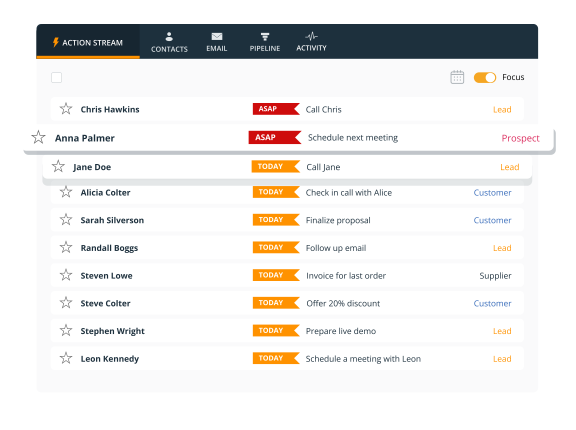
And to help you remain in touch, it should always prompt you to schedule another follow-up once you complete one.
Notes and interaction history
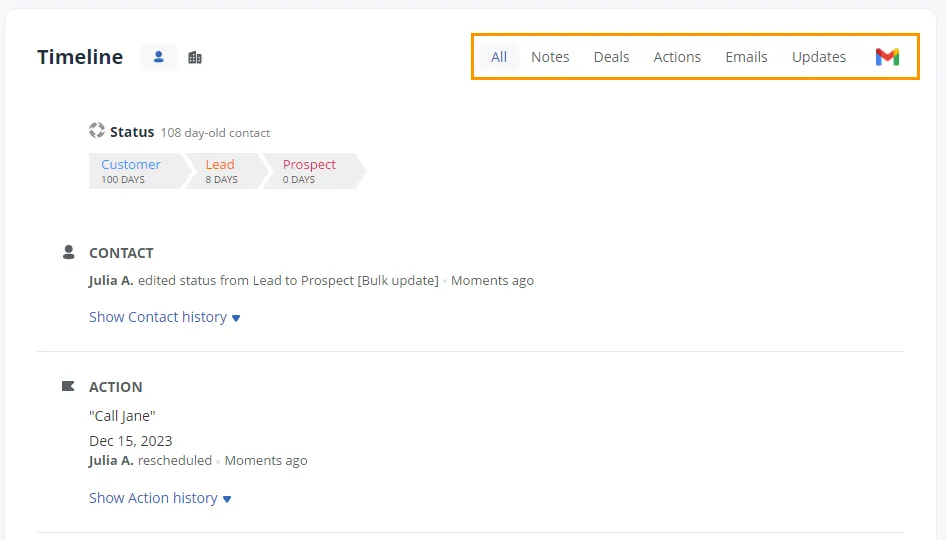
A personal CRM should log every interaction you’ve had with connections. It should also allow you to record important details your friend mentioned or what you discussed with a potential customer.
Contact relationship mapping
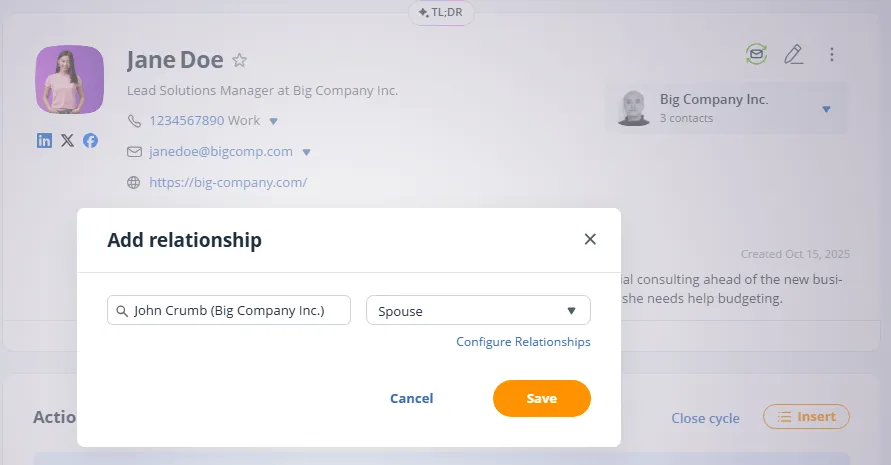
Personal CRM is all about social connections. Your contacts can relate to each other one way or the other. For instance, this person referred you to that person, this colleague used to work at the same company as that contact, this friend introduced you to that client, etc.
A personal CRM should let you define and visualize those connections. This way, when you're reaching out to someone, you can say something along the lines of “Hey Sam, Tom’s told me a lot about how you work.”
Tagging and filtering
As your contact list grows, you’ll need to be able to segment it. Which is why your personal CRM should include tags and filters.
With Statuses, you can group contacts and create categories like clients, friends, former colleagues, people you met at ‘X’ event, warm leads, family, etc.
Once your relationships are grouped, you can use filters to pull up any group.
Instant contact capture
Adding someone new to your contacts should take seconds, not minutes. The best personal CRM software let you capture someone's information directly from LinkedIn, a website, your email inbox, or even a business card—in just a few clicks.
Click-to-call
A good personal CRM should let you call your contacts directly from inside the app. Ideally, it should happen in just one click. It saves time and makes it easier to reach out in the moment, instead of putting it off.
Full email sync
To reduce the amount of work it takes to send emails back and forth with your connections, the best personal CRMs include full email sync.
With full email sync, you can send emails—to friends, family, potential customers, and more—without leaving your personal CRM. Every email these people send to you shows up inside the tool, and your full conversation is recorded as well.
Mobile app
Relationships happen everywhere, not just at your desk. You can network at networking events, over lunch, or on the way home from a meeting. That’s why the best personal CRM software have mobile apps.
With these mobile apps, you can add new people to your network, stay in touch, and build relationships from anywhere and at any time.
The Best Personal CRM Software
Here are eight of the best personal CRM tools available right now, based on our hands-on testing and assessments by our CRM experts.
OnePageCRM | Best for Follow-up Reminders
User Rating: 4.7/5 stars on G2
Pricing: From $9.95/user/month
Free Trial: 21 days. No credit card required
If following up and staying in touch with people is your biggest challenge, OnePageCRM is just what you need.
Every person in OnePageCRM has a Next Action attached to them. In simple terms, it’s the next thing you need to do to stay in touch and keep the relationship warm. For example, “Email Sarah” or "Check in with James."
Each of these follow-ups has a due date, and OnePageCRM automatically organizes and color-codes your contacts according to those due dates:
- The ones that are overdue show up at the top and are marked in red.
- Next are the ones due today, shown in orange.
- Then come the ones you need to follow up with later, marked in grey.
To help you nurture relationships more easily, OnePageCRM lets you capture contacts directly from your email, web pages, or social media profiles and add them to your system in just a few clicks.
You can also call, email, and add notes without leaving the personal CRM. Every interaction, whether it’s emails, notes, or call logs, is stored in one place, so you always know where things stand with each person.
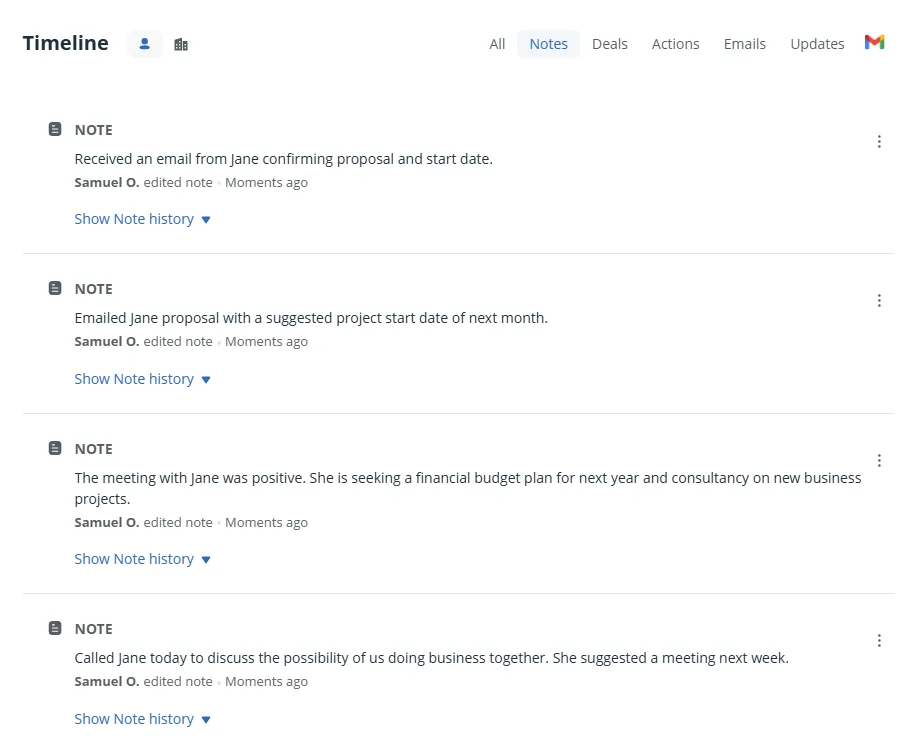
There’s also a built-in AI assistant that summarizes your interactions with people and gives you full context about the relationship at a glance. It even suggests what you can do next to further nurture the relationship. You can even connect OnePageCRM to ChatGPT, Claude, and other AI tools, and have them work as assistants in your CRM.
On top of that, OnePageCRM’s interface is clean, easy for beginners to use, and you can get started without any setup or learning curves. It also has a mobile app for iOS and Android, plus integrations with tools like Google Workspace and many others.
What Stands Out in this Personal CRM:
- One of the most affordable options on this list
- Always know what to do next with each person
- Organizes people by urgency
- Full profiles and interaction history on one page
- Send and receive emails inside the app
- Call from inside the tool
- Features an AI assistant
- Captures contacts from LinkedIn, websites, or email inboxes
- Tracks email engagement
- Includes mobile apps for iOS and Android
OnePageCRM FAQs:
Mesh (Clay) | Best for Contact Enrichment
User Rating: 4.7/5 stars on G2
Pricing: Free plan up to 1,000 contacts. Clay Pro at $10/month for unlimited contacts and more features.
Free Trial: Available (14-day free trial of Clay Pro)
Mesh (formerly known as Clay) is built around the idea that your database should update itself. That’s why it automatically builds detailed profiles for people in your network.
All you have to do is connect your email, calendar, address book, LinkedIn, and social accounts, and Mesh pulls in the job titles, company info, social profiles, mutual connections, and even recent activity of your connections.
One of its Mesh’s top features is its relationship strength scoring. This tracks how frequently you interact with people, and highlights those relationships that are going cold, so you can reach out before they fade. It also shows helpful context before meetings, so you always walk in prepared.
Beyond that, when you meet someone new and exchange emails, they appear in Mesh. Likewise, when a contact changes jobs or cities, Mesh picks it up.
Moreover, Mesh features an AI navigator (Nexus) that can search your network, summarize contacts, and draft follow-up messages.
That said, Mesh's depth of contact data comes from accessing a lot of your connected accounts. Giving access to your email, iMessage, and social accounts may feel like too much for some people.
Moreover, Clay/Mesh’s mobile platform is limited to iOS, as there's no Android app.
What Stands Out in this Personal CRM:
- Auto-enrichment from email, calendar, LinkedIn, and social media
- Little to no manual data entry
- Relationship strength scoring shows who's going cold
- Calendar context surfaces meeting prep without extra effort
- Clean, visual interface that feels more like a social app than a CRM
- Free plan available
Mesh FAQs:
Dex | Best for LinkedIn Networkers
User Rating: 4.3/5 stars on G2
Pricing: From $12/month.
Free Trial: 7 days
Dex is especially useful if you live on LinkedIn and do a lot of networking there.
You begin by connecting your LinkedIn, Gmail, Outlook, Facebook, iCloud, and phone to Dex. From there, it automatically syncs your connections and keeps their job titles up to date. And when someone gets promoted or changes companies, Dex automatically flags it and gives you a natural, low-pressure reason to reach out.
Dex’s Chrome extension is its standout feature. When you're browsing LinkedIn, you can add someone to Dex with a single click.
Beyond that, you can set keep-in-touch reminders (monthly, quarterly, annually, or whatever fits the relationship), log notes about your last conversation, and view a full timeline of every interaction with each person.
Dex also includes a Copilot that can generate conversation starters from a contact's notes and LinkedIn background. It can also create pre-meeting briefs, which include a quick summary of your shared history and recent information about a contact.
Dex’s downside is its professional focus. If you want something for tracking close friends and family rather than professional contacts, you may need to check out other tools on this list.
Likewise, there's no shared workspace or team collaboration features.
What Stands Out in this Personal CRM:
- LinkedIn sync with job change alerts
- One-click contact capture from LinkedIn
- Set keep-in-touch reminders per contact
- Full interaction timeline (emails, meetings, notes)
- AI-powered pre-meeting briefs
- Mobile app available for iOS and Android
- Pulls contacts from LinkedIn, Gmail, Outlook, Facebook, and phone
Dex FAQs:
Monica | Best for Privacy-Focused Users
User Rating: 5/5 stars on G2
Pricing: Free (self-hosted). Free plan available with a 10-contact limit. The hosted version is $9 per month.
Free Trial: Nil
Monica is based on the belief that your relationship data should belong to you, and only you. Thus, it’s not intended for professional networking, but for tracking personal relationships.
To achieve this, Monica is made open-source. This means that the code is publicly available, and you can install it on your own server and run the whole thing for free. You also don’t have to worry about any third-party company ever touching your private data.
Monica is a place where you can deliberately document what you know about the people you care about. This includes private conversations, milestones, birthdays, pets, important dates, and life events.
Feature-wise, Monica lets you manually build out contact profiles for the people in your life. You log conversations, record shared memories, track birthdays and life events, set reminders, and keep a personal journal.
However, Monica doesn't offer any integrations with email or LinkedIn. Neither does it have a mobile app. And since it’s a manual tool, you have to bring the information to it, rather than it pulling data from your existing accounts.
What Stands Out in this Personal CRM:
- Open-source and completely free to self-host
- Complete privacy, your data stays on your own server
- No tracking, no ads, no data monetization
- Great for managing personal relationships, not just professional ones
- REST API for developers who want to automate
Monica FAQs:
Covve | Best for Mobile-First Relationship Management
User Rating: 4.8/5 stars on G2
Pricing: Paid plan begins from $12/seat/month or $120/seat/year
Free Trial: 14-day trial
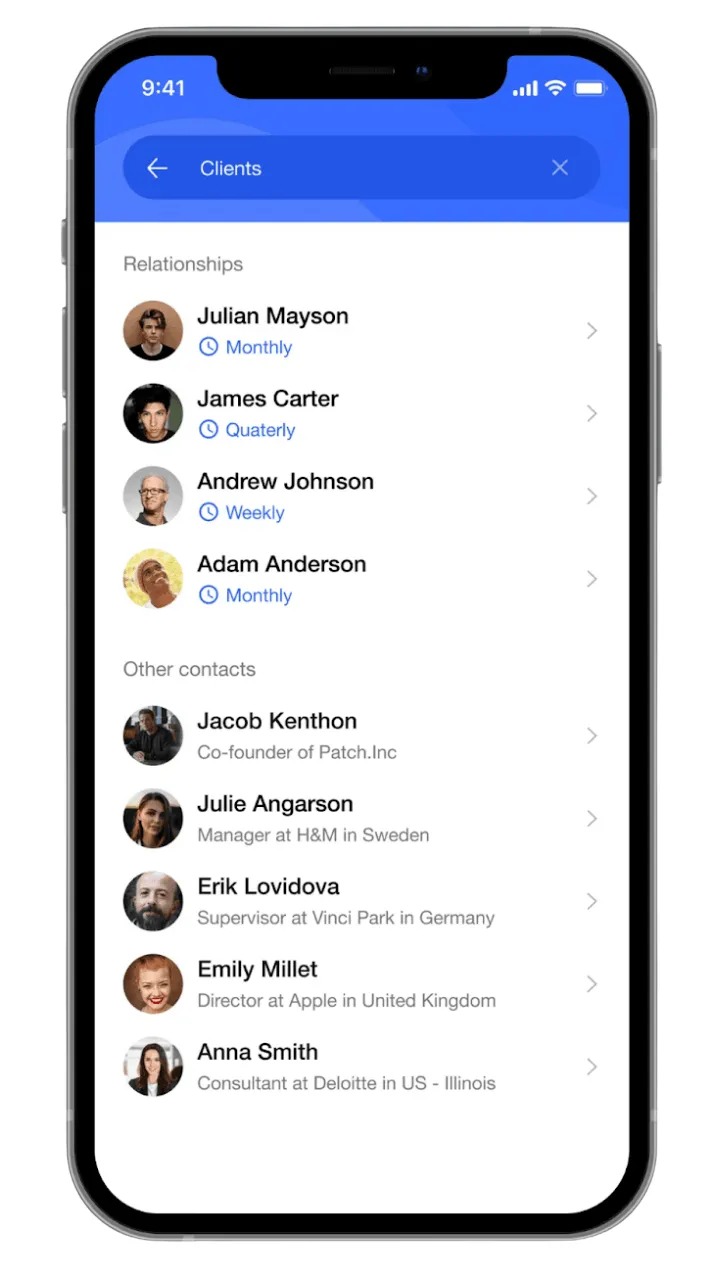
Covve is a personal CRM designed for professionals who manage their network on the go.
Covve’s standout feature is its News Engine, a built-in AI tool that scans over 150 news sources and sends you updates when something happens that's relevant to your contacts. This could be when their company makes the news, there's a development in their industry, or something shifts in their professional world.
Beyond that, Covve features follow-up reminders, note-taking, call logging, weekly networking stats, and the ability to scan business cards and add new contacts from there. There’s also a digital business card feature, so you can share your details electronically.
To top it off, Covve has contact enrichment to keep your contacts' profiles up to date with job changes and other publicly available information.
The major limitation is that Covve is essentially mobile-only. There's no desktop app, and the web interface is limited.
If you spend most of your day at a computer and prefer managing contacts from a browser, Covve will feel limiting.
What Stands Out in this Personal CRM:
- News Engine gives you organic reasons to reach out
- Smart follow-up reminders
- Contact capture via business card scanner
- Minimal setup
- Notes, call logs, and interaction history
- Mobile-first design (iOS and Android)
Covve FAQs:
Notion | Best Free DIY Personal CRM
User Rating: 4.6/5 stars on G2
Pricing: Free (personal), Plus from $10/user/month
Free Trial: Free plan available (no trial needed)
Notion isn't a CRM, but thanks to its flexibility, many people build their own personal CRM inside it.
When you use Notion as your personal CRM, it essentially acts as a database of your contacts. You just need to customize the columns to track whatever matters to you, whether it is last conversation date, relationship type, follow-up date, notes, project history, or even shared context.
If you’d rather not customize on your own, you can instead opt for Notion CRM templates. You’ll find lots of useful (and free!) community templates from Notion's marketplace.
Keep in mind that Notion may be lacking features you’d expect in a typical personal CRM. Features like full email sync, enrichment, and instant contact capture.
It’s a lot like using a spreadsheet as a personal CRM, rather than a dedicated tool. Which is why it only makes sense if you're already paying for (and using) Notion, and need a personal CRM without committing to another subscription.
What Stands Out in this Personal CRM:
- Free for personal use (free plan)
- Fully customizable, so you can track exactly what you want
- 1,000+ Notion CRM templates available
- Great starting point if you already use Notion
- Data is portable and easy to export
Notion CRM FAQs:
Streak | Best Personal CRM for Gmail
User Rating: 4.5/5 stars on G2
Pricing: Pro plan from $49/user/month
Free Trial: 14-day free trial
If you already spend most of your day building relationships via Gmail, Streak may just be the personal CRM for you.
Right inside your Gmail inbox, Streak lets you add your connections and their details. For people with missing information, the tool’s contact enrichment can help you fill in details like phone numbers, addresses, and social profiles.
Since the personal CRM operates in your inbox, it’s only natural that you can not only send and receive emails to people. But what’s more? You can see when someone opens your email or clicks a link inside it.
Streak also allows you to make calls, take notes, and add new contacts to your network directly from LinkedIn. There’s even an AI co-pilot that parses your interactions with people and creates a quick summary.
On the downside, however, Streak won’t work if you don't use Gmail. It's not compatible with Outlook, Apple Mail, or any other email provider. And if you want to automate your work, you'll need to pay for a higher-tier plan.
What Stands Out in this Personal CRM:
- Gmail-based, so the interface is familiar
- Email tracking shows when contacts open your emails
- Includes mobile app available for iOS and Android (via Gmail add-on)
- Integrates with the full Google Workspace suite
- Schedule emails for later
Streak CRM FAQs:
How We Evaluated & Picked the Best Personal CRMs
When putting this list of the best personal CRM tools together, we looked at each tool based on criteria that actually matter to individuals and solopreneurs who want to keep relationships warm without much physical, mental, and financial strain.
Ease of use
Personal CRMs have to be tools you’ll open and actually use consistently. That’s why we prioritized tools with simple interfaces, quick onboarding, low learning curve, and minimal maintenance.
Follow-up and reminder system
The whole point of a personal CRM is to remind you to stay in touch with people. So, we looked at how each tool handles follow-up activities and deadlines. Does the tool actively prompt you to reach out, or does it just store contacts passively? Does it push you to follow through?
Contact management and enrichment
We looked at how easy it is to bring your contacts into the CRM and manage them once they’re there. Does the tool automate things, or are you stuck entering everything manually?
We also considered whether you can see the full picture at a glance, including contact details, past interactions, and any upcoming activities, all in one place.
Integrations
Using tools that already fit into your workflow makes everything easier and increases the chances you’ll actually stick with your personal CRM. So we looked at whether each CRM connects with popular tools like email, calendar, Chrome, LinkedIn, and other apps you already use.
Mobile experience
For day-to-day use, mobile access really matters. We looked at which tools offer dedicated mobile apps and which ones don’t, and how easy they are to use on the go.
Pricing
Since a personal CRM is mainly for individuals and solopreneurs, it should be accessible. We looked at how affordable each tool is and whether it delivers real value for the price, especially for solo users.
Specific use case fit
A tool that's great for LinkedIn-heavy networkers isn't necessarily great for someone managing a family network. Thus, we chose tools that perform well in specific use cases.
User reviews
We also looked at feedback from platforms like G2 to back up our own live testing and assessments. That way, you’re not just getting our opinion, but real insights from people who’ve actually used these tools.
Which is the Best Personal CRM Tool in 2026?
There’s really no general ‘best’ personal CRM tool. Rather, the best personal CRM is the one that’s most suitable for your needs.
- If you want a personal CRM that works best for relationship-building and staying in touch. One that tells you who to interact with and when, records all interactions, and lets you communicate with the right person at the right time, OnePageCRM is the best fit.
- If you want the most personal LinkedIn networking experience, go with Dex.
- For contact enrichment, the best choice is Mesh (formerly Clay).
- If privacy and absolute data ownership are what you care about, Monica is the obvious answer.
- If you want something free and DIY, start with a Notion CRM template.
- Want to focus on managing relationships on the go? Opt for Covve.
- If you live in Gmail and don't want another app, Streak is the way.
Choose what works for you and make the most of it. I wish you the best!