NEW Email Sequences and AI Assistant are live now


 All product updates
Before a call, you need context. But if the lead has months of notes, emails, calls, and deals, getting context can be overwhelming.
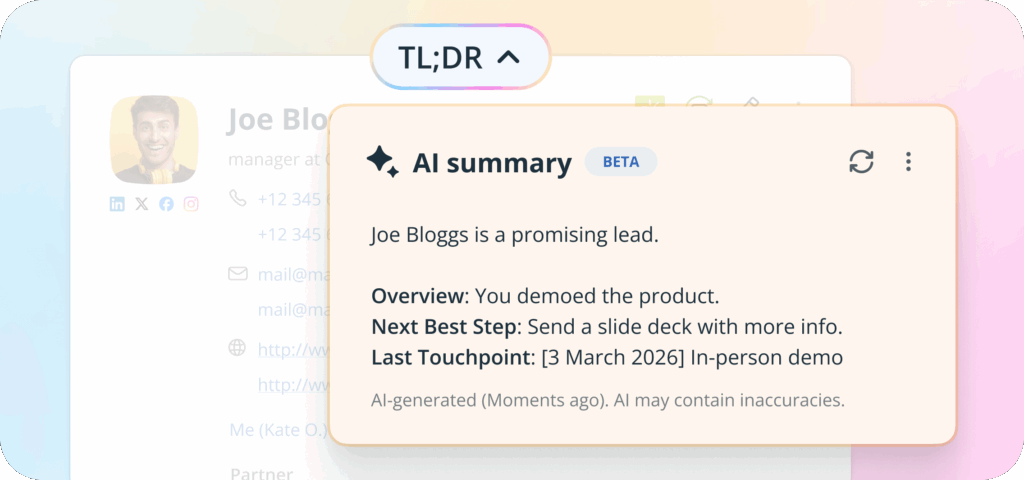
In OnePageCRM, the TL;DR button generates an AI summary of comprehensive contact pages in seconds.
Open any contact with a detailed history and click the TL;DR button at the top of their page.
The AI reads through the entire activity timeline and gives you a concise summary.
You have a call with a customer you haven’t spoken to in two months. Their contact page has fifteen notes, eight logged calls, and three deals.
Instead of scanning through everything manually, click TL;DR.
In a few seconds, AI shows you a handy prep for the call and a reminder of what was discussed. There are also a few Next Best Actions that you can follow.
When a contact is reassigned to a new team member, the receiving person needs the full history.
With the TL;DR summary, the AI does the job. It scans the contact page and provides a quick overview of the most important discussion points.
Just click the button, read the summary, and pick up where things left off.
Some contacts go quiet for months. When it’s time to reach out again, you need to remember why they went cold and what they were interested in.
Click TL;DR to get a refresher. The summary pulls the key details from past interactions and even highlights the Last Touchpoint date.
From here, you can easily write a relevant follow-up.




