Top 7 Free Notion CRM Templates
Samuel Oyebode
January 22, 2026
21 min read



Want to close more deals than you currently do? You just need to understand your leads better.
What better way to gain this understanding than with a tool specifically designed to help you manage leads?
To save you precious time, energy, and money, we’ve done all the testing and compiled for you, this list of the 8 best lead management software.
You’ll find descriptions of each software, as well as the cost, customer ratings, and top lead management features. We also share screenshots to help you visualize what using each software might look like.
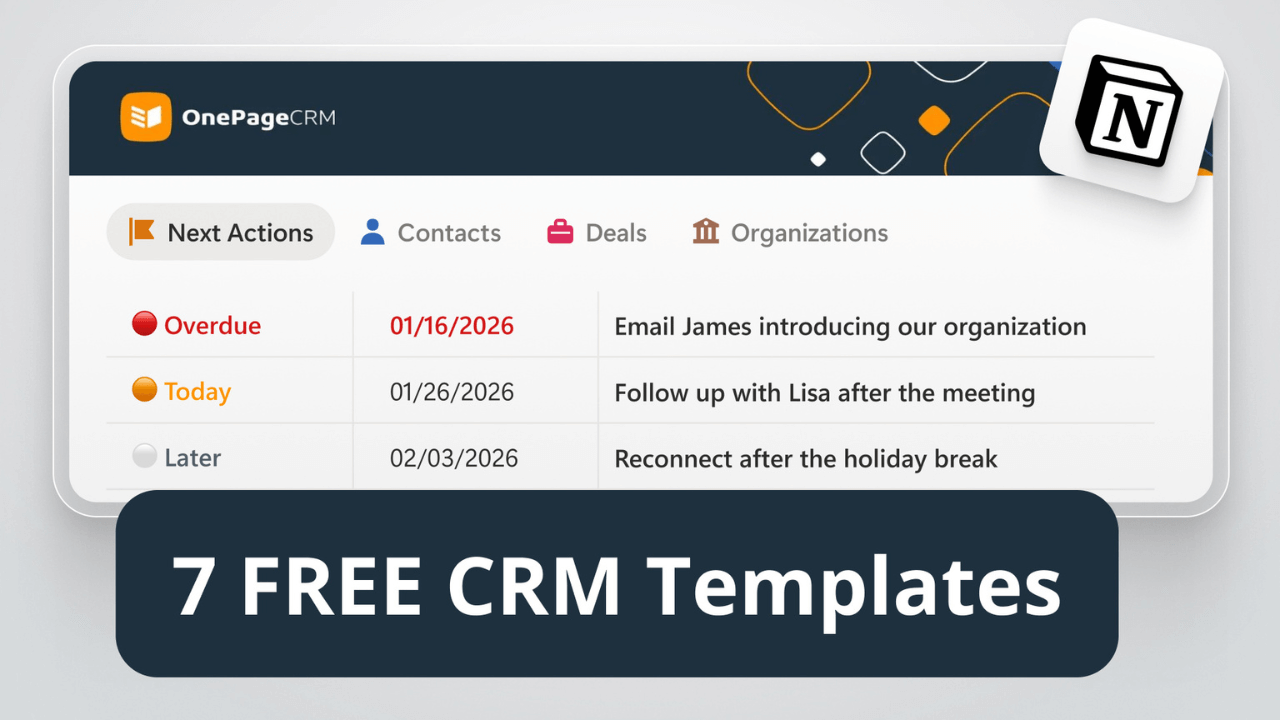
OnePageCRM is a CRM, but it’s perfect for tracking and managing leads. Once you log in, you’ll see your leads, arranged in order of how urgently you need to interact or follow up with them. You’ll also see the exact follow-up task required for each lead.
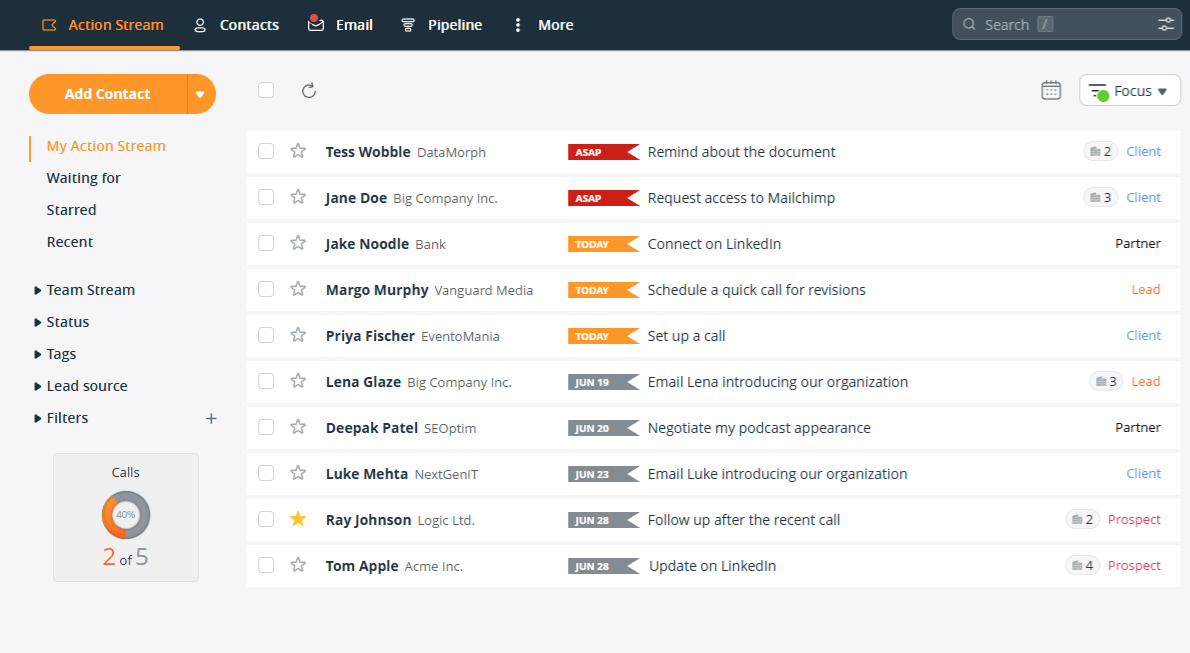
Every lead in OnePageCRM has a dedicated page. On this single page, you can manage all of your interactions with the lead:
OnePageCRM also makes it quick and easy to add new leads. You can automatically gather leads’ data via web forms or from websites, emails, or social media profiles. The leads appear together with to-do items (follow-up reminders) and are sorted based on the urgency of each follow-up.
Features OnePageCRM Offers (on the lowest plan):
Pricing starts from: $9.95 per user/month (if paid annually).
Free trial: 21-day free trial. No credit card info needed.
Best suited for: Small and medium-sized businesses looking for a simple tool to track follow-ups and interactions with leads.
Customer rating: OnePageCRM has an average rating of 4.7/5 on G2.
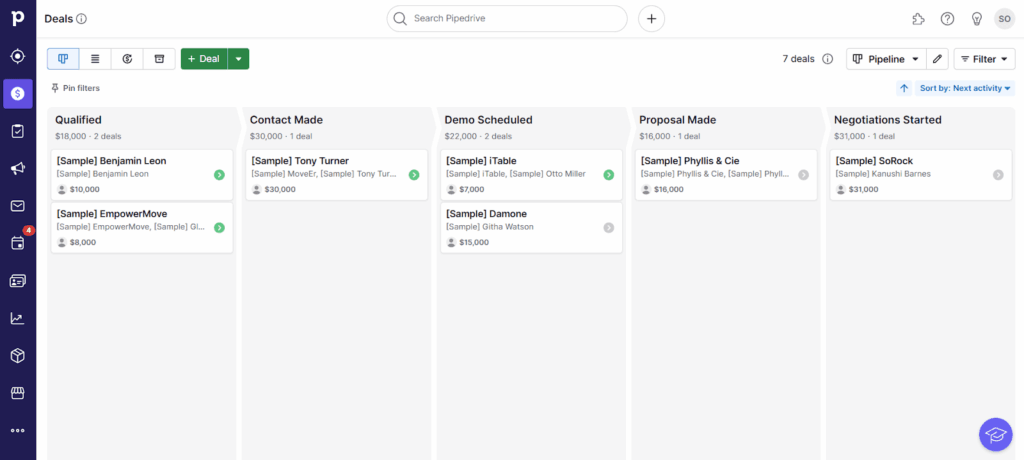
Pipedrive is more focused on tracking deals, rather than leads. Instead of a list of contacts, the first thing you’ll see when you open this CRM is the pipeline containing all deals at various stages of your sales cycle.
Pipedrive also features an “Activity Calendar” where you can schedule and view all calls, meetings, and other tasks you have on your plate. The calendar syncs with your Google Calendar and Outlook, and even sends reminders for every activity.
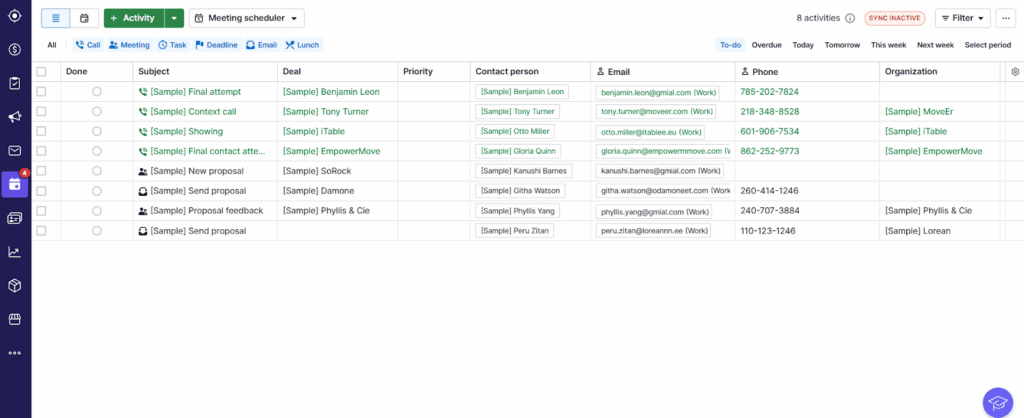
Features Pipedrive Offers (on the lowest plan):
Pricing starts from: $14 per user/month (if paid annually).
Free trial: 14-day free trial. No credit card info required.
Best suited for: Small or medium-sized businesses with large sales teams or complicated sales processes. Pipedrive is a good solution for tracking comprehensive sales deals. Not all of its lead management features are included in the lowest plan, so Pipedrive is most suitable for businesses with larger budgets.
Customer rating: Pipedrive has an average rating of 4.3/5 on G2.
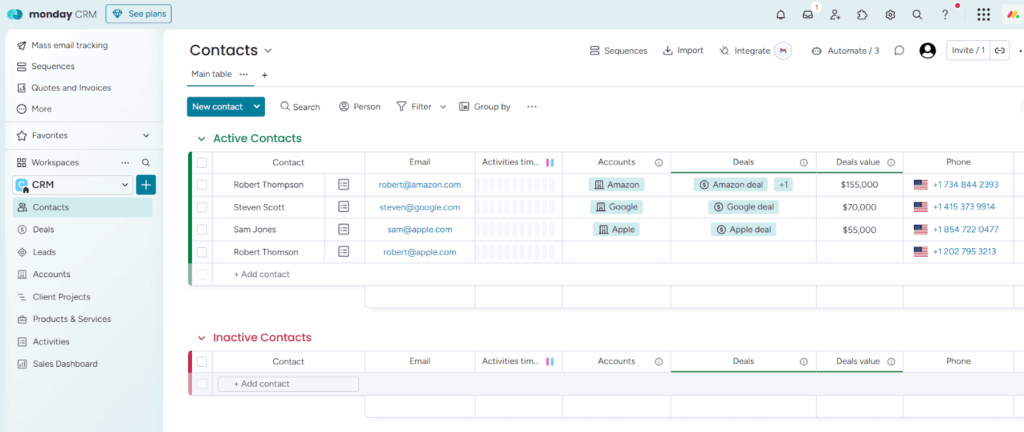
Although Monday.com is mostly known for work management, it also has a CRM template for sales. This Sales CRM comes with ready-made boards for tracking leads and deals, but it’s more suitable for the latter.
Each deal is like a project. It gets its own page, where you can view contact details, manage the deal’s journey through your pipeline, and keep track of all communications.
As a fully customizable platform, Monday.com gives you building blocks to shape your lead management system as you like. However, if you’re not experienced in CRM setup, you may end up building a system that’s too complex or inefficient.
Luckily, there’s a tutorial video explaining how to use the CRM:
Features Monday CRM Offers (on the lowest plan):
Pricing starts from: $36 per month for the Sales CRM (if paid annually), with a minimum of 3 users per plan. Keep in mind: The Sales CRM and the work management tool have separate pricing plans, both of which have a starting limit of 3 users.
Free trial: 14-day free trial. No credit card info needed.
Best suited for: Agencies with a big team looking for a tool to track client projects and assign them to different team members, or those businesses that already use Monday.com for project tracking.
Customer rating: Monday.com’s CRM has an average rating of 4.6/5 on G2.
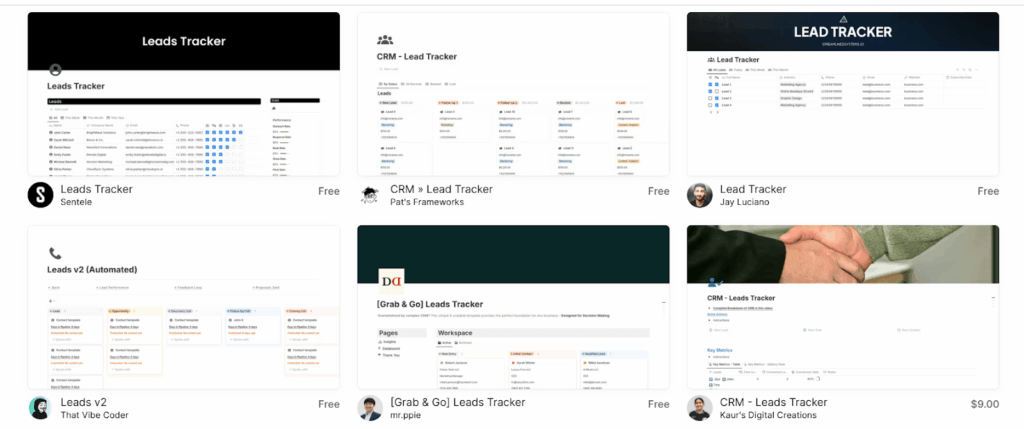
Notion is an all-in-one workspace where you can organize and manage all kinds of projects. It’s not a dedicated sales tracking tool. Rather, it’s a customizable platform with templates that you can use to track leads.
There are tons of CRM templates to choose from, but you might have to customize them to suit your business and specific sales pipeline. So, if you’re not a fan of setting up your own lead management system, this might not be for you.
Features Notion Templates Offer (on the lowest plan):
Since Notion isn’t a CRM, they don’t have a lead-capturing browser extension or contact enrichment functionality.
Pricing: There’s a free plan, but paid plans begin from $10 per user/month (if paid annually).
Free trial: 30-day free trial. Needs credit card info.
Best suited for: Freelancers or solopreneurs who like DIY tools and look for a way to organize their workflow in a custom-built app. However, as your Notion database becomes more complex and your contact list grows, you might experience a larger load time, as per some reviews.
Customer rating: Notion has an average rating of 4.7/5 on G2.
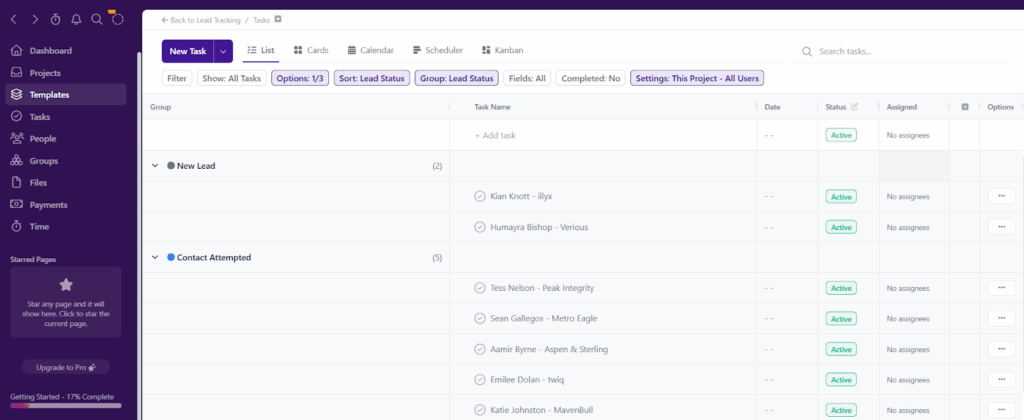
Project.co is a lot like Monday.com. Although it’s primarily a software for organizing and managing projects, it can also be used as a sales lead tracking tool.
This app presents all your contacts in a list and, by default, groups them according to their lead status. However, it does not come with fields to track leads’ contact information. You’ll have to add those yourself.
Project.co also features a calendar where you can schedule activities with each lead, assign sales reps to them, and set deadlines.
Features Project.co Offers (on the lowest plan):
Project.co is a project management tool. That’s why it doesn’t have lead capture or data enrichment features. Its lead tracking functionality is quite limited. But you can integrate it with your Zapier account.
Pricing: There’s a free plan (only up to 10 client records). The paid one starts from $10 per user/month.
Free trial: None. But there’s a satisfaction guarantee, meaning Project.co will give you a refund if you’re not happy with the Pro plan after 30 days of use.
Best suited for: Small businesses and teams who focus on project management and want to keep leads in the same app. It has a free plan, but it is quite limited and suitable only for those businesses that have just a couple of big customer accounts.
Customer rating: Project.co has an average rating of 4.7/5 on G2.
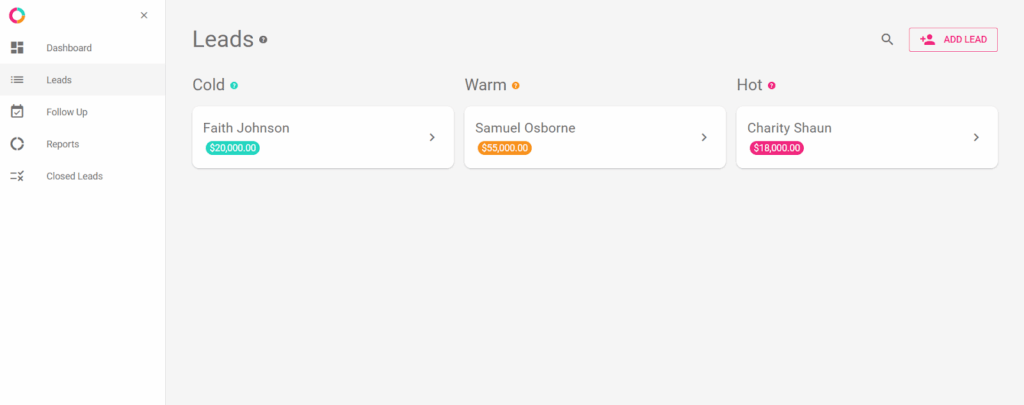
PrettySimple is a mobile app created to help solopreneurs and salespeople track leads and sales. Since it was made by solopreneurs, this software comes with a design that’s not just clean, but also simple to use.
There are no complicated features or integrations. It lets you capture leads, record where they came from, and sort them by temperatures such as “Cold”, “Warm”, and “Hot”.
You can’t access PrettySimple’s web version without an iOS device. To use this lead tracker in your web browser, you must first download the mobile app and sign up. Afterward, you can log in and use the app through your web browser (if you want).
Features PrettySimple Offers (on the lowest plan):
Pricing starts from: $4.99/month.
Free trial: 14-day free trial. Credit card details required.
Best suited for: Solopreneurs who use iOS devices and need something basic to track leads.
Customer rating: PrettySimple is not featured on G2, but it has received an average rating of 5/5 from 46 users on the App Store.

Sheetify CRM is the only tracker on this list of tools that doesn’t require any subscription. You pay once and get lifetime access to the Google Sheet.
This spreadsheet CRM has a tab for tracking all your leads’ information. It also features a tab for scheduling and managing sales tasks, a calendar to track your deals and sales tasks, and an email marketing add-on that allows you to send emails directly from within the tracker.
Despite all these features, Sheetify CRM is a spreadsheet, and as such, has limits. Once your business grows, it won’t be able to keep up.
Here’s a short video tutorial on how Sheetify CRM works:
Features Sheetify CRM Offers (on the lowest plan):
Pricing starts from: $97 (a one-time purchase).
Free trial: None.
Best suited for: Micro businesses who are still heavily reliant on spreadsheets (especially Google Sheets) and are not ready to make a move to a CRM product. Sheetify CRM is a good transition option.
Customer rating: Sheetify CRM is not featured on G2 or other review websites.
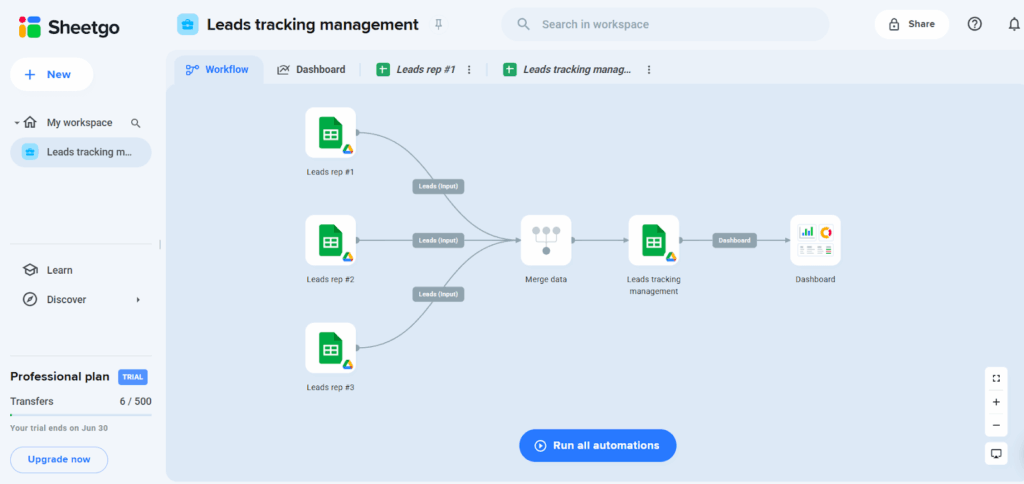
SheetGo lives on Google Sheets, but it’s a more sophisticated option than many lead management systems built in spreadsheets.
Each sales rep gets their own spreadsheet for managing leads, while the sales manager or team lead has a separate sheet for supervision.
SheetGo’s master dashboard gathers data from all the spreadsheets and uses it to create real-time sales reports or insights.
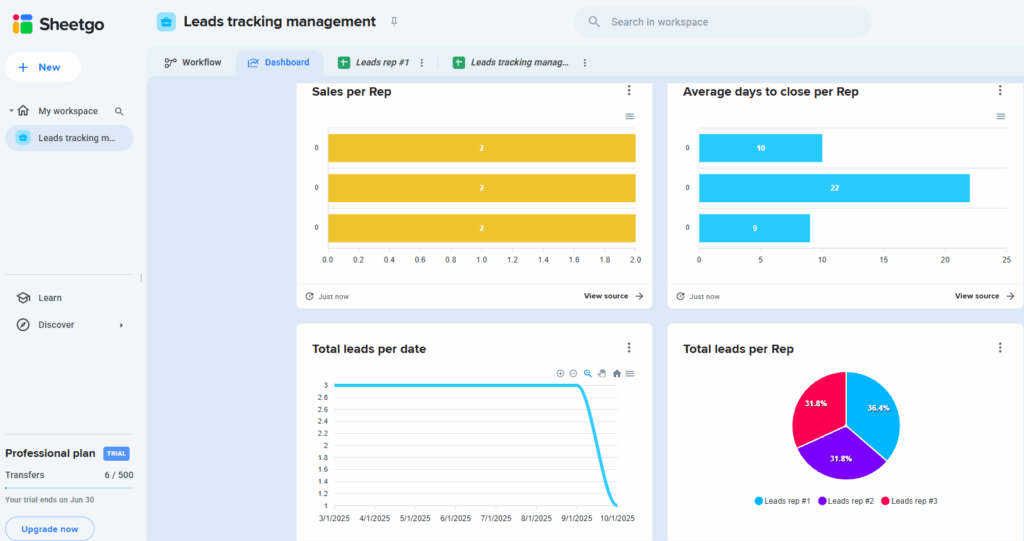
Features SheetGo Offers (on the lowest plan):
Pricing starts from: $22/month, but there’s a free plan.
Free trial: 14-day free trial. No credit card info is required.
Best suited for: Micro businesses who still use spreadsheets to track leads but want to automate some very minor parts of their workflows. Unlike Sheetify CRM, SheetGo has a free (although limited) plan, so it can satisfy the needs of those businesses who are ready to make a step towards a more sophisticated spreadsheet setup but are still not ready to pay.
Customer rating: SheetGo has an average rating of 4.3/5 on G2.
Lead management tools allow you to gather and visualize your leads’ data. The whole point of having a lead tracker is to nurture new connections and turn them into loyal customers.
That’s why great lead management software should do more than just organize leads. It should also help you reach out at the right time, stay on top of follow-ups, and move each lead forward in your pipeline.
Something as simple as a spreadsheet can be just right if you’re working with a small pool of contacts. If you’re the type to customize and build your own system, you could opt for a free Notion CRM or specialized add-ons on Google Sheets (like SheetGo or Sheetify CRM).
And if you want something more powerful but still simple, OnePageCRM can work for you. It captures leads automatically, records the sales activities in one place (including emails), shows your next steps, and reminds you to follow up. It’s also more affordable than most other lead management tools.


More than just a writer, Samuel is a communications expert. He understands how confusing and overwhelming SaaS products can be. That's why he's spent 6+ years helping SaaS brands deliver simple, actionable content that makes their products easy to understand.