
There's a lot more to selling than the selling itself. You also have to look into leads, prepare for calls, follow up, write up documents, do some admin, and so much more.
All these things can be tedious and time-consuming, but on the bright side, AI can take them off your hands.
Connect your AI tool to your OnePageCRM account, and you'll essentially have an AI sales agent to handle all the annoying sales work.
Below, we'll show you how it works, how to set it up, and what it can do for you.
How an AI sales agent works in your CRM
AI sales agent, here, is the result of connecting AI to your sales CRM to help handle some of your sales work, especially the repetitive one. You'll also see it called an AI agent for CRM, but it's the same thing.
In OnePageCRM, you do this by connecting an AI tool to your account. That AI tool can be Claude or ChatGPT. It can also be Perplexity, Grok, Mistral, or another AI tool that connects to other apps.
Once it's connected, the AI can see your contacts, deals, notes, follow-ups, and more. And if you want it to, it can also edit and/or update them when you prompt or tell it to (via the voice feature).
The connection happens through an MCP, and it only takes a few minutes to set up. You simply add OnePageCRM to your AI tool's connectors, sign in, and choose how much access to give the AI.
Find and sort your leads
Having an AI sales agent in your CRM makes it a lot easier to find and manage leads. Here's how.
Qualify the leads from your website form
The contact form on your website brings in potential customers. But it also brings in job seekers, people trying to sell you something, and so on.
Instead of going through all of them to find the ones worth following up with, you can ask your AI sales agent to do it for you.
For example, you could ask it to go through this week's form leads and pick out the ones worth a follow-up.
It'll weigh up what each person put in the form, like their budget and when they're looking to buy. Then it'll put a Next Action on each one that qualifies. And it'll list the rest for you, with the reason it ruled each one out.
Research a company and add its decision makers
Before you sell to a company, it helps to know who to talk to there and a little about the company itself.
Rather than look all of that up yourself, you can have your AI sales agent do the research and add the people and info it finds to your CRM.
For instance, you could give it a company name like Notion and ask it to find the people who make the buying decisions there. Then have it add each of them to your CRM. Anything else useful it comes across goes into a note as well.
You can even take it a step further and ask it to schedule follow-ups for each of the new leads.
Know which leads to go after first
When a lot of new leads come in at the same time, it's hard to know who to focus on first. Some are usually a far better match for what you sell than others, but you'd only know by going through each one's record.
Or you could leave that to your AI sales agent.
For example, you could ask it to score your new leads on how closely they match your best customers. Then have it mark each one as Hot, Warm, or Cold.
It'll go through what's on each lead's record and add the tag that fits. After that, you can filter your Action Stream by the Hot tag to see the leads most worth your time.
Work on contacts and deals
Once a lead is in your CRM, there's still plenty to do. Here's where your AI sales agent comes in.
Catch up on a contact before a call
A call with a lead goes a lot better when you know what you talked about last time and what you promised them. To find all of that, though, you'd have to spend time scrolling through your old notes and emails.
Your AI sales agent can put together a quick brief for you instead.
It'll read through your notes, open deals, and Next Actions, and sum them up in a few lines. It'll also look online and tell you if anything has changed at the company, so there are no surprises on the call.
Log calls and move deals forward
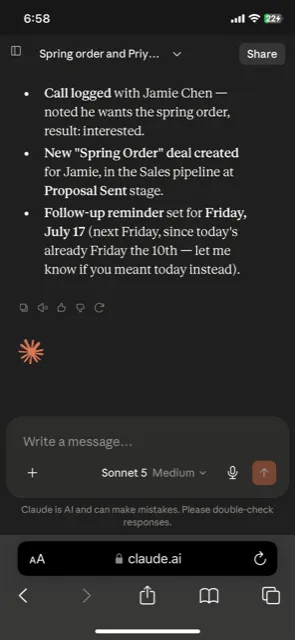
Manually logging your calls with people and updating their deals can be a bit tedious. But if you tell your AI sales agent how the call went, it'll do the work for you.
It'll log the call on the contact's page, and depending on how the conversation turned out, it'll move their deal to another stage, schedule follow-ups, and even add a note if there's anything worth keeping in mind.
What's more, you don't even need to be at your desk for this. If you're on the move, you can say the same thing to your AI tool's phone app, and it'll make the updates for you.
Pull the action points out of a call recording
If you record your calls, every action point you agree on ends up in the transcript.
AI can go through the transcript and set up a Next Action for each thing you agreed to, on the contact it belongs to. It'll also write a draft of your follow-up email, which you can check and change before you send it.
And if you use Zoom for calls, you won't even need to copy and paste the transcripts. Simply connect your AI tool to Zoom, and it'll pull the transcripts in by itself.
Write follow-up emails with full context
Your AI sales agent can save you the trouble of writing up emails every time.
Ask the AI, and it'll draft an email the way you would, and because it can see your notes on the recipient's profile, it'll bring up what the two of you last talked about. And if you'd like to talk some more, you can connect Calendly and have your AI add a meeting booking link to the email.
Once you're happy with the draft, you can save it as a note in your CRM or send it out directly from inside the AI chat window (if Gmail is connected, of course).
Connect to your calendar and other tools
When you book a follow-up meeting, your AI sales agent can help you put it in your calendar.
Say you want to speak to a prospect on Tuesday morning. You could ask the AI to set up the call and note it on their CRM record. And it'll do just that.
The same goes for other tools you use. Once they're connected to the AI, it can use what's in them along with what's in your CRM.
Find out why you lose deals
Why waste time going through a deal's history just to find out why you lost it? Your AI sales agent can do the job quicker and more thoroughly.
If you ask it to, your AI will go through the notes and emails from every deal you lost, and pick out the reasons that come up the most. And if you need something more elaborate, it can also build a report or dashboard off of what it finds.
Keep your contacts in order
A CRM works best when what's in it is tidy and up to date. Your AI sales agent can help you keep it that way.
Bring in a list of contacts
When you have a long list of new contacts whose details are written every which way, the last thing you want to do is type them all into your CRM yourself. This kind of work will be better handled by your AI sales agent.
In addition to adding every person on the list as new contacts, it'll also tidy up all the messily written details, keeping your database consistent.
Sort your contacts into groups
Managing and selling to your contacts is a lot easier if you've grouped them accordingly. Your AI sales agent can take on this task for you.
You can ask the AI to:
- go through each contact's basic details, notes, deals, follow-ups, and activities,
- find what they have in common,
- turn that into a few tags that fit,
- add the right tag to each contact.
Then you can sort your contacts by any of those tags and work through one group at a time.
See which deals have no follow-up
To move a deal forward, you need to act on it. That's why a part of your AI sales agent's job is to identify those deals you've stopped acting on, or never started.
The AI can go through your Pipeline and list every deal that doesn't have a Next Action set up. It can also suggest what you can do next (and when) to move those deals closer to a sale.
Start using your own AI sales agent today
If you already use OnePageCRM and an AI tool, you only need to connect the two to have your very own AI sales agent. And if you don't, you can start a free trial of OnePageCRM and try all of this out before you decide.
If you'd like ready-made wording for any of the jobs above, our CRM prompts library has prompts you can copy. And if you're still choosing a CRM, our AI CRM guide shows which ones let you set up an AI agent for sales, like this.