
Every small business owner, salesperson, and marketing team knows follow-ups matter. Yet promising leads still slip away. You'll find plenty of posts from founders on Quora and Reddit about how they lost deals simply because they forgot to follow up.
While the reasons vary, follow-ups rarely fail because of a discipline problem. For a lot of small businesses, the problem is the system around them or the way they approach follow-ups.
Here are eight reasons follow-ups fail, and what to do about each one.

1. You mistake silence for a lost lead
Leads don't always respond quickly, even if you've had a good call or chat with them and sent whatever they asked for. But this delay doesn’t always mean they don’t plan to move forward.
That's why quiet leads should stay visible in your CRM. They don't have to be at the top of your tasks list, but scheduling a follow-up for a few days or weeks later can make a real difference.
And if you have a good CRM tool in your corner, doing this will be a lot easier.
For example, in OnePageCRM, you’re encouraged to add a CRM task or action item for every contact. For leads that have gone quiet, you can set the Next Action two or three weeks out so you don't have to rely on memory. If you're not sure when to circle back, you can add a Queued action instead.
You don't have to keep every quiet lead open forever. The point is to make a deliberate decision about whether to follow up, put the opportunity on hold, or close the sales cycle. If the prospect resurfaces months later, their contact record and conversation history will still be there.
2. You're waiting for a reply, but nothing is tracking it
A lot of people tick off the task once they’ve sent a proposal or a demo a lead asked for. But the work doesn’t finish there. You're still waiting for the lead’s response, which determines what happens next.
This is different from a lead that has gone quiet. Before you can decide whether to follow up, you need a way to track what you’re waiting for and how long you’ve been waiting.
The problem is, most CRMs only track what you need to do, and not what happens after that.
In OnePageCRM, there’s a ‘Waiting’ flag that helps you identify contacts where the next move belongs to someone else. There’s also a separate ‘Waiting for’ tab where you can quickly see which contacts you’re expecting to hear back from.
This way, rather than treating the sent email as the end of the task, you keep the outstanding conversation visible.
3. Your follow-up system needs upkeep you also forget
Some follow-up systems take so much work to keep up to date that they become a job of their own. That’s usually the case when you track follow-ups in one place but talk to people somewhere else, so you have to update your list by hand whenever something changes.
The problem is that this extra work is easy to forget. Skip a few updates, and the list is full of old conversations and wrong dates. At that point, it’s hard to tell who actually needs a follow-up, so some people don’t get one.
Reminders can’t fully fix this either. A reminder to “Follow up with James” is only useful if you remember what you and James talked about last.
That’s why it helps to have a sales-focused CRM that clearly shows you who you need to follow up with, when, and why.
In OnePageCRM, each contact can have a Next Action with a due date. That’s your follow-up reminder, and because it’s tied to the contact, all the context you need to act on it is right there with it.
What’s more? The two-way email sync means you also have a complete history of your client conversation inside that same place.
4. Overdue follow-ups pile up until you stop looking
Having a few overdue follow-ups in your CRM is a great reminder. But when your task list is full of overdue actions, it’s hard to figure out which ones are still worth pursuing and which are no longer relevant.
If you have such a long list of overdue follow-ups, start by reviewing what’s there. Then decide which leads still deserve your attention, reschedule follow-ups that are worth pursuing, and close out tasks that no longer make sense.
If you can't remember why a follow-up matters, check the contact's conversation history before deciding what to do next.
In OnePageCRM, your Action Stream brings your Next Actions into one place, helping you see what needs your attention the most.
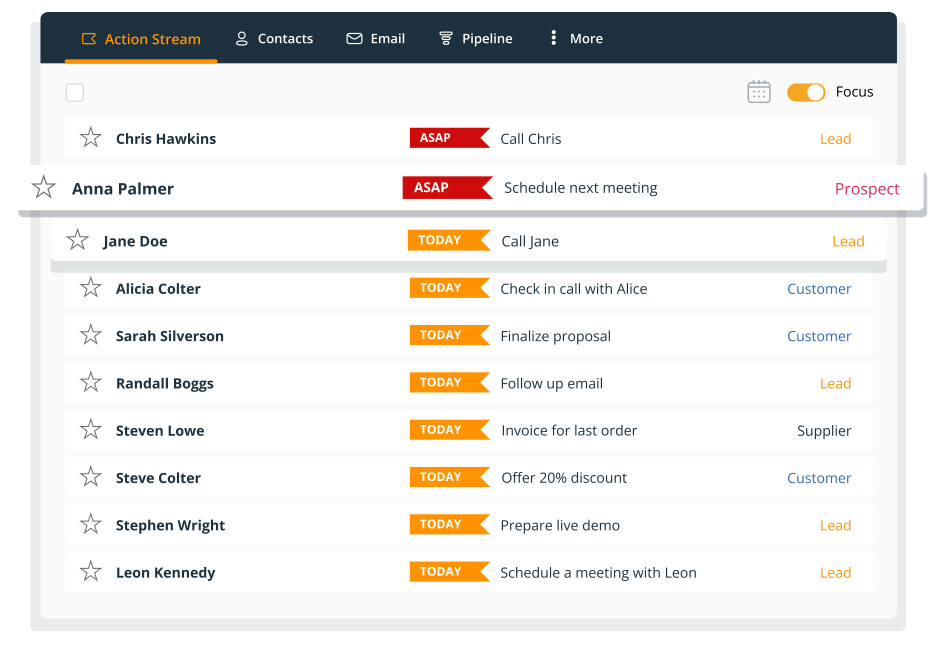
Once you review your list, you can complete an action, schedule it for another date, or close the sales cycle if the opportunity is no longer worth pursuing.
5. No next step was ever scheduled
Scheduling your next steps with a lead is good, and completing them is even better. But that’s not where it ends.
If you complete a task and move on without setting up the next step or when you should get back in touch, nothing is going to bring that prospect back to your attention. And eventually, you’ll forget all about them.
Make it a habit to decide on the next action before you move on from a sales conversation. It might be sending additional information, checking whether the prospect has reviewed your proposal, scheduling another call, or something else.
Some CRM software can help you with this.
Take OnePageCRM, for instance. When you tick an action off, the box for the next one opens straight away. You're asked what happens next while you still remember the call. If you haven’t decided a date yet, simply create a Queued action so it doesn’t slip your mind.
6. Your CRM tracks leads but never prompts you
Most CRMs show you your contact list, deal stages, notes, and emails, but they don’t clearly tell you which contact needs attention next.
Say you have a pipeline full of promising leads, each at a different stage. One prospect needs a proposal, another is waiting for a reply, and a third hasn't responded in two weeks.
If you have to inspect every contact separately to identify overdue follow-ups, today's tasks, and upcoming actions, you're still doing much of the organizing yourself. And that’s a problem.
Your CRM should tell you what needs attention next the moment you open it. Few small business CRMs do this right, and OnePageCRM is one of them.
OnePageCRM's Action Stream is designed to put Next Actions at the center of the working day. Actions are organized by urgency and color-coded, making it easier to see what needs attention now and what can wait. But that’s not all.
OnePageCRM can also email you a daily reminder with your upcoming actions, send a daily summary notification to your phone, and show desktop notifications through its browser extension.
You still have to create a Next Action or Scheduled Action for every contact yourself, but OnePageCRM shows them in a way that makes it quick to spot what needs your attention and when.
7. You don't know how many follow-ups are too many
There’s no set number of follow-ups that works for every prospect. Someone who asked for a proposal might just need a few days to read it. But someone who stopped replying after your first conversation might not be interested anymore.
If you treat both the same way, you could give up on the first one too soon or keep chasing the second one long after they’ve moved on.
So before you reach out the first time, have a rough plan for how many follow-ups you’ll send, how far apart, and when you’ll stop.
A CRM makes this easier, because you can see when you last contacted someone and what happened. In OnePageCRM, you can set the Next Action for the right date and check the contact’s notes and past conversations before you follow up again. And if you’ve tried several times with no reply, you can put the lead on hold or close the sales cycle.
8. You don't want to sound pushy
Sometimes you know exactly who needs a follow-up and when, but you still don’t send it. You worry the prospect will feel pressured, or that one more message will hurt the relationship. So you wait a few more days, then another week, until the follow-up is forgotten.
One founder on Indie Hackers wrote about making four calls, finding it awkward, and giving up.
What usually makes a follow-up feel pushy is having no reason behind it. So before you send one, look back at your last conversation with the prospect. Did they say they were interested? Are they waiting on someone else before they can decide? Do you have something useful to add, or are you just asking if they’ve had a chance to look?
When you know why you’re following up, it’s much easier to do so.
OnePageCRM can help with that. In OnePageCRM, you can create a Next Action for a future date, so you know when to reach out without having to remember it yourself. You can also check your notes and communication history before contacting them, so you can make your follow-up relevant to what you last talked about.
The real problem isn't always the follow-up
If we look at these eight situations again, in most of them, you already knew you should follow up. The issues are that the next step isn't visible, the reminder lacks context, the list is unreliable, or you have too many other things competing for attention.
That's why another productivity tip or a promise to "be more organized" isn't often enough.
You can try harder to remember, but relying only on your memory isn’t a great approach. You can build a spreadsheet, but then you have to remember to maintain it. You can buy a CRM, but if it only stores contacts and deals, you may still have to work out who needs attention each day.
The better approach is to use a system that makes the next action clear and keeps it visible until you've dealt with it.
That means:
- Every active contact has a next step. If there isn't one, decide whether the opportunity is waiting, queued for later, or closed.
- Waiting for someone else doesn't mean forgetting about them. Track outstanding replies as well as the tasks you're responsible for.
- Reminders include context. Make it clear what you need to do and keep the action close to the conversation.
- Your daily list stays usable. Review overdue work, prioritize what matters, and move less urgent tasks out of the way.
This is the idea behind OnePageCRM's Action Stream and Next Actions: your CRM shouldn't just record what happened. It should help you decide what happens next.