
Selling comes with lots of small tasks.
You have to write call notes, update deals, send follow-ups, respond to emails, and so much more. These jobs take time away from talking to your customers, and yet, they have to get done.
Superhuman Go can now do a lot of that work for you.
By connecting with your CRM, Superhuman Go can help you carry out some of the repetitive admin work you’d otherwise have to spend time doing yourself.
In this article, we'll look at how Superhuman Go works and share some practical prompts you can try with OnePageCRM.
What is Superhuman Go?
Superhuman Go is one of the tools in Superhuman’s AI productivity suite. It’s an AI assistant that you can use to ask questions, write text, read and summarize documents, and get tasks done.
It has a full-screen chat that works like Claude and ChatGPT. You type a prompt in plain English, and it carries out the task for you.
Superhuman Go is also built to help you where you're already working, rather than in a separate window. With the browser extension for Chrome and Edge, you can open Go in a side panel on the page you're on. It understands what's on your screen, so you won’t have to copy and paste or describe what you're working on.
Superhuman Go even connects to the apps you already use, like Gmail, Outlook & Calendar, Slack, Salesforce, Notion, Zoom, and OnePageCRM. That means the AI can take actions in those tools, not just answer questions.
For example, once you connect Superhuman Go to OnePageCRM, you can open it in a side panel and ask it to create new contacts, summarize your Action Stream, reschedule overdue Next Actions, log a note after a call, or schedule a follow-up.
What can you do with the Superhuman Go AI assistant?
Beyond chat and writing help, Superhuman Go can also handle tasks across the tools you use for business.
Here are some practical ways you can use the Superhuman Go AI assistant with OnePageCRM.
Ask Superhuman Go to handle CRM admin
Once OnePageCRM is connected, you can ask Superhuman Go to do your CRM admin tasks.
A few examples:
- “Log a note on Jane Doe about today's call and set a Next Action to send the proposal on Friday.”
- “Reschedule my overdue Actions and spread them across the next two weeks.”
- “Summarize my history with this contact, including past notes, deals, and open Next Actions.”
Superhuman Go reads your CRM, makes the changes, and tells you what it did.
Automatically add Next Actions
If emails pile up faster than you can follow up, you can ask Superhuman Go to go through your inbox and set up follow-ups for you:
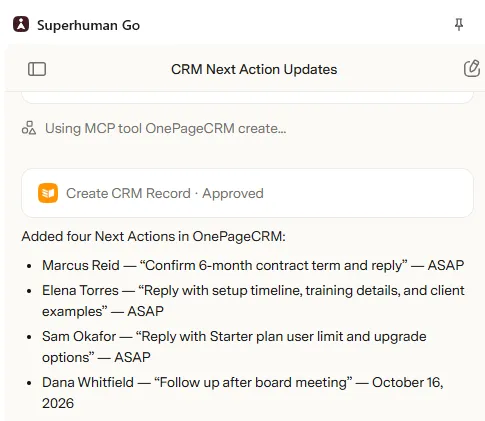
“Review my inbox and identify any contacts in my CRM who need a Next Action. Add the appropriate Next Action to each relevant contact, then tell me which Next Action you added to each contact.”
It finds the emails from your contacts that need a follow-up, adds a Next Action to each record in OnePageCRM, and gives you a list of what it added.
Start your day knowing what's next
If you have many contacts with Next Actions, you can ask Superhuman Go for a summary instead of scrolling through your Action Stream:
“Summarize my Action Stream and tell me what to focus on first today.”
It tells you what needs your attention today and what can wait.
Get context before you reply
Working on an email to a customer? Ask Superhuman Go to compare it with the notes in your CRM. It recognizes the contact from the sender's email address, so you don't have to look them up first.
“Compare the latest email with Sam Okafor with the notes in my CRM and tell me what I should mention in my reply.”
Draft replies with your deal history in mind
When a customer emails you about a deal, you can ask Superhuman Go to write the reply and pull in the context from your CRM, instead of digging through the Contact history before you respond:
“Draft a reply to this email in my usual tone, and mention where we left off on their deal in my CRM.”
It writes a reply that picks up where your last conversation ended, so you can review it, make any changes, and send it.
Use Superhuman Mail, Superhuman Go, and OnePageCRM together
If you already use the Superhuman email client to organize and sort your email, you can use the Superhuman AI assistant and OnePageCRM to get valuable insights.
For example, you can ask the Superhuman Go AI assistant: “Of the emails in my inbox marked 'response needed,' which ones are tied to my highest-value open deals in OnePageCRM? Rank them for me.”
Leave the busywork to Superhuman Go
There will always be one small task or the other. But if you connect Superhuman Go to your CRM, you won't have to be the one doing them.
Ready to try Superhuman Go with your CRM? Connect OnePageCRM to Superhuman Go and let AI take care of the annoying work.