
There are tons of "best CRM for agencies" lists on the internet. But most of them don’t tell you that there’s no one best CRM for agencies.
In reality, the best agency CRM for you is one that works best for any specific needs your agency might have.
So instead of ranking the CRMs from best to worst, this guide groups them by use case and shows what each agency CRM is suitable for.

What makes a good CRM for a small agency?
In a small agency, the founder is often handling both sales and delivery. Deals can take months to close, teams are lean, and your tech stack already includes tools for proposals, contracts, and project management.
A good agency CRM should fit right into that setup. More specifically, it should:
- Nudge you to follow up. Your agency CRM must remind you to follow up at the right time, so deals don’t stall and relationships don’t go cold.
- Track relationships, not just deals. Besides managing pipelines, a huge part of your work involves building long-term relationships. So, your agency CRM should give you full context on every contact, as well.
- Be quick to set up. You shouldn’t need hours of setup or training to get started. A good agency CRM should be simple enough to start using right away.
- Play nicely with the rest of your stack. It should provide seamless integrations with the tools you already use for proposals, contracts, email, and project management.
- Work well on mobile. Since you’re not always at your desk, the CRM should let you manage contacts, follow-ups, and notes from your mobile device.
Every CRM in this guide is reviewed against these needs.
Side-by-side comparison of the best CRMs for agencies
The table below highlights the best CRMs for agencies and the specific needs each one is best suited for.
| Agency CRM | Best for | Starts from |
| OnePageCRM | Follow-ups | $9.95/month |
| Pipedrive | Deal management | $14/month |
| Capsule | Free plan | $18/month |
| Folk | Notion-style design | $24/month |
| Copper | Google Workspace | $9/month |
| Streak | Gmail-centric agencies | $49/month |
| HoneyBook | Invoicing and contracts | $29/month |
| Dubsado | Processes automation | $35/month |
| Bonsai | Freelancers | $9/month |
| HubSpot | Marketing automation | $15/month |
| GoHighLevel | SMMA agencies | $97/month |
| Productive | Mid-sized agencies | $10/month |
| Monday.com | Project management | $36/month |
Best agency CRM for follow-ups and sales
If you spend a lot of time nurturing relationships with potential clients, pitching, and keeping track of leads and deals, you need a sales CRM that’s built around following up.
This is especially important for branding studios, boutique PR firms, B2B communications consultants, advertising agencies, production companies, and digital marketing agencies.
Features often included in these agency CRMs:
- A daily list of follow-ups, sorted by urgency
- A simple sales pipeline
- Two-way email sync
- Bulk, personalized email with tracking
- Team-visible activity and notes
- A mobile app
OnePageCRM
If your agency is actively selling and pitching to new customers, you know how important it is to follow up with prospective clients. That’s exactly what OnePageCRM is built for.
In OnePageCRM, the first thing you’ll see is a list of today's follow-ups, like “Email Sam” or “Send a free resource to Ben”. These follow-ups are sorted and color-coded according to how urgently you need to carry them out.
You simply work through each follow-up activity and set the next ones before you move on, so your sales process keeps moving forward.
To help track and manage these moving sales opportunities, OnePageCRM includes a kanban sales pipeline. There’s also a light project management tool to help you deliver the services you’ve sold.
Pricing starts at $9.95 per user/month, and that includes full email connection, click-to-call, lead capture tools, an AI assistant, bulk email, mobile apps, and more.
You can also connect OnePageCRM to ChatGPT, Claude, Grok, and Perplexity and have them handle your admin for you (logging calls, updating deals, scheduling follow-ups, and more).
| OnePageCRM | |
| Price | $9.95 per user/month |
| Follow-ups | Yes (Auto-sorted & color-coded by urgency) |
| Two-way email sync | Yes (Gmail, Outlook, IMAP) |
| Lead capture | Yes (browser extension and web forms) |
| Bulk personalized email | Yes |
| Mobile apps | Yes (iOS and Android) |
| Workflow automation | Yes |
| Best for | Agencies that have long sales cycles and actively keep in touch with prospective clients. |
Pipedrive
Pipedrive is built for agencies that focus on their deal pipeline. Your deals live on a kanban-style pipeline, making it easy to see where every opportunity stands and what needs to happen next.
You also get click-to-call, a mobile app, and over 500 integrations through Pipedrive’s marketplace. Pricing starts at $14 per user/month, but keep in mind that two-way email sync is locked behind higher plans. Likewise, web forms are only available via an add-on costing an extra $32.50 per month. Other options include both on the entry plan.
| Pipedrive | |
| Price | $14 per user/month |
| Follow-ups | Yes |
| Two-way email sync | Only on higher plans |
| Lead capture | Requires a paid add-on |
| Bulk personalized email | Only on higher plans |
| Mobile apps | Yes |
| Workflow automation | Only on higher plans |
| Best for | Sales-led agencies that want a visual pipeline |
Capsule CRM
Capsule is worth considering if you’re after a minimalist CRM for your agency. You can capture leads from LinkedIn and Gmail, organize contacts, manage tasks, and track sales opportunities using a Kanban board.
There’s also a mobile app, which is helpful if you’re often away from your desk. You can manage your agency on the go, and it even works without an internet connection.
Paid plans start at $18 per user/ month, but Capsule also has a free plan for up to 250 contacts, if you want to test it first. The main trade-off, though, is that there's no two-way email sync on any plan.
| Capsule CRM | |
| Price | $18 per user/month (free plan up to 250 contacts) |
| Follow-ups | No (just task management) |
| Two-way email sync | No |
| Lead capture | Yes |
| Bulk personalized email | Only on higher plans |
| Mobile apps | Yes |
| Workflow automation | Only on higher plans |
| Best for | Small agencies looking for a tidy contact database |
Folk CRM
If your agency already uses tools like Notion and you want a CRM that feels the same way, Folk is worth a shot.
This agency CRM lets you organize leads in customizable views, track them through a Kanban pipeline, and enrich their data automatically using sources like Clearbit and Apollo. The browser extension also pulls leads straight from LinkedIn, Twitter, Instagram, and Gmail, which is useful if your agency does a lot of outbound prospecting on social platforms.
Folk also includes two-way email sync and click-to-call on all plans. Pricing starts at $24 per user/month, though deal management is only available on the higher tiers. There's also no mobile app.
| Folk | |
| Price | $24 per seat/month |
| Follow-ups | Yes |
| Two-way email sync | Yes |
| Lead capture | Yes |
| Bulk personalized email | Yes |
| Mobile apps | No |
| Workflow automation | Only on higher plans |
| Best for | Collaborative teams selling via social media |
Copper CRM
If your agency runs on Google Workspace, Copper can fit into that setup. This agency CRM sits inside a sidebar in Gmail, so you can manage prospective clients and your sales pipeline without leaving your inbox.
Contact details and email conversations sync automatically from Gmail, which saves you from manual data entry.
Copper also lets you turn closed deals into projects, which is handy for agencies that need to manage client delivery after the sale. There's a mobile app, too.
Pricing starts at $9 per user/month, though bulk emailing and lead management are only available on higher plans.
| Copper | |
| Price | $9 per user/month |
| Follow-ups | No (just task reminders) |
| Two-way email sync | Yes |
| Lead capture | Yes |
| Bulk personalized email | Only on higher plans |
| Mobile apps | Yes |
| Workflow automation | Only on higher plans |
| Best for | Agencies that already use Google Workspace for work |
Streak CRM
Streak is a good choice if your agency handles most of its client outreach through Gmail. This agency CRM allows you to manage your pipeline, track deals, and handle tasks from the same place you already send emails.
When you're reaching out to many prospects, you can send personalized emails in bulk and see who opened or clicked. Streak's AI co-pilot also scans your past conversations with a lead and gives you a quick summary, so you have context before your next touchpoint.
At $49 per user/month, Streak is one of the more expensive agency CRMs on this list. And since it’s a Gmail-only software, it won’t work if your agency uses Outlook or some other email provider.
| Streak | |
| Price | $49 per user/month |
| Follow-ups | No (task reminders only) |
| Two-way email sync | Yes |
| Lead capture | Yes |
| Bulk personalized email | Yes |
| Mobile apps | Yes |
| Workflow automation | Only on higher plans |
| Best for | Solo agencies and tiny teams that sell mostly using emails |
Best agency CRM for client workflow and invoicing
If most of your time goes into moving signed clients through the actual work—like handling contracts, invoices, scheduling, and delivery—then you need a CRM that works more like a client experience platform.
This kind of agency CRM is especially useful for wedding photographers, portrait studios, solo designers, freelance copywriters, illustrators, small event planners, and the like—solo creatives who handle everything alone.
Features often included in these agency CRMs:
- Client portals
- E-signature and contract generation
- Native invoicing
- Bookable scheduling forms with availability
- Pipeline
HoneyBook
For solo agency owners who manage the entire client journey themselves, HoneyBook handles the business side of things. You can send proposals and contracts, collect e-signatures, issue invoices, set up payment plans, and automatically chase overdue payments via email reminders.
Your clients get their own portal to access project files and details, as well as a calendar (with meeting reminders) to book consultations with you. This agency CRM also features a pipeline that lets you track where each project stands.
Honeybook uses flat-rate pricing, starting at $29/month. However, the entry plan only covers one user; to add team members, you need to upgrade.
| HoneyBook | |
| Price | $29 per month (flat, not per user) |
| Client portal | Yes |
| E-signature contracts | Yes |
| Native invoicing | Yes |
| Scheduling | Yes |
| Sales pipeline/follow-up engine | Yes |
| Mobile apps | Yes |
| Best for | Solo agency owners managing the full client experience, from first inquiry to final delivery |
Dubsado
Dubsado is similar to HoneyBook in that it helps agency owners manage what happens after a client says yes. You can generate contracts, create branded invoices, set up payment options, and automatically send reminders when payments are overdue.
Clients get a portal to access their project details, and there's a calendar for booking appointments. You can also track project status and pull up reporting dashboards for insights into how things are moving.
At $35/month flat, Dubsado covers up to 4 users, making it a suitable agency CRM for small teams. That said, it does take longer to set up than some alternatives like HoneyBook.
| Dubsado | |
| Price | $35 per month (flat) |
| Client portal | Yes |
| E-signature contracts | Yes |
| Native invoicing | Yes |
| Scheduling | Yes |
| Workflow automation depth | Yes |
| Sales pipeline/follow-up engine | Yes |
| Best for | Small agencies that handle mixed project types and are willing to invest 2–3 weeks in setup |
Bonsai
Bonsai is geared more toward freelancers than agencies, but if you're a one-person operation, it may be worth a look. It includes time tracking, task management, and project management with Kanban views, which can be helpful if you bill clients by the hour or juggle multiple projects at once.
Bonsai’s pricing starts at $9 per user/month, but most of the tools that matter for client workflow—tools like invoices, contracts, proposals, a client portal, and scheduling—are locked behind higher plans.
So, you'll likely need to upgrade before Bonsai becomes genuinely useful for managing client work end to end.
| Bonsai | |
| Price | $9 per user/month |
| Client portal | Only on higher plans |
| E-signature contracts | Only on higher plans |
| Native invoicing | Only on higher plans |
| Time tracking | Yes |
| Sales pipeline/follow-up engine | Only on higher plans |
| Mobile apps | Only on higher plans |
| Best for | One-person agencies that bill by the hour and juggle multiple projects at once |
Best agency CRM for marketing agencies
If your agency delivers marketing services to clients—like running their email campaigns, managing their ads, or handling their lead generation—you may need a CRM that also serves as the tool you use to do that work.
These all-in-one tools let you sell your services and actually carry them out from the same place. They're especially common among social media marketing agencies (SMMAs), digital agencies serving local businesses, inbound marketing agencies, and the like.
Features often included in these agency CRMs:
- Lead generation
- Blogging
- Social media integration
- Workflow and or marketing automation
- Funnel, website, and landing page builder
HubSpot
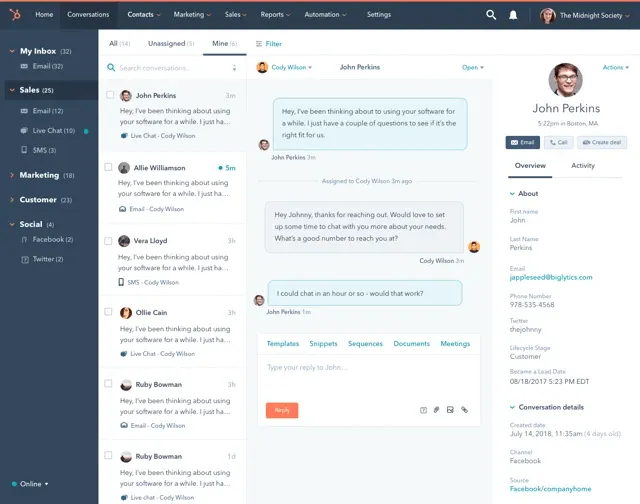
HubSpot is an all-in-one platform that many inbound marketing agencies use not only as their CRM, but also as the tool they deliver client work from. You can manage your pipeline, run email campaigns, build web forms and landing pages, automate marketing workflows, and connect with over 1,900 apps—all under one roof.
The platform includes a free plan, and its Starter tier starts at $15 per user/month. However, essential features like multiple pipelines, email sequences, omnichannel marketing, automation, and custom reports are locked behind the Professional plan, which costs $90 per user/month and comes with a mandatory $1,500 onboarding fee.
It's a powerful platform, but it takes time to learn and can get costly as your agency grows. Agencies that don’t need the full marketing suite can get away with cheaper alternatives.
| HubSpot | |
| Price | $15 per user/month |
| Lead capture | Yes |
| Blogging | Yes (requires a Content Hub plan) |
| Social media integration | Only on higher plans |
| Marketing automation | Limited tools and usage limits |
| Funnel builder | No |
| Website/landing page builder | Yes |
| Mobile apps | Yes |
| Best for | B2B inbound marketing agencies and HubSpot Solutions Partner agencies |
GoHighLevel
If your agency runs lead generation or marketing campaigns for clients, GoHighLevel is designed to be the only platform you need.
You can manage your own agency's sales pipeline while also carrying out the actual marketing work from the same place. That could include building funnels, running ads, sending email and SMS campaigns, and engaging leads across social media platforms like WhatsApp, Instagram, and Messenger.
Especially popular with SMMAs and digital agencies serving local businesses, GoHighLevel’s pricing starts from $97/month for your whole team.
The downside is that GoHighLevel takes time to learn. Smaller agencies should expect two to six weeks before everything is fully set up.
| GoHighLevel | |
| Price | $97 per month |
| Lead capture | Yes |
| Blogging | Yes |
| Social media integration | Yes |
| Marketing automation | Yes |
| Funnel builder | Yes |
| Website/landing page builder | Yes |
| Mobile apps | Yes |
| Best for | SMMA and local-services digital agencies reselling marketing-as-a-service |
Best CRMs for agency operations
If your agency has grown beyond 10 or 15 people and you need to manage pipelines, projects, time tracking, budgets, and financials all in one place, a basic CRM won’t cut it anymore. That’s where these agency CRMs come in.
These tools are ideal for mid-sized agencies handling multiple projects across different clients. They help with resource planning, tracking profitability, and managing the day-to-day operations of the business, especially in areas where a standard CRM starts to fall short.
Features often included in these agency CRMs:
- Client management
- Project and resource planning
- Time tracking and billable utilization
- Budgeting and profitability tools
- Revenue tracking
Productive
Productive.io is built for agencies that need to manage clients, projects, and finances in the same place.
You get a sales CRM, project management, resource planning (to see who's available and when), time tracking that links directly to budgets, and invoicing that pulls data from tracked hours. There's also budgeting and profitability tracking, so you can see which clients and projects are actually making you money.
Productive’s Pricing starts at $10/user/month (billed annually), with a minimum of 3 seats. Be aware that some features agencies tend to grow into—like recurring budgets, rate cards, and revenue forecasting—are locked behind the higher plans.
| Productive.io | |
| Price | $10 per user/month |
| Client management | Yes |
| Workflow automation | Yes |
| Project management | Yes |
| Time tracking | Yes |
| Resource planning | Yes |
| Budgeting | Yes |
| Financial tracking | Yes |
| Mobile apps | Yes |
| Best for | Mid-sized agencies managing projects + financials in one system |
Monday.com
Monday.com is a work management platform agencies can use to plan projects, coordinate tasks across teams, and track work.
You can visualize projects using Kanban, Timeline, Gantt, and Calendar views. You can also automate repetitive tasks and build dashboards that give you insight into the state of your agency’s operations.
Monday.com allows you to track the time spent on work, but you’ll need to get a Pro subscription first. If you have an Enterprise subscription, you can access resource management tools for planning team availability across projects. And for client management, you’ll need to pay for Monday’s own dedicated CRM.
Monday.com’s pricing starts at $9 per seat/month, with a minimum of 3 users.
| Monday.com | |
| Price | $36 per month (3 users included) |
| Client management | Only on the dedicated Monday CRM |
| Workflow automation | Only on higher plans |
| Project management | Yes |
| Time tracking | Only from the Pro plan |
| Resource planning | Only on the Enterprise plan |
| Budgeting | No |
| Financial tracking | No |
| Mobile apps | Yes |
| Best for | Agencies already running project work on Monday |
Which CRM is best for your agency?
As we’ve mentioned, there’s no single best CRM for every agency. It really comes down to what you need right now.
Start by picking the category that matches the problem you’re trying to solve. Then explore the options in that section and choose the one that feels like the best fit for your workflow.
Give it a try and spend some time with it before deciding. That’s the only way to know if it actually works for you.
Cheers!