ActiveCampaign is an email marketing tool for sending email campaigns, newsletters, and automated email sequences.
The ActiveCampaign CRM integration syncs your OnePageCRM contacts to ActiveCampaign, so you can send email campaigns to them and see every campaign a contact received inside OnePageCRM.
Import your contacts from OnePageCRM into ActiveCampaign. When you update a contact in OnePageCRM, the change syncs to ActiveCampaign automatically.
You can sync your whole database or only a saved filter. For example, just your Leads.
Send automated email campaigns
Contacts sync together with their Status, Tags, and Lead Source. Use these to group contacts in ActiveCampaign and send a different email series to each group. One series for new Leads, another for Customers.
When a contact moves to a new Status in OnePageCRM, ActiveCampaign picks up the change. You don’t need to move anyone between groups by hand.
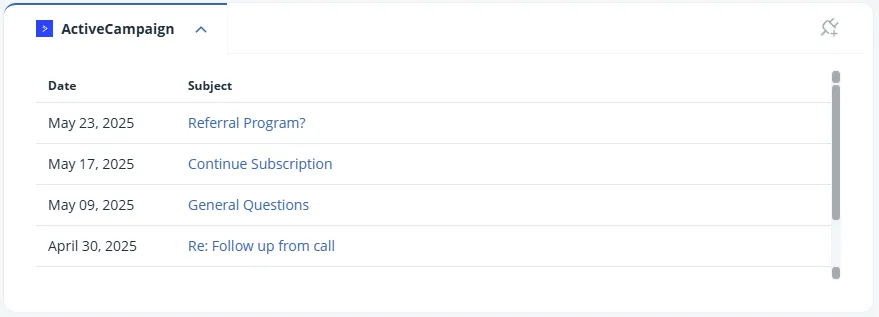
The ActiveCampaign widget on the Contact Page lists every email campaign a contact received, with the date and subject line. Click a subject line to open that campaign’s report in ActiveCampaign.
Say your sales funnel has three stages, like Prospects, Leads, and Customers. With ActiveCampaign, you can create a separate automated email series for each stage. The CRM integration keeps each group up to date, so every contact gets the emails that match where they are in your funnel.
Name, email address, and organization, plus the Status, Tags, and Lead Source you set in OnePageCRM. Custom Fields don’t sync.
From ActiveCampaign. You build and send your campaigns there. OnePageCRM keeps your contact list up to date and shows you which campaigns each contact received.
Add your ActiveCampaign account name in OnePageCRM, then start the contact import from ActiveCampaign. The setup guide covers every step.
Ask yourself three questions. Does the tool connect well with the other apps you use, like OnePageCRM? Can you start automations from your CRM? And do the automations actually save you time?

 1:19
1:19