
Ari Gunzburg is a keynote speaker, author, and founder of Motivisto. His work is built around a simple idea: great people build great teams, and great teams build great organizations.
Ari speaks at conferences and team events for groups of all sizes, in all industries, from small businesses to Fortune 100 companies. His keynotes help people unlock their greatness, adapt to change, and get through high-pressure situations at work.
But speaking isn't all there is to running the business. Ari also has to land the bookings in the first place. That means knowing who he's contacted, when he contacted them, and when to reach out next.
To stay on top of all that, Ari needed a CRM.
Searching for a nimble tool
Pipedrive was the first CRM that caught Ari's attention in the early 2010s. Back then, it was fast and simple, which is exactly what he was looking for.
At the time, Pipedrive was a small, nimble, fast, get-out-of-your-way sales CRM.
 Ari GunzburgKeynote Speaker
Ari no longer needed a CRM, but kept the knowledge of the CRM in his back pocket, as one he would use when necessary. Then the time came, and he was ready to set it up for his business.
But it didn't work the way he had hoped. The dev team kept on adding features over the years, and the CRM turned out to be slower and more complicated than he thought.
Very quickly, I was disappointed. I'd click a button and wait. Click a button and wait again. I'd have to switch through 4 or 5 different screens to get the simplest things done.
So, Ari resumed his search for a fast and easy-to-use CRM.
Using an intuitive CRM
The search ended at OnePageCRM, and Ari liked what he found. One of the biggest reasons was the simple layout.
Everything he needed for sales was well organized, and it was all on one page.
The simplicity is built in; it's just one page. You can put somebody in front of OnePageCRM and show them that the contacts are on this side, the filters are here, and the data is on this side. And that's it.
Making follow-ups easy
The other thing Ari liked most was how OnePageCRM handles follow-ups.
For every contact, he adds the next step he'll take with them and when. That's called a Next Action, and OnePageCRM reminds him about it when the day comes.
When I finish one thing, I add a reminder to give this contact a call in two weeks. And I know OnePageCRM is going to take care of everything, and the contact will pop back up in two weeks.
All his Next Actions then line up in one list, sorted by what's most urgent. OnePageCRM calls this list the Action Stream, and it shows Ari exactly who he needs to contact each day.
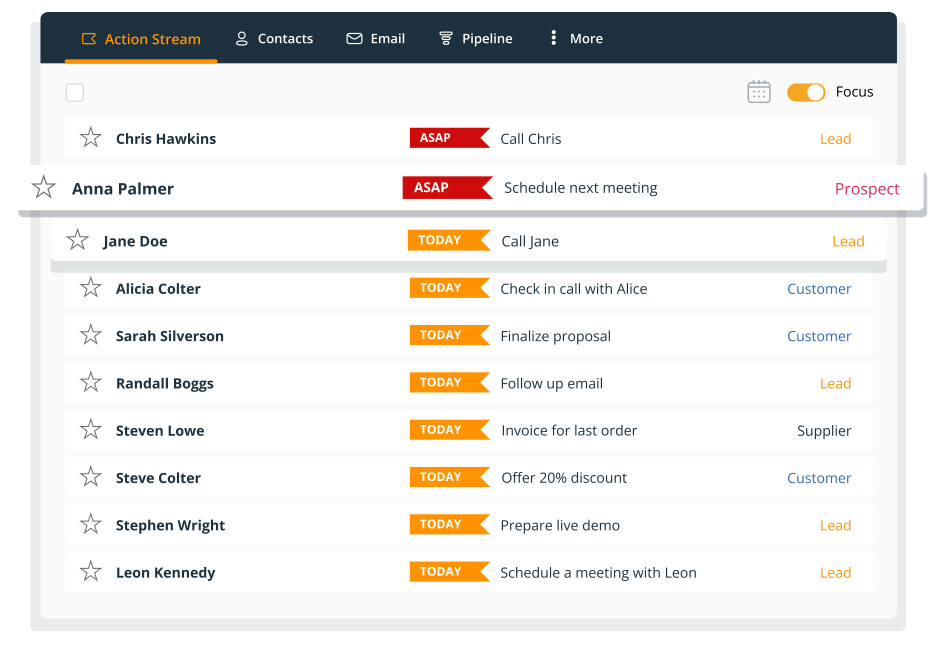
The Action Stream concept is brilliant. When you’re working with a lot of contacts, the CRM doesn't have to be complicated. It has to be quick.